

 v0.2.3
custom_timer
一個用於建立可自訂計時器的 Flutter 套件,支援控制器。
147喜歡 1110近 30 天下載150Pub 分數
AndroidiOSWebmacOSWindowsLinux
一個用於建立可自訂計時器的 Flutter 套件。

以下為英文專案原文快照,最新內容請造訪 GitHub。
A Flutter package to create a customizable timer.

Add SingleTickerProviderStateMixin to your stateful widget. 👇
class _MyAppState extends State<MyApp> with SingleTickerProviderStateMixin {
Then define a CustomTimer controller
late CustomTimerController _controller = CustomTimerController(
  vsync: this,
  begin: Duration(hours: 24),
  end: Duration(),
  initialState: CustomTimerState.reset,
  interval: CustomTimerInterval.milliseconds
);
And you are ready to use the timer:
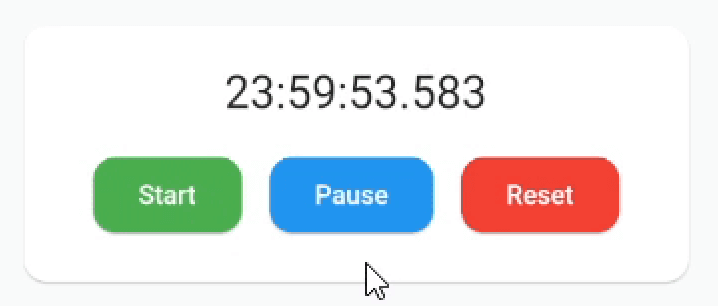
CustomTimer(
  controller: _controller,
  builder: (state, time) {
    // Build the widget you want!🎉
    return Text(
      "${time.hours}:${time.minutes}:${time.seconds}.${time.milliseconds}",
      style: TextStyle(fontSize: 24.0)
    );
  }
)
Now you can use the controller methods:
_controller.reset();
_controller.start();
_controller.pause();
_controller.finish();

_controller.add(Duration(minutes: 30));
_controller.subtract(Duration(minutes: 30));
_controller.jumpTo(Duration(hours: 12));
You can also set the begin or end, even with the counter running:
_controller.begin = Duration();
_controller.end = Duration(hours 12);
And add listeners to state changes or just use the properties when you need them:
_controller.state.addListener(() {
  print(_controller.state.value); // 👉 CustomTimerState.paused
  print(_controller.remaining.value.hours); // 👉 12h
});
Remember to dispose when you are no longer using it.
Add this to your package's pubspec.yaml file:
dependencies:
  custom_timer: ^0.2.3
Install it:
$ flutter pub get
Import the package in your project:
import 'package:custom_timer/custom_timer.dart';
Hi there 👋 This package is in development so if you find a bug or have a suggestion please let me know so we can improve it! 😃 If you want to motivate me to continue, you can give me a cup of coffee ☕ and I will get a lot of energy out of it.

依賴清單 2 項
{"sdk":"flutter"}{"sdk":"flutter"}先依使用情境篩選,再比較專案活躍情況,最後到原始儲存庫確認使用要求。
“A repository is the most basic element of GitHub.”
GitHub Docs — About repositories ↗