搜尋套件、儲存庫與 APP 分類

custom_timer 封面
套件詳情v0.2.3

custom_timer

一個用於建立可自訂計時器的 Flutter 套件,支援控制器。

AndroidiOSWebmacOSWindowsLinux
近 30 天下載
1070
喜歡數
147
Pub 分數
150

安裝套件

flutter pub add custom_timer

套件介紹

根據套件公開資料產生的選型評估,僅供參考。

一個 Flutter 套件,讓開發者能夠建立高度可自訂的計時器,並內建控制器功能。它支援即時更新、精確的時間控制,並能無縫整合至跨多個平台的 Flutter 應用程式中。此計時器可透過專用控制器暫停、繼續、重設與監控,非常適合用於倒數計時、秒錶功能,或任何基於時間的 UI 元件。設計上兼具彈性與易用性,適用於 Android、iOS、Web、macOS、Windows 與 Linux。

適用情境

  • 倒數計時器
  • 計時器應用
  • 限時使用者互動
  • 即時進度追蹤
  • 互動式學習應用
  • 遊戲計時器

主要特色

  • 可自定義的計時器持續時間
  • 內建的狀態管理控制器
  • 暫停、恢復和重設功能
  • 跨平台相容性
  • 即時回調事件
  • 與 Flutter 小部件的輕鬆整合

適合對象

  • 開發時間敏感功能的開發者
  • 需要精確時間控制的應用程式
  • 教育類或生產力工具
  • 遊戲化應用
  • 需要動態時間顯示的UI組件

使用建議

  • 需要手動處理計時器生命週期
  • 可能需要額外的邏輯來處理複雜的排程
  • 未針對超出一般使用情境的高頻率更新進行優化
  • 內建樣式選項有限(需自訂組件組合)

原始 README

以下為關聯原始碼儲存庫的 README 原文快照,最新內容請造訪原始碼儲存庫。

Custom Timer ⌛

A Flutter package to create a customizable timer.


🎉 Features

  • Timer controller.
  • Auto count up / down timer.
  • Custom builder.
  • Millisecond support.

📌 Usage


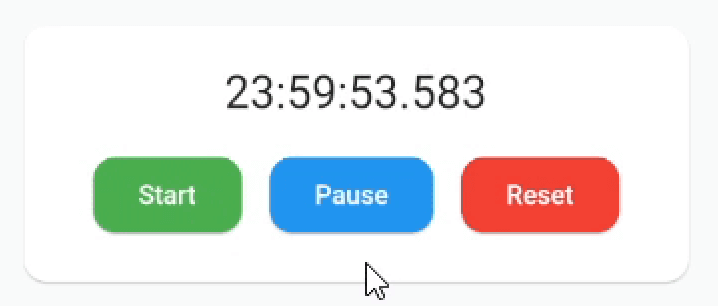
example1


Add SingleTickerProviderStateMixin to your stateful widget. 👇

class _MyAppState extends State<MyApp> with SingleTickerProviderStateMixin {

Then define a CustomTimer controller

late CustomTimerController _controller = CustomTimerController(
  vsync: this,
  begin: Duration(hours: 24),
  end: Duration(),
  initialState: CustomTimerState.reset,
  interval: CustomTimerInterval.milliseconds
);

And you are ready to use the timer:

CustomTimer(
  controller: _controller,
  builder: (state, time) {
    // Build the widget you want!🎉
    return Text(
      "${time.hours}:${time.minutes}:${time.seconds}.${time.milliseconds}",
      style: TextStyle(fontSize: 24.0)
    );
  }
)

Now you can use the controller methods:

_controller.reset();
_controller.start();
_controller.pause();
_controller.finish();

_controller.add(Duration(minutes: 30));
_controller.subtract(Duration(minutes: 30));
_controller.jumpTo(Duration(hours: 12));

You can also set the begin or end, even with the counter running:

_controller.begin = Duration();
_controller.end = Duration(hours 12);

And add listeners to state changes or just use the properties when you need them:

_controller.state.addListener(() {
  print(_controller.state.value); // 👉 CustomTimerState.paused
  print(_controller.remaining.value.hours); // 👉 12h
});

Remember to dispose when you are no longer using it.


🔧 Installation

Add this to your package's pubspec.yaml file:

dependencies:
  custom_timer: ^0.2.3

Install it:

$ flutter pub get

Import the package in your project:

import 'package:custom_timer/custom_timer.dart';

🙇 Author


Hi there 👋 This package is in development so if you find a bug or have a suggestion please let me know so we can improve it! 😃 If you want to motivate me to continue, you can give me a cup of coffee ☕ and I will get a lot of energy out of it.

Buy Me A Coffee

所屬分類

原始碼儲存庫

使用此套件的專案