

 v0.3.11+11
responsive
為行動裝置、桌面與網頁端的 Flutter 應用提供一種簡單的響應式 UI 實作方式,支援根據不同螢幕尺寸與裝置方向調整元件大小。
66喜歡 75近 30 天下載140Pub 分數
AndroidiOSWebmacOSWindowsLinux
flutter-es/responsive open-source repository details.

以下為英文專案原文快照,最新內容請造訪 GitHub。


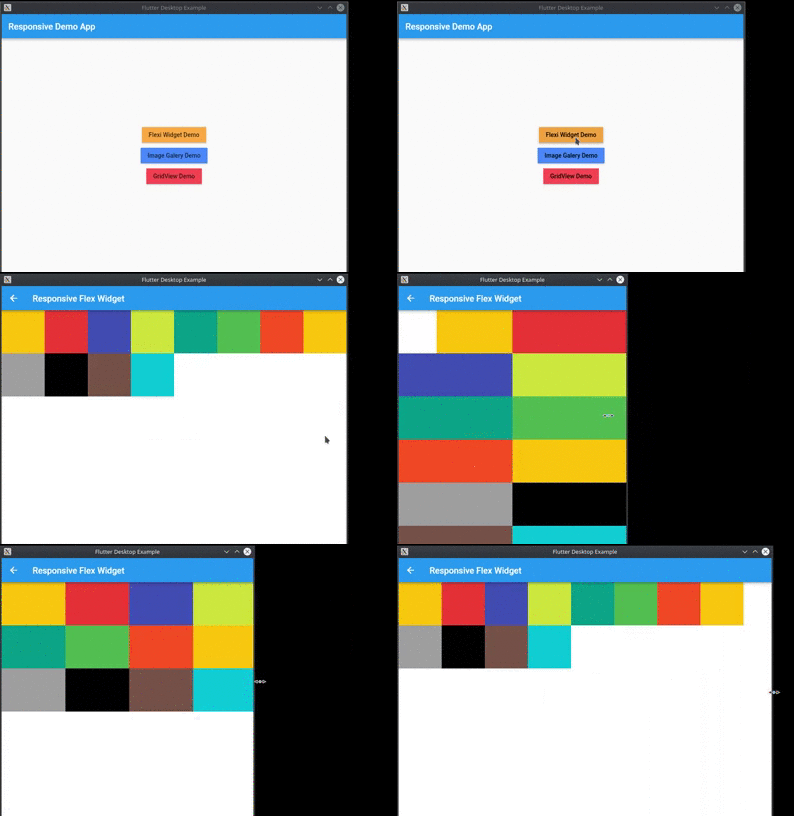
Provide a easy way to make responsive UI for Flutter Applications in mobile, desktop and web, allow different widget size for each screen size and device orientation..
Made by Marvin Quevedo and [Víctor Guardiola](mailto:victor.guardiola@gmail.com) of FlutterEs Community.
Este paquete ha sido creado por la comunidad de Flutter en Español, si deseas ser parte de nosotros, puedes visitar cualquiera de estos links:


dependencies:
  responsive: 0.2.3
You have two ways of use it:
You can use the ReponsiveRow widget and the FlexResponsive widget to make the layout
or
you can use the static method Responsive.calcColumns to assign the correct number of columns to a widget like a GridView.
import 'package:flutter/material.dart';
import 'package:responsive/flex_widget.dart';
import 'package:responsive/responsive_row.dart';

void main() => runApp(MyApp());

class MyApp extends StatelessWidget {
  // This widget is the root of your application.
  @override
  Widget build(BuildContext context) {
    return MaterialApp(
      title: 'Responsive Example',
      theme: ThemeData(
        primarySwatch: Colors.blue,
      ),
      home: Scaffold(
        appBar: AppBar(),
        body: ListView(
          children: <Widget>[
            ResponsiveRow(
              columnsCount: 12,
              crossAxisAlignment: WrapCrossAlignment.center,
              children: <Widget>[
                FlexWidget(
                  child: Container(
                    height: 100,
                    color: Colors.amber,
                  ),
                  xs: 4,
                  xsOffset: 2,
                  sm: 3,
                  md: 2,
                  lg: 1,
                  xsLand: 4,
                  xsLandOffset: 0,
                  smLand: 2,
                  mdLand: 1,
                  lgLand: 1,
                ),
                FlexWidget(
                  child: Container(
                    height: 100,
                    color: Colors.red,
                  ),
                  xs: 6,
                  sm: 3,
                  md: 2,
                  lg: 1,
                  xsLand: 4,
                  smLand: 2,
                  mdLand: 1,
                  lgLand: 1,
                ),
                FlexWidget(
                  child: Container(
                    height: 100,
                    color: Colors.indigo,
                  ),
                  xs: 6,
                  sm: 3,
                  md: 2,
                  lg: 1,
                  xsLand: 4,
                  smLand: 2,
                  mdLand: 1,
                  lgLand: 1,
                ),
                FlexWidget(
                  child: Container(
                    height: 100,
                    color: Colors.lime,
                  ),
                  xs: 6,
                  sm: 3,
                  md: 2,
                  lg: 1,
                  xsLand: 4,
                  smLand: 2,
                  mdLand: 1,
                  lgLand: 1,
                ),
                FlexWidget(
                  child: Container(
                    height: 100,
                    color: Colors.teal,
                  ),
                  xs: 6,
                  sm: 3,
                  md: 2,
                  lg: 1,
                  xsLand: 4,
                  smLand: 2,
                  mdLand: 1,
                  lgLand: 1,
                ),
                FlexWidget(
                  child: Container(
                    height: 100,
                    color: Colors.green,
                  ),
                  xs: 6,
                  sm: 3,
                  md: 2,
                  lg: 1,
                  xsLand: 4,
                  smLand: 2,
                  mdLand: 1,
                  lgLand: 1,
                ),
                FlexWidget(
                  child: Container(
                    height: 100,
                    color: Colors.deepOrange,
                  ),
                  xs: 6,
                  sm: 3,
                  md: 2,
                  lg: 1,
                  xsLand: 4,
                  smLand: 2,
                  mdLand: 1,
                  lgLand: 1,
                ),
                FlexWidget(
                  child: Container(
                    height: 100,
                    color: Colors.amber,
                  ),
                  xs: 6,
                  sm: 3,
                  md: 2,
                  lg: 1,
                  xsLand: 4,
                  smLand: 2,
                  mdLand: 1,
                  lgLand: 1,
                ),
                FlexWidget(
                  child: Container(
                    height: 100,
                    color: Colors.grey,
                  ),
                  xs: 6,
                  sm: 3,
                  md: 2,
                  lg: 1,
                  xsLand: 4,
                  smLand: 2,
                  mdLand: 1,
                  lgLand: 1,
                ),
                FlexWidget(
                  child: Container(
                    height: 100,
                    color: Colors.black,
                  ),
                  xs: 6,
                  sm: 3,
                  md: 2,
                  lg: 1,
                  xsLand: 4,
                  smLand: 2,
                  mdLand: 1,
                  lgLand: 1,
                ),
                FlexWidget(
                  child: Container(
                    height: 100,
                    color: Colors.brown,
                  ),
                  xs: 6,
                  sm: 3,
                  md: 2,
                  lg: 1,
                  xsLand: 4,
                  smLand: 2,
                  mdLand: 1,
                  lgLand: 1,
                ),
                FlexWidget(
                  child: Container(
                    height: 100,
                    color: Colors.cyan,
                  ),
                  xs: 6,
                  sm: 3,
                  md: 2,
                  lg: 1,
                  xsLand: 4,
                  smLand: 2,
                  mdLand: 1,
                  lgLand: 1,
                ),
              ],
            )
          ],
        ),
      ),
    );
  }
}
依賴清單 2 項
{"sdk":"flutter"}{"sdk":"flutter"}先依使用情境篩選,再比較專案活躍情況,最後到原始儲存庫確認使用要求。
“A repository is the most basic element of GitHub.”
GitHub Docs — About repositories ↗