搜尋套件、儲存庫與 APP 分類

responsive 封面
套件詳情v0.3.11+11

responsive

為行動裝置、桌面與網頁端的 Flutter 應用提供一種簡單的響應式 UI 實作方式,支援根據不同螢幕尺寸與裝置方向調整元件大小。

AndroidiOSWebmacOSWindowsLinux
近 30 天下載
75
喜歡數
66
Pub 分數
140

安裝套件

flutter pub add responsive

套件介紹

根據套件公開資料產生的選型評估,僅供參考。

響應式套件簡化了在Flutter應用中跨行動裝置、桌面與網頁平台建立適應性使用者介面的過程。它讓開發者能根據螢幕尺寸與裝置方向定義不同的組件大小與版面配置,確保一致且最佳的UI體驗。透過直覺式的API,該套件簡化了響應式設計,無需複雜的條件邏輯或手動媒體查詢處理。對於針對多種裝置形態且具備不同螢幕尺寸的應用程式而言,此套件尤為實用。

適用情境

  • 跨平台應用程式開發
  • 自適應版面適用於行動裝置和桌面端
  • 基於螢幕方向的動態UI縮放
  • 建構可擴展的Web介面
  • 適用於平板電腦和大螢幕的響應式設計

主要特色

  • 自動螢幕尺寸檢測
  • 面向方向的控件大小調整
  • 用於響應式小部件的簡單 API
  • 支援所有主要的 Flutter 平台
  • 針對常見設備的內建中斷點

適合對象

  • 開發跨平台 Flutter 應用的開發者
  • 優先考慮跨裝置的UI一致性
  • 需要動態佈局調整的專案

使用建議

  • 可能需要在多種設備類型上進行測試
  • 過度嵌套響應式組件帶來的效能影響
  • 超出預設斷點之外的自訂功能有限

原始 README

以下為關聯原始碼儲存庫的 README 原文快照,最新內容請造訪原始碼儲存庫。

responsive

build status Pub support

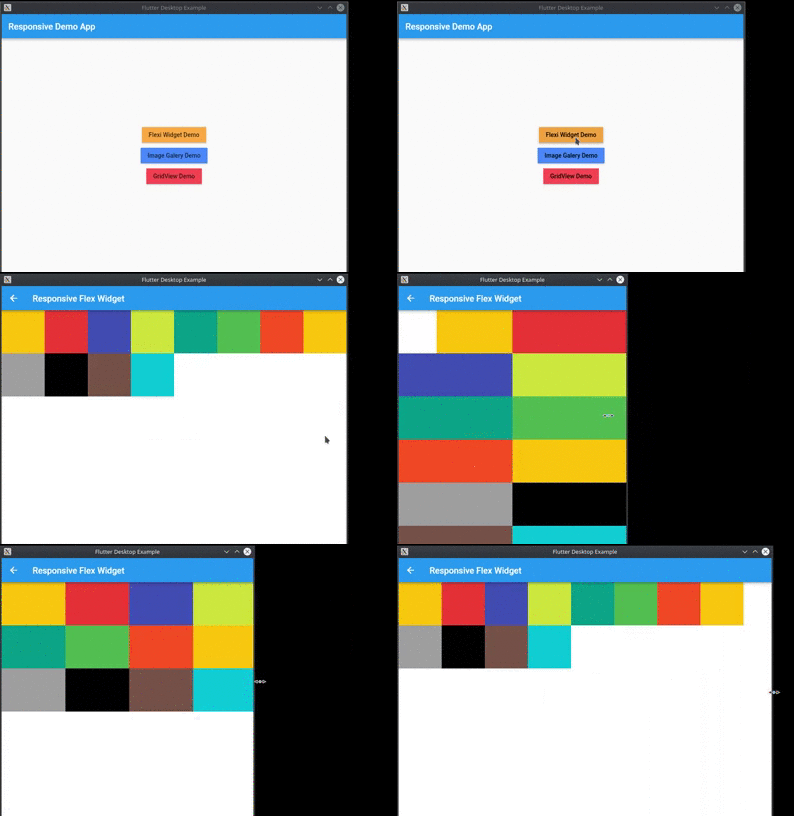
Provide a easy way to make responsive UI for Flutter Applications in mobile, desktop and web, allow different widget size for each screen size and device orientation..

Made by Marvin Quevedo and [Víctor Guardiola](mailto:victor.guardiola@gmail.com) of FlutterEs Community.

Este paquete ha sido creado por la comunidad de Flutter en Español, si deseas ser parte de nosotros, puedes visitar cualquiera de estos links:

Facebook

Slack

Twitter

www.flutter-es.io

Telegram

portrait view

landscape view

Video example

Add dependency
dependencies:
  responsive: 0.2.3

Usage

You have two ways of use it:

You can use the ReponsiveRow widget and the FlexResponsive widget to make the layout

or

you can use the static method Responsive.calcColumns to assign the correct number of columns to a widget like a GridView.

Easy to use

import 'package:flutter/material.dart';
import 'package:responsive/flex_widget.dart';
import 'package:responsive/responsive_row.dart';

void main() => runApp(MyApp());

class MyApp extends StatelessWidget {
  // This widget is the root of your application.
  @override
  Widget build(BuildContext context) {
    return MaterialApp(
      title: 'Responsive Example',
      theme: ThemeData(
        primarySwatch: Colors.blue,
      ),
      home: Scaffold(
        appBar: AppBar(),
        body: ListView(
          children: <Widget>[
            ResponsiveRow(
              columnsCount: 12,
              crossAxisAlignment: WrapCrossAlignment.center,
              children: <Widget>[
                FlexWidget(
                  child: Container(
                    height: 100,
                    color: Colors.amber,
                  ),
                  xs: 4,
                  xsOffset: 2,
                  sm: 3,
                  md: 2,
                  lg: 1,
                  xsLand: 4,
                  xsLandOffset: 0,
                  smLand: 2,
                  mdLand: 1,
                  lgLand: 1,
                ),
                FlexWidget(
                  child: Container(
                    height: 100,
                    color: Colors.red,
                  ),
                  xs: 6,
                  sm: 3,
                  md: 2,
                  lg: 1,
                  xsLand: 4,
                  smLand: 2,
                  mdLand: 1,
                  lgLand: 1,
                ),
                FlexWidget(
                  child: Container(
                    height: 100,
                    color: Colors.indigo,
                  ),
                  xs: 6,
                  sm: 3,
                  md: 2,
                  lg: 1,
                  xsLand: 4,
                  smLand: 2,
                  mdLand: 1,
                  lgLand: 1,
                ),
                FlexWidget(
                  child: Container(
                    height: 100,
                    color: Colors.lime,
                  ),
                  xs: 6,
                  sm: 3,
                  md: 2,
                  lg: 1,
                  xsLand: 4,
                  smLand: 2,
                  mdLand: 1,
                  lgLand: 1,
                ),
                FlexWidget(
                  child: Container(
                    height: 100,
                    color: Colors.teal,
                  ),
                  xs: 6,
                  sm: 3,
                  md: 2,
                  lg: 1,
                  xsLand: 4,
                  smLand: 2,
                  mdLand: 1,
                  lgLand: 1,
                ),
                FlexWidget(
                  child: Container(
                    height: 100,
                    color: Colors.green,
                  ),
                  xs: 6,
                  sm: 3,
                  md: 2,
                  lg: 1,
                  xsLand: 4,
                  smLand: 2,
                  mdLand: 1,
                  lgLand: 1,
                ),
                FlexWidget(
                  child: Container(
                    height: 100,
                    color: Colors.deepOrange,
                  ),
                  xs: 6,
                  sm: 3,
                  md: 2,
                  lg: 1,
                  xsLand: 4,
                  smLand: 2,
                  mdLand: 1,
                  lgLand: 1,
                ),
                FlexWidget(
                  child: Container(
                    height: 100,
                    color: Colors.amber,
                  ),
                  xs: 6,
                  sm: 3,
                  md: 2,
                  lg: 1,
                  xsLand: 4,
                  smLand: 2,
                  mdLand: 1,
                  lgLand: 1,
                ),
                FlexWidget(
                  child: Container(
                    height: 100,
                    color: Colors.grey,
                  ),
                  xs: 6,
                  sm: 3,
                  md: 2,
                  lg: 1,
                  xsLand: 4,
                  smLand: 2,
                  mdLand: 1,
                  lgLand: 1,
                ),
                FlexWidget(
                  child: Container(
                    height: 100,
                    color: Colors.black,
                  ),
                  xs: 6,
                  sm: 3,
                  md: 2,
                  lg: 1,
                  xsLand: 4,
                  smLand: 2,
                  mdLand: 1,
                  lgLand: 1,
                ),
                FlexWidget(
                  child: Container(
                    height: 100,
                    color: Colors.brown,
                  ),
                  xs: 6,
                  sm: 3,
                  md: 2,
                  lg: 1,
                  xsLand: 4,
                  smLand: 2,
                  mdLand: 1,
                  lgLand: 1,
                ),
                FlexWidget(
                  child: Container(
                    height: 100,
                    color: Colors.cyan,
                  ),
                  xs: 6,
                  sm: 3,
                  md: 2,
                  lg: 1,
                  xsLand: 4,
                  smLand: 2,
                  mdLand: 1,
                  lgLand: 1,
                ),
              ],
            )
          ],
        ),
      ),
    );
  }
}

所屬分類

原始碼儲存庫

使用此套件的專案

暫無相關資料。