
 v0.6.0
reorderables
可重新排序的表格、行、列、包裝器、滑動清單,允許拖放其子項。
1020喜歡 11.8萬近 30 天下載150Pub 分數
AndroidiOSWebmacOSWindowsLinux
可重新排序的表格、行、欄位、包裝器和滑動清單,允許拖放子項目。https://pub.dartlang.org/packages/reorderables

{"sdk":"flutter"}{"sdk":"flutter"}以下為英文專案原文快照,最新內容請造訪 GitHub。
** Kindly submit PR if you encounter issues and please make sure you're using stable channel releases.
** Maintaining open source software ain't easy. If you've commercially used this software, please consider support.
pub package Awesome Flutter Buy Me A Coffee
Various reorderable, a.k.a. drag and drop, Flutter widgets, including reorderable table, row, column, wrap, and sliver list, that make their children draggable and
reorder them within the widget. Parent widget only need to provide an onReorder function that is invoked with the old and new indexes of child being reordered.
To use this package, add reorderables as a dependency in your pubspec.yaml file.
dependencies:
  reorderables:
And import the package in your code.
import 'package:reorderables/reorderables.dart';
This package includes ReorderableSliverList, ReorderableTable, ReorderableWrap, ReorderableRow, and ReorderableColumn, which are reorderable versions of Flutter's SliverList, Table, Wrap, Row, and Column respectively.
ReorderableSliverList ReorderableTable ReorderableWrap Nested ReorderableWrap ReorderableColumn #1 ReorderableColumn #2 ReorderableRow
ReorderableSliverList behaves exactly like SliverList, but its children are draggable.
To make a SliverList reorderable, replace it with ReorderableSliverList and replace SliverChildListDelegate/SliverChildBuilderDelegate with ReorderableSliverChildListDelegate/ReorderableSliverChildBuilderDelegate. Do make sure that there's a ScrollController attached to the ScrollView that contains ReorderableSliverList, otherwise an error will be thrown when dragging list items.
class _SliverExampleState extends State<SliverExample> {
  List<Widget> _rows;

  @override
  void initState() {
    super.initState();
    _rows = List<Widget>.generate(50,
        (int index) => Text('This is sliver child $index', textScaleFactor: 2)
    );
  }

  @override
  Widget build(BuildContext context) {
    void _onReorder(int oldIndex, int newIndex) {
      setState(() {
        Widget row = _rows.removeAt(oldIndex);
        _rows.insert(newIndex, row);
      });
    }
    // Make sure there is a scroll controller attached to the scroll view that contains ReorderableSliverList.
    // Otherwise an error will be thrown.
    ScrollController _scrollController = PrimaryScrollController.of(context) ?? ScrollController();

    return CustomScrollView(
      // A ScrollController must be included in CustomScrollView, otherwise
      // ReorderableSliverList wouldn't work
      controller: _scrollController,
      slivers: <Widget>[
        SliverAppBar(
          expandedHeight: 210.0,
          flexibleSpace: FlexibleSpaceBar(
            title: Text('ReorderableSliverList'),
            background: Image.network(
              'https://upload.wikimedia.org/wikipedia/commons/thumb/6/68/Yushan'
                '_main_east_peak%2BHuang_Chung_Yu%E9%BB%83%E4%B8%AD%E4%BD%91%2B'
                '9030.png/640px-Yushan_main_east_peak%2BHuang_Chung_Yu%E9%BB%83'
                '%E4%B8%AD%E4%BD%91%2B9030.png'),
          ),
        ),
        ReorderableSliverList(
          delegate: ReorderableSliverChildListDelegate(_rows),
          // or use ReorderableSliverChildBuilderDelegate if needed
//          delegate: ReorderableSliverChildBuilderDelegate(
//            (BuildContext context, int index) => _rows[index],
//            childCount: _rows.length
//          ),
          onReorder: _onReorder,
        )
      ],
    );
  }
}
The difference between table and list is that cells in a table are horizontally aligned, whereas in a list, each item can have children but they are not aligned with children in another item.
Making a row draggable requires cells to be contained in a single widget. This isn't achievable with Table or GridView widget since their children are laid out as cells of widget instead of rows of widget.
class _TableExampleState extends State<TableExample> {
  List<ReorderableTableRow> _itemRows;

  @override
  void initState() {
    super.initState();
    var data = [
      ['Alex', 'D', 'B+', 'AA', ''],
      ['Bob', 'AAAAA+', '', 'B', ''],
      ['Cindy', '', 'To Be Confirmed', '', ''],
      ['Duke', 'C-', '', 'Failed', ''],
      ['Ellenina', 'C', 'B', 'A', 'A'],
      ['Floral', '', 'BBB', 'A', 'A'],
    ];

    Widget _textWithPadding(String text) {
      return Padding(
        padding: EdgeInsets.symmetric(vertical: 4),
        child: Text(text, textScaleFactor: 1.1),
      );
    }

    _itemRows = data.map((row) {
      return ReorderableTableRow(
        //a key must be specified for each row
        key: ObjectKey(row),
        mainAxisSize: MainAxisSize.max,
        mainAxisAlignment: MainAxisAlignment.spaceBetween,
        children: <Widget>[
          _textWithPadding('${row[0]}'),
          _textWithPadding('${row[1]}'),
          _textWithPadding('${row[2]}'),
          _textWithPadding('${row[3]}'),
//          Text('${row[4]}'),
        ],
      );
    }).toList();
  }

  @override
  Widget build(BuildContext context) {
    var headerRow = ReorderableTableRow(
      mainAxisSize: MainAxisSize.max,
      mainAxisAlignment: MainAxisAlignment.spaceBetween,
      children: [
        Text('Name', textScaleFactor: 1.5),
        Text('Math', textScaleFactor: 1.5),
        Text('Science', textScaleFactor: 1.5),
        Text('Physics', textScaleFactor: 1.5),
        Text('Sports', textScaleFactor: 1.5)
      ]
    );

    void _onReorder(int oldIndex, int newIndex) {
      setState(() {
        ReorderableTableRow row = _itemRows.removeAt(oldIndex);
        _itemRows.insert(newIndex, row);
      });
    }

    return ReorderableTable(
      header: headerRow,
      children: _itemRows,
      onReorder: _onReorder,
    );
  }
}
In a table, cells in each row are aligned on column basis with cells in other rows, whereas cells in a row of a list view don't align with other rows.
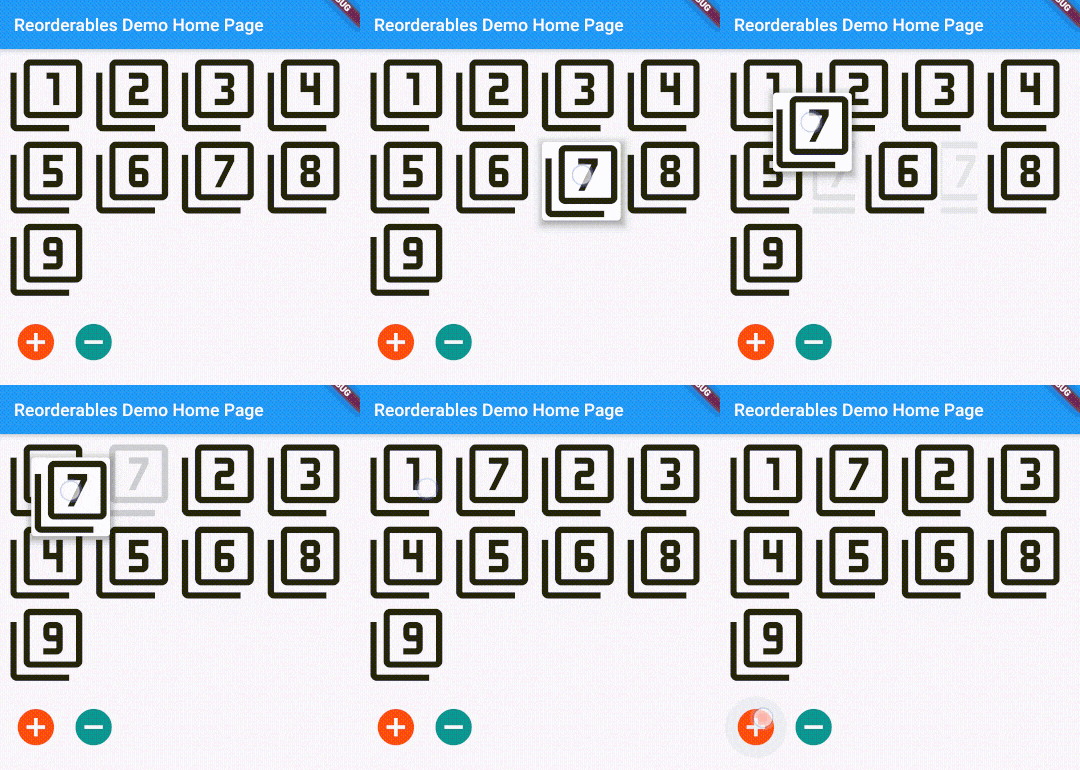
This widget can also limit the minimum and maximum amount of children in each run, on top of the size-based policy in Wrap's algorithm. See API references for more details. *Since v0.2.5, children of ReorderableWrap don't need to have a key explicitly specified.
class _WrapExampleState extends State<WrapExample> {
  final double _iconSize = 90;
  List<Widget> _tiles;

  @override
  void initState() {
    super.initState();
    _tiles = <Widget>[
      Icon(Icons.filter_1, size: _iconSize),
      Icon(Icons.filter_2, size: _iconSize),
      Icon(Icons.filter_3, size: _iconSize),
      Icon(Icons.filter_4, size: _iconSize),
      Icon(Icons.filter_5, size: _iconSize),
      Icon(Icons.filter_6, size: _iconSize),
      Icon(Icons.filter_7, size: _iconSize),
      Icon(Icons.filter_8, size: _iconSize),
      Icon(Icons.filter_9, size: _iconSize),
    ];
  }

  @override
  Widget build(BuildContext context) {
    void _onReorder(int oldIndex, int newIndex) {
      setState(() {
        Widget row = _tiles.removeAt(oldIndex);
        _tiles.insert(newIndex, row);
      });
    }

    var wrap = ReorderableWrap(
      spacing: 8.0,
      runSpacing: 4.0,
      padding: const EdgeInsets.all(8),
      children: _tiles,
      onReorder: _onReorder,
       onNoReorder: (int index) {
        //this callback is optional
        debugPrint('${DateTime.now().toString().substring(5, 22)} reorder cancelled. index:$index');
      },
      onReorderStarted: (int index) {
        //this callback is optional
        debugPrint('${DateTime.now().toString().substring(5, 22)} reorder started: index:$index');
      }
    );

    var column = Column(
      crossAxisAlignment: CrossAxisAlignment.start,
      children: <Widget>[
        wrap,
        ButtonBar(
          alignment: MainAxisAlignment.start,
          children: <Widget>[
            IconButton(
              iconSize: 50,
              icon: Icon(Icons.add_circle),
              color: Colors.deepOrange,
              padding: const EdgeInsets.all(0.0),
              onPressed: () {
                var newTile = Icon(Icons.filter_9_plus, size: _iconSize);
                setState(() {
                  _tiles.add(newTile);
                });
              },
            ),
            IconButton(
              iconSize: 50,
              icon: Icon(Icons.remove_circle),
              color: Colors.teal,
              padding: const EdgeInsets.all(0.0),
              onPressed: () {
                setState(() {
                  _tiles.removeAt(0);
                });
              },
            ),
          ],
        ),
      ],
    );

    return SingleChildScrollView(
      child: column,
    );

  }
}
It is also possible to nest multiple levels of ReorderableWrap. See example/lib/nested_wrap_example.dart for complete example code.
class _NestedWrapExampleState extends State<NestedWrapExample> {
//  List<Widget> _tiles;
  Color _color;
  Color _colorBrighter;

  @override
  void initState() {
    super.initState();
    _color = widget.color ?? Colors.primaries[widget.depth % Colors.primaries.length];
    _colorBrighter = Color.lerp(_color, Colors.white, 0.6);
  }

  @override
  Widget build(BuildContext context) {
    void _onReorder(int oldIndex, int newIndex) {
      setState(() {
        widget._tiles.insert(newIndex, widget._tiles.removeAt(oldIndex));
      });
    }

    var wrap = ReorderableWrap(
      spacing: 8.0,
      runSpacing: 4.0,
      padding: const EdgeInsets.all(8),
      children: widget._tiles,
      onReorder: _onReorder
    );

    var buttonBar = Container(
      color: _colorBrighter,
      child: Row(
        mainAxisSize: MainAxisSize.min,
        mainAxisAlignment: MainAxisAlignment.start,
        children: <Widget>[
          IconButton(
            iconSize: 42,
            icon: Icon(Icons.add_circle),
            color: Colors.deepOrange,
            padding: const EdgeInsets.all(0.0),
            onPressed: () {
              setState(() {
                widget._tiles.add(
                  Card(
                    child: Container(
                      child: Text('${widget.valuePrefix}${widget._tiles.length}', textScaleFactor: 3 / math.sqrt(widget.depth + 1)),
                      padding: EdgeInsets.all((24.0 / math.sqrt(widget.depth + 1)).roundToDouble()),
                    ),
                    color: _colorBrighter,
                    elevation: 3,
                  )
                );
              });
            },
          ),
          IconButton(
            iconSize: 42,
            icon: Icon(Icons.remove_circle),
            color: Colors.teal,
            padding: const EdgeInsets.all(0.0),
            onPressed: () {
              setState(() {
                widget._tiles.removeAt(0);
              });
            },
          ),
          IconButton(
            iconSize: 42,
            icon: Icon(Icons.add_to_photos),
            color: Colors.pink,
            padding: const EdgeInsets.all(0.0),
            onPressed: () {
              setState(() {
                widget._tiles.add(NestedWrapExample(depth: widget.depth + 1, valuePrefix: '${widget.valuePrefix}${widget._tiles.length}.',));
              });
            },
          ),
          Text('Level ${widget.depth} / ${widget.valuePrefix}'),
        ],
      )
    );

    var column = Column(
      crossAxisAlignment: CrossAxisAlignment.start,
      children: [
        buttonBar,
        wrap,
      ]
    );

    return SingleChildScrollView(
      child: Container(child: column, color: _color,),
    );
  }
}
class _ColumnExample1State extends State<ColumnExample1> {
  List<Widget> _rows;

  @override
  void initState() {
    super.initState();
    _rows = List<Widget>.generate(50,
        (int index) => Text('This is row $index', key: ValueKey(index), textScaleFactor: 1.5)
    );
  }

  @override
  Widget build(BuildContext context) {
    void _onReorder(int oldIndex, int newIndex) {
      setState(() {
        Widget row = _rows.removeAt(oldIndex);
        _rows.insert(newIndex, row);
      });
    }

    return ReorderableColumn(
      header: Text('THIS IS THE HEADER ROW'),
      footer: Text('THIS IS THE FOOTER ROW'),
      crossAxisAlignment: CrossAxisAlignment.start,
      children: _rows,
      onReorder: _onReorder,
    );
  }
}
class _ColumnExample2State extends State<ColumnExample2> {
  List<Widget> _rows;

  @override
  void initState() {
    super.initState();
    _rows = List<Widget>.generate(10,
        (int index) => Text('This is row $index', key: ValueKey(index), textScaleFactor: 1.5)
    );
  }

  @override
  Widget build(BuildContext context) {
    void _onReorder(int oldIndex, int newIndex) {
      setState(() {
        Widget row = _rows.removeAt(oldIndex);
        _rows.insert(newIndex, row);
      });
    }

    Widget reorderableColumn = IntrinsicWidth(
      child: ReorderableColumn(
        header: Text('List-like view but supports IntrinsicWidth'),
//        crossAxisAlignment: CrossAxisAlignment.start,
        children: _rows,
        onReorder: _onReorder,
      )
    );

    return Transform(
      transform: Matrix4.rotationZ(0),
      alignment: FractionalOffset.topLeft,
      child: Material(
        child: Card(child: reorderableColumn),
        elevation: 6.0,
        color: Colors.transparent,
        borderRadius: BorderRadius.zero,
      ),
    );
  }
}
See exmaple/lib/row_example.dart
I've switched to Flutter channel stable from beta in order avoid compatibility issues. Supporting master or dev channels is not intended as they change frequently. Kindly make sure that you are using stable channel when submitting issues.
If you need commercial support, please reach out to me by sending me message on LinkedIn Hansheng
Otherwise, you can also support me by buying me a coffee or donate me via PayPal. Your support is very much appreciated. :)
Buy Me A Coffee or Donate or Say Thanks!