

 v0.0.1+3
snap_scroll_physics
滾動物理屬性,用於在不同偏移量處捕捉使用者的滾動
76喜歡 9近 30 天下載140Pub 分數
AndroidiOSWebmacOSWindowsLinux
Flutter | 為您的滾動視圖添加吸附物理效果

以下為英文專案原文快照,最新內容請造訪 GitHub。

When building scrollable views, sometimes you would prefer that the scroll stopped at a given offset, or that it avoids to stop inside some area. This package allows you to implement this on any Flutter scroll view.
This kind of behaviour can be seen in any iOS app using the UIKit/SwiftUI Navigation bar, also with custom headers inside some popular apps like Twitter, Chrome, Gmail, Google Photos, Apple Music, Facebook and many more!

physics: SnapScrollPhysics(
    snaps: [
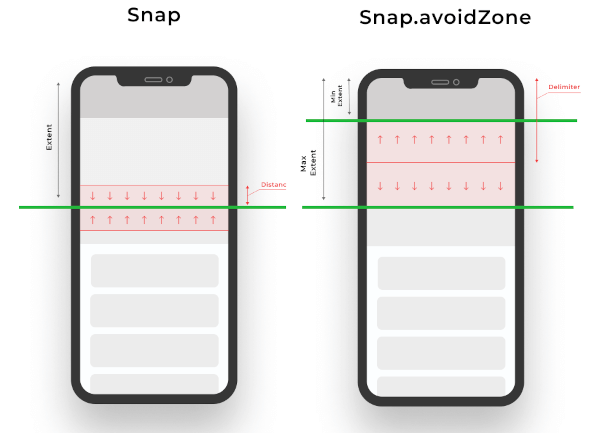
        Snap(200, distance: 50), // If the scroll offset is expected to stop between 150-250 the scroll will snap to 200,
        Snap(200, leadingDistance: 50), // If the scroll offset is expected to stop  between 150-200 the scroll will snap to 200,
        Snap(200, trailingDistance: 50), // If the scroll offset is expected to stop between 150-200 the scroll will snap to 200,
        Snap(200, trailingDistance: 50), // If the scroll offset is expected to stop between 150-200 the scroll will snap to 200,
        Snap.avoidZone(0, 200), // If the scroll offset is expected to stop between 0-200, the scroll will snap to 0 if the expected one is between 0-99, and to 200 if it is between 100-200,
        Snap.avoidZone(0, 200, delimiter: 50), // If the scroll offset is expected to stop between 0-200, the scroll will snap to 0 if the expected one is between 0-49, and to 200 if it is between 50-200
    ]
),
physics: SnapScrollPhysics.cupertinoAppBar, // Default values for the Cupertino appbar
https://user-images.githubusercontent.com/19904063/116775316-b67b8f80-aa62-11eb-9ae1-58da68a381e4.mp4
https://user-images.githubusercontent.com/19904063/116775452-56391d80-aa63-11eb-95ae-f8fd8154cbc9.mp4
IMPORTANT! Sadly ScrollPhysics are not reactivily updated, so if you change the values, they won't be automatically updated. See #80051.
This can be temporaly fixed by this, while is discouraged in production if no changes are needed at runtime:
List<Snap> getSnaps() {
    return [
       Snap(200), // Hot reload works
    ];
}
@override
  Widget build(BuildContext context) {
    return CustomScrollView(
      physics: SnapScrollPhysics.builder(getSnaps),
      slivers: [
       // ....
      ],
    );
  }
依賴清單 2 項
{"sdk":"flutter"}{"sdk":"flutter"}先依使用情境篩選,再比較專案活躍情況,最後到原始儲存庫確認使用要求。
“A repository is the most basic element of GitHub.”
GitHub Docs — About repositories ↗