搜尋套件、儲存庫與 APP 分類

snap_scroll_physics 封面
套件詳情v0.0.1+3

snap_scroll_physics

滾動物理屬性,用於在不同偏移量處捕捉使用者的滾動

AndroidiOSWebmacOSWindowsLinux
近 30 天下載
9
喜歡數
76
Pub 分數
140

安裝套件

flutter pub add snap_scroll_physics

套件介紹

根據套件公開資料產生的選型評估,僅供參考。

一個 Flutter 套件,提供滾動物理效果,可將滾動位置吸附至特定偏移量,從而提升可滾動元件的使用者體驗。它允許對滾動行為進行精確控制,非常適合需要對齊至預設位置的輪播圖式介面或格狀佈局。此套件支援所有主要平台,並能與標準 ScrollView 無縫整合。它擴展了 Flutter 內建的物理系統,提供可自訂的吸附間隔與平滑過渡。

適用情境

  • 輪播滑塊
  • 網格佈局與對齊
  • 表單欄位導航
  • 產品輪播
  • 自訂滾動吸附
  • 互動式教程

主要特色

  • 吸附到預定義的偏移量
  • 平滑過渡動畫
  • 跨平台支援
  • 擴展預設物理效果
  • 可設定的吸附間隔
  • 與 ScrollViews 的輕鬆整合

適合對象

  • 開發互動式捲動介面的開發者
  • 需要精確滾動對齊的設計人員
  • 具有輪播或基於標籤的導航的應用程式
  • 需要自定義滾動行為的專案
  • 針對多個平台的團隊

使用建議

  • 可能需要調整以獲得最佳使用者體驗
  • 如果未妥善管理,可能與其他物理系統衝突
  • 不適合連續滾動內容
  • 使用大量快照點時的性能影響
  • 僅限可滾動的組件

原始 README

以下為關聯原始碼儲存庫的 README 原文快照,最新內容請造訪原始碼儲存庫。

Snap Scroll Physics

pub package

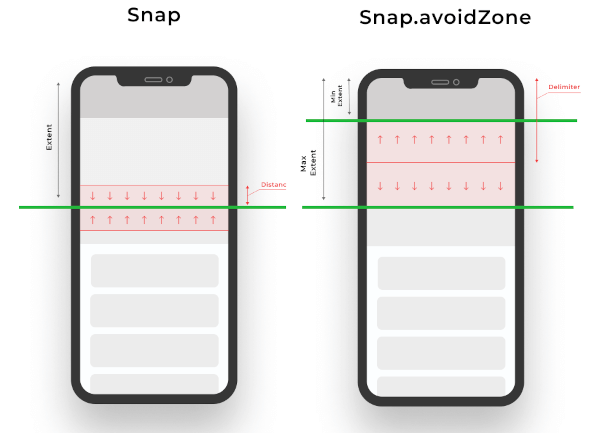
When building scrollable views, sometimes you would prefer that the scroll stopped at a given offset, or that it avoids to stop inside some area. This package allows you to implement this on any Flutter scroll view.

This kind of behaviour can be seen in any iOS app using the UIKit/SwiftUI Navigation bar, also with custom headers inside some popular apps like Twitter, Chrome, Gmail, Google Photos, Apple Music, Facebook and many more!

snap_scroll

physics: SnapScrollPhysics(
    snaps: [
        Snap(200, distance: 50), // If the scroll offset is expected to stop between 150-250 the scroll will snap to 200,
        Snap(200, leadingDistance: 50), // If the scroll offset is expected to stop  between 150-200 the scroll will snap to 200,
        Snap(200, trailingDistance: 50), // If the scroll offset is expected to stop between 150-200 the scroll will snap to 200,
        Snap(200, trailingDistance: 50), // If the scroll offset is expected to stop between 150-200 the scroll will snap to 200,
        Snap.avoidZone(0, 200), // If the scroll offset is expected to stop between 0-200, the scroll will snap to 0 if the expected one is between 0-99, and to 200 if it is between 100-200,
        Snap.avoidZone(0, 200, delimiter: 50), // If the scroll offset is expected to stop between 0-200, the scroll will snap to 0 if the expected one is between 0-49, and to 200 if it is between 50-200
    ]
),
physics: SnapScrollPhysics.cupertinoAppBar, // Default values for the Cupertino appbar

https://user-images.githubusercontent.com/19904063/116775316-b67b8f80-aa62-11eb-9ae1-58da68a381e4.mp4

https://user-images.githubusercontent.com/19904063/116775452-56391d80-aa63-11eb-95ae-f8fd8154cbc9.mp4

IMPORTANT! Sadly ScrollPhysics are not reactivily updated, so if you change the values, they won't be automatically updated. See #80051.

This can be temporaly fixed by this, while is discouraged in production if no changes are needed at runtime:


List<Snap> getSnaps() {
    return [
       Snap(200), // Hot reload works
    ];
}
@override
  Widget build(BuildContext context) {
    return CustomScrollView(
      physics: SnapScrollPhysics.builder(getSnaps),
      slivers: [
       // ....
      ],
    );
  }

所屬分類

原始碼儲存庫

使用此套件的專案