
 v0.0.2
rolling_switch
具有吸引人動畫的自訂開關按鈕,可讓您自訂顏色、圖示和其他外觀內容。
59喜歡 179近 30 天下載150Pub 分數
AndroidiOSWebmacOSWindowsLinux
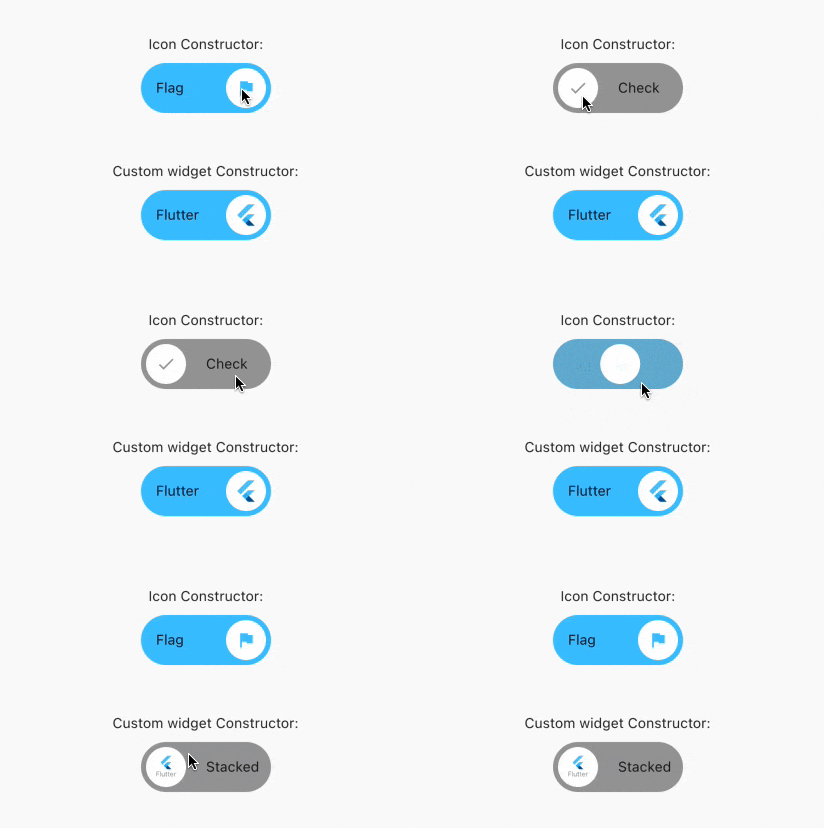
適用於 Flutter 應用的完全可自訂滾動開關小部件

{"sdk":"flutter"}^0.0.1{"sdk":"flutter"}^1.5.3以下為英文專案原文快照,最新內容請造訪 GitHub。
Rolling Switch Package
Full customizable rolling switch widget for flutter apps forked from this library
Custom Switch button with attractive animation,
made to allow you to customize colors, icons, custom widget and other cosmetic content.
Manage the widget states in the same way you do with the classical material's switch widget.
style: lint https://img.shields.io/github/license/jamescardona11/rolling_switch https://img.shields.io/pub/v/rolling_switch
Import this library into your project:
roling_switch: ^latest_version
RollingSwitch.icon(
  onChanged: (bool state) {
    print('turned ${(state) ? 'on' : 'off'}');
  },
  rollingInfoRight: const RollingIconInfo(
    icon: Icons.flag,
    text: Text('Flag'),
  ),
  rollingInfoLeft: const RollingIconInfo(
    icon: Icons.check,
    backgroundColor: Colors.grey,
    text: Text('Check'),
  ),
),
const RollingWidgetInfo(icon: FlutterLogo())
RollingSwitch.icon(
  rollingInfoRight: const RollingIconInfo(
    backgroundColor: Colors.green,
  ),
  rollingInfoLeft: const RollingIconInfo(
    backgroundColor: Colors.grey,
  ),
)
RollingSwitch.icon(
  ...
  circularColor: (icon: FlutterLogo())
)
RollingSwitch.icon(
  rollingInfoRight: const RollingIconInfo(
    text: Text('Flag'),
  ),
  rollingInfoLeft: const RollingIconInfo(
    text: Text('Stack'),
  ),
)
RollingSwitch.icon(
  ...
  enableDrag: true
)
https://github.com/jamescardona11/rolling_switch/blob/main/img/example.gif?raw=true