

v2.0.1
event_bus
一個使用 Dart Streams 的簡單事件總線,用於解耦應用程式
749喜歡 37.6萬近 30 天下載150Pub 分數
AndroidiOSWebmacOSWindowsLinux
使用 Dart Streams 實現事件總線以解耦應用程式

以下為英文專案原文快照,最新內容請造訪 GitHub。
A simple Event Bus using Dart Streams for decoupling applications.


GitHub | Pub | Demos and Examples
An Event Bus follows the publish/subscribe pattern. It allows listeners to subscribe for events and publishers to fire events. This enables objects to interact without requiring to explicitly define listeners and keeping track of them.
The Event Bus pattern is especially helpful for decoupling MVC (or MVP) applications.
One group of MVC is not a problem.
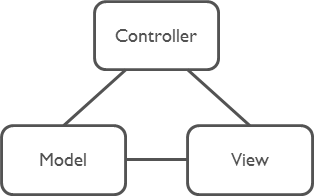
But as soon as there are multiple groups of MVCs, those groups will have to talk to each other. This creates a tight coupling between the controllers.
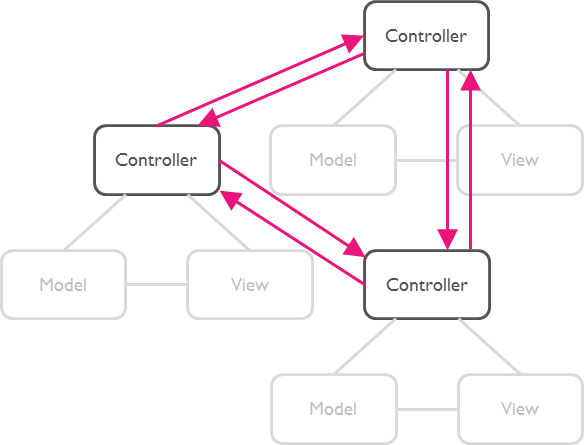
By communication through an Event Bus, the coupling is reduced.
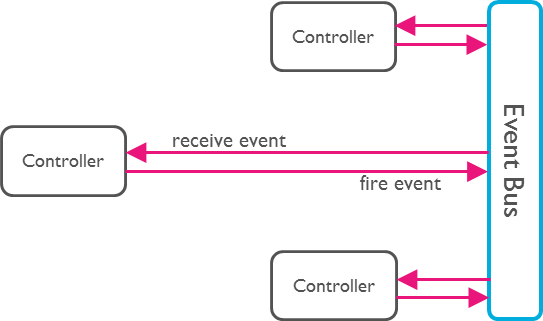
Create an instance of EventBus and make it available to other classes.
Usually there is just one Event Bus per application, but more than one may be set up to group a specific set of events.
import 'package:event_bus/event_bus.dart';

EventBus eventBus = EventBus();
Note: The default constructor will create an asynchronous event bus. To
create a synchronous bus you must provide the optional sync: true attribute.
Any Dart class can be used as an event.
class UserLoggedInEvent {
  User user;

  UserLoggedInEvent(this.user);
}

class NewOrderEvent {
  Order order;

  NewOrderEvent(this.order);
}
Register listeners for specific events:
eventBus.on<UserLoggedInEvent>().listen((event) {
  // All events are of type UserLoggedInEvent (or subtypes of it).
  print(event.user);
});
Register listeners for all events:
eventBus.on().listen((event) {
  // Print the runtime type. Such a set up could be used for logging.
  print(event.runtimeType);
});
EventBus uses Dart Streams
as its underlying mechanism to keep track of listeners. You may use all
functionality available by the Stream
API. One example is the use of StreamSubscriptions
to later unsubscribe from the events.
StreamSubscription loginSubscription = eventBus.on<UserLoggedInEvent>().listen((event) {
  print(event.user);
});

loginSubscription.cancel();
Finally, we need to fire an event.
User myUser = User('Mickey');
eventBus.fire(UserLoggedInEvent(myUser));
Instead of using the default StreamController you can use the following constructor
to provide your own.
An example would be to use an RxDart Subject as the controller.
import 'package:rxdart/rxdart.dart';

EventBus behaviorBus = EventBus.customController(BehaviorSubject());
webdev servewebdev buildpub run build_runner test -- -p chromeThe MIT License (MIT)
依賴清單 5 項
^2.4.8^4.0.9^2.0.0^1.0.0^1.5.0先依使用情境篩選,再比較專案活躍情況,最後到原始儲存庫確認使用要求。
“A repository is the most basic element of GitHub.”
GitHub Docs — About repositories ↗