

 v1.0.23
mnc_identifier_ocr
跨平台的KTP掃描,可在iOS和Android上實現快速、準確的身份驗證。
30喜歡 53近 30 天下載130Pub 分數
AndroidiOS
mncinnovation/mnc_identifier_ocr open-source repository details.

以下為英文專案原文快照,最新內容請造訪 GitHub。

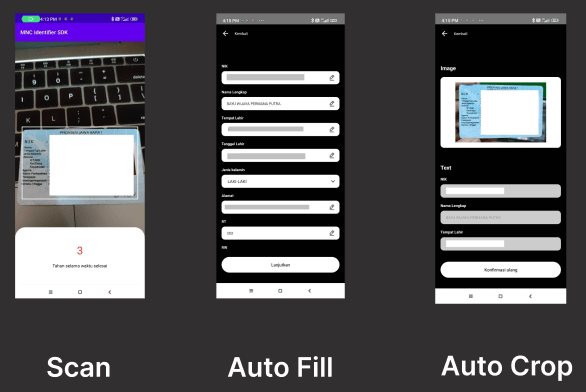
A Flutter plugin for Android and iOS for scanning KTP
You can use the command to add MNC Identifier OCR as a dependency with the latest stable version:
$ dart pub add mnc_identifier_ocr
Or you can manually add MNC Identifier OCR into the dependencies section in your pubspec.yaml:
dependencies:
  mnc_identifier_ocr: ^replace-with-latest-version
The latest version is: 1.0.22
This plugin requires Android SDK 21 or higher.
Add CaptureOCRActivity into your AndroidManifest.xml
<activity android:name="id.mncinnovation.ocr.CaptureOCRActivity" android:theme="@style/Theme.AppCompat.Light.NoActionBar" />
This plugin requires iOS 12.0 or higher and only working on real device.
Add NSCameraUsageDescription key to your info.plist file. Describe why your app needs access to the camera. This is called Privacy - Camera Usage Description in the visual editor.
import 'package:mnc_identifier_ocr/mnc_identifier_ocr.dart';
import 'package:mnc_identifier_ocr/model/ocr_result_model.dart';

Future<void> scanKtp() async {
  try {
    OcrResultModel res = await MncIdentifierOcr.startCaptureKtp(
      withFlash: true,
      cameraOnly: true,
    );
    debugPrint('result: ${res.toJson()}');
    debugPrint('KTP image path: ${res.imagePath}');
    debugPrint('Face image path: ${res.faceImagePath}');
    // Access KTP data fields
    debugPrint('NIK: ${res.ktp?.nik}');
    debugPrint('Nama: ${res.ktp?.nama}');
    // ...and so on
  } catch (e) {
    debugPrint('something goes wrong $e');
  }
}
imagePath contains the path to the full KTP image.faceImagePath contains the path to the cropped face image.ktp contains the extracted KTP data fields.Note: On iOS, this plugin only works on a real device.
依賴清單 6 項
{"sdk":"flutter"}^0.13.1^4.1.3^2.1.2{"sdk":"flutter"}^1.0.0先依使用情境篩選,再比較專案活躍情況,最後到原始儲存庫確認使用要求。
“A repository is the most basic element of GitHub.”
GitHub Docs — About repositories ↗