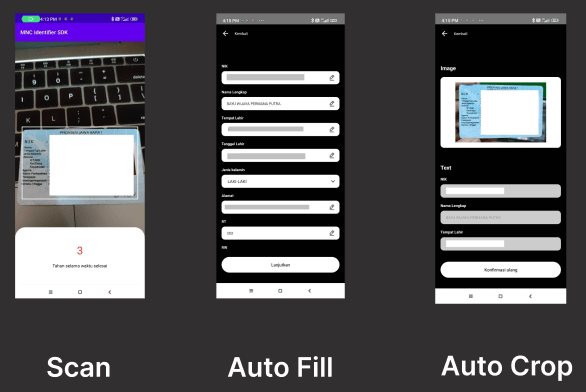
MNC Identifier OCR
A Flutter plugin for Android and iOS for scanning KTP
Installation
Add dependency
You can use the command to add MNC Identifier OCR as a dependency with the latest stable version:
$ dart pub add mnc_identifier_ocr
Or you can manually add MNC Identifier OCR into the dependencies section in your pubspec.yaml:
dependencies:
  mnc_identifier_ocr: ^replace-with-latest-version
The latest version is: 1.0.22
Additional Steps
Android
This plugin requires Android SDK 21 or higher.
Add CaptureOCRActivity into your AndroidManifest.xml
<activity android:name="id.mncinnovation.ocr.CaptureOCRActivity" android:theme="@style/Theme.AppCompat.Light.NoActionBar" />
iOS
This plugin requires iOS 12.0 or higher and only working on real device .
Add NSCameraUsageDescription key to your info.plist file. Describe why your app needs access to the camera. This is called Privacy - Camera Usage Description in the visual editor.
Usage
import 'package:mnc_identifier_ocr/mnc_identifier_ocr.dart' ;
import 'package:mnc_identifier_ocr/model/ocr_result_model.dart' ;
Future <void > scanKtp () async {
try {
OcrResultModel res = await MncIdentifierOcr .startCaptureKtp (
withFlash: true ,
cameraOnly: true ,
);
debugPrint ('result: ${res.toJson()} ' );
debugPrint ('KTP image path: ${res.imagePath} ' );
debugPrint ('Face image path: ${res.faceImagePath} ' );
debugPrint ('NIK: ${res.ktp?.nik} ' );
debugPrint ('Nama: ${res.ktp?.nama} ' );
} catch (e) {
debugPrint ('something goes wrong $e ' );
}
}
imagePath contains the path to the full KTP image.faceImagePath contains the path to the cropped face image.ktp contains the extracted KTP data fields.
Note: On iOS, this plugin only works on a real device.