

v0.3.1+1
parallax_image
一個 Flutter 小部件,用於繪製影像並使其移動速度慢於主要滾動內容。
94喜歡 15近 30 天下載40Pub 分數
平台暫無資料
一個 Flutter 小部件,用於繪製影像並使其移動速度慢於主要滾動內容。

以下為英文專案原文快照,最新內容請造訪 GitHub。
A Flutter widget that paints an image and moves it at a slower speed than the main scrolling content.
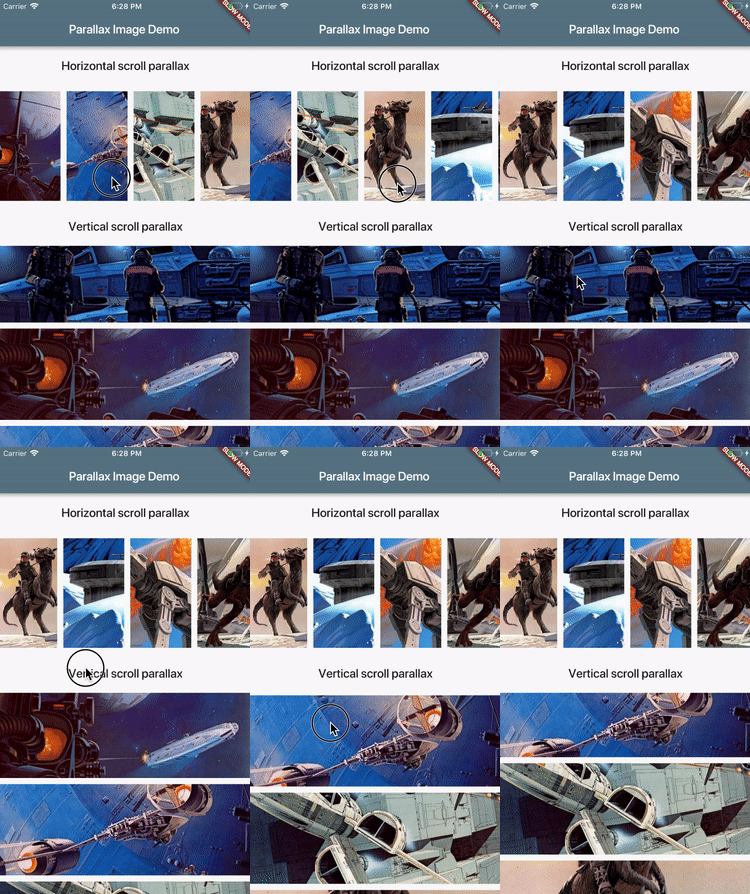
Add dependency to your pubspec.yaml:
dependencies:
  parallax_image: [latest version]
ParallaxImage can be used with any Scrollable (ListView for instance).
When created, it subscribes to scroll updates on nearest Scrollable ancestor.
It is also possible to specify custom ScrollController in which case this
widget subscribes to updates on ScrollController.position (assumes that
controller is attached to only one Scrollable).
class MyWidget extends StatefulWidget {
  @override
  MyWidgetState createState() => new MyWidgetState();
}

class MyWidgetState extends State<MyWidget> {
  final _controller = new ScrollController();

  @override
  Widget build(BuildContext context) {
    return new ListView(controller: _controller, children: [
      new ParallaxImage(
        image: new AssetImage('images/january.jpg'),
        // Extent of this widget in scroll direction.
        // In this case it is vertical scroll so extent defines
        // the height of this widget.
        // The image is scaled with BoxFit.fitWidth which makes it
        // occupy full width of this widget.
        // After image is scaled it should normally have height greater
        // than this value to allow for parallax effect to be
        // visible.
        extent: 100.0,
        // Optionally specify child widget.
        child: new Text('January'),
        // Optinally specify scroll controller.
        controller: _controller,
      ),
      // ...add more list items
    ]);
  }
}
See example/ folder for a complete demo.
Please file feature requests and bugs at the issue tracker.
依賴清單 1 項
{"sdk":"flutter"}先依使用情境篩選,再比較專案活躍情況,最後到原始儲存庫確認使用要求。
“A repository is the most basic element of GitHub.”
GitHub Docs — About repositories ↗