
 v1.1.10
booking_calendar
用於透過您的應用程式進行線上預訂的 Flutter 套件。可與串流搭配使用以取得即時預訂資料,例如使用 Firestore 串流
152喜歡 239近 30 天下載140Pub 分數
AndroidiOSWebmacOSWindowsLinux
用於管理線上預訂的 Flutter 套件
以下為英文專案原文快照,最新內容請造訪 GitHub。



Want to make online bookings in your app? Then luckily you need look no further!
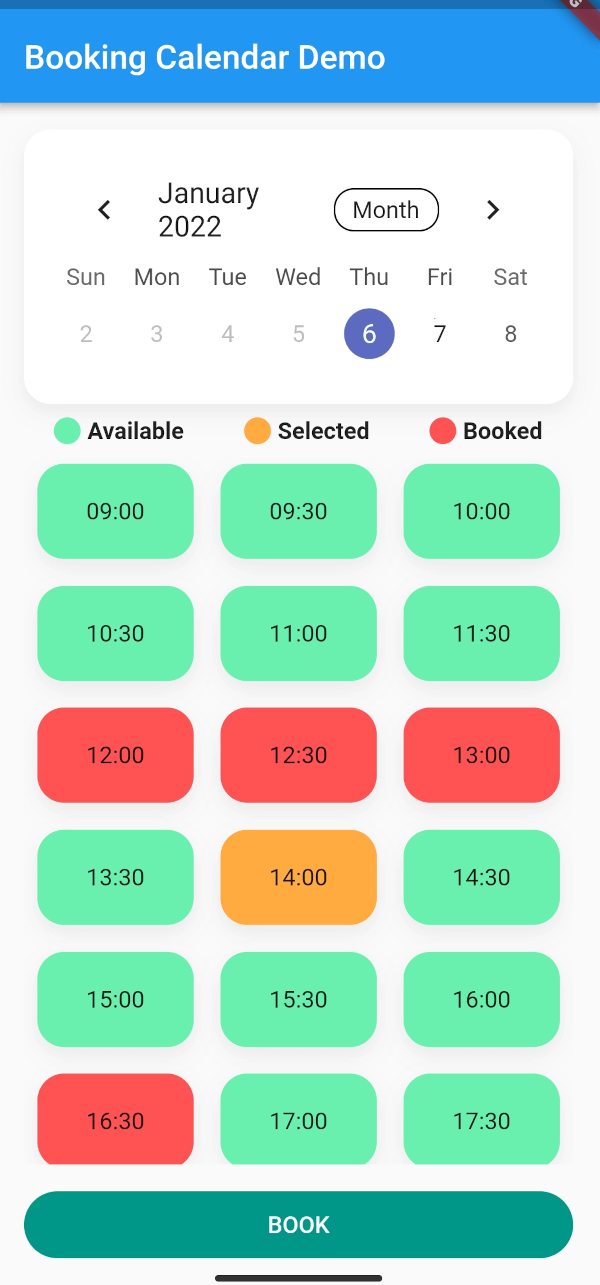
With a total of 4 lines, you get a working online booking system where users can track bookings in real-time.
It calculates the cases where there would be a conflict in the calendar and displays them in different colors.
You can customise your booking calendar with a number of additional parameters.
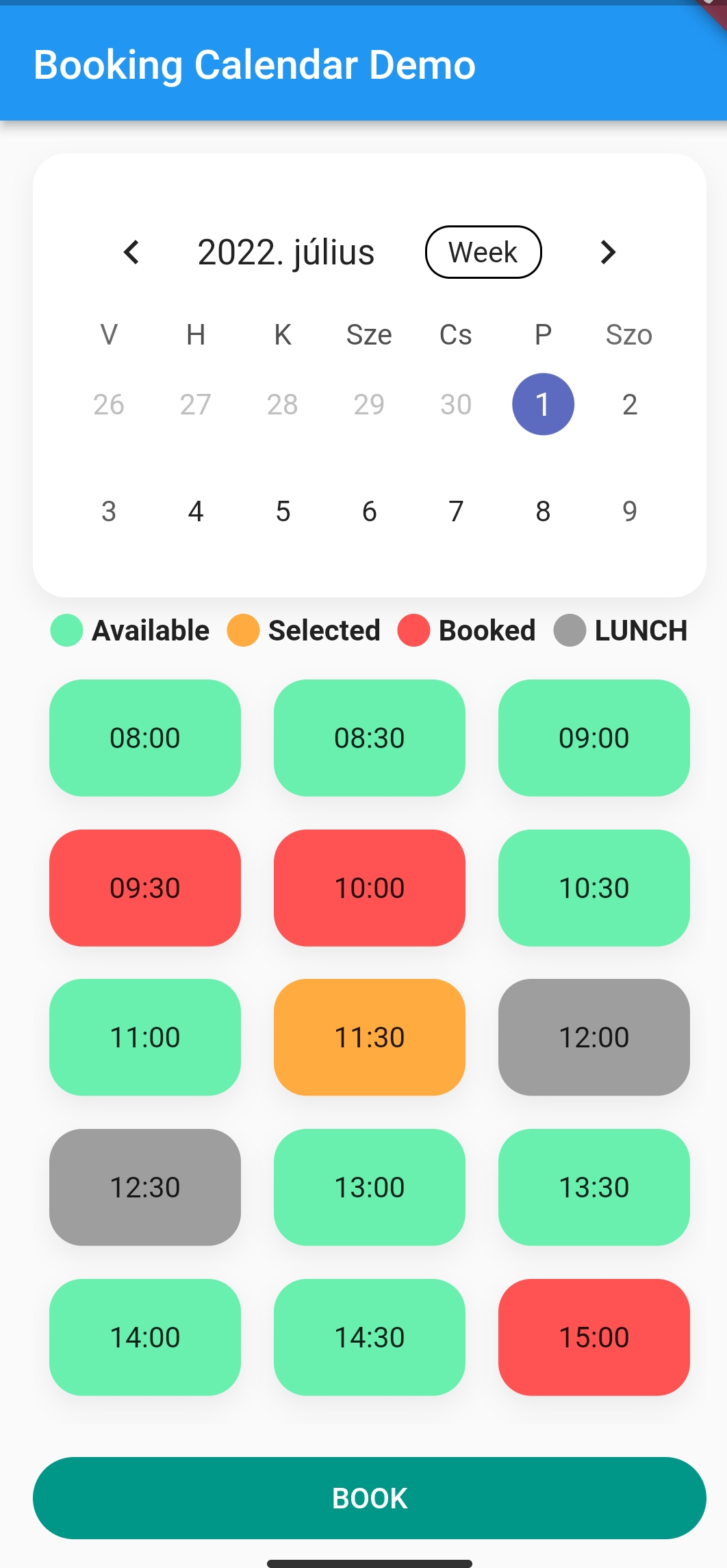
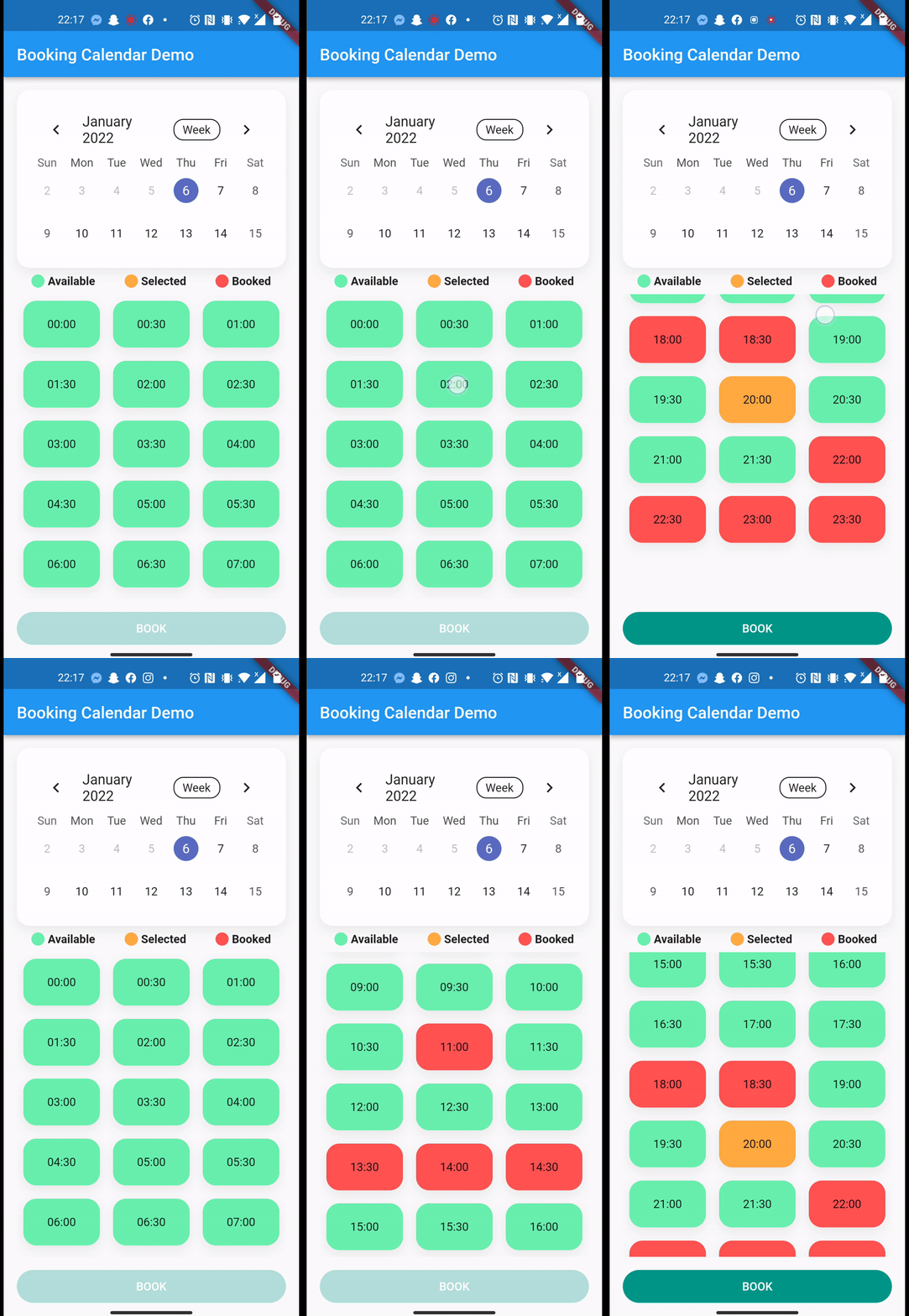
Check the Demo Example for more Information
 Widget build(BuildContext context) {
    return BookingCalendar(
        key: key,
        ///These are the required parameters
        getBookingStream: getBookingStream,
        uploadBooking: uploadBooking,
        convertStreamResultToDateTimeRanges: convertStreamResultToDateTimeRanges,
        ///These are only customizable, optional parameters
        bookingButtonColor: bookingButtonColor,
        bookingButtonText: bookingButtonText,
        bookingExplanation: bookingExplanation,
        bookingGridChildAspectRatio: bookingGridChildAspectRatio,
        bookingGridCrossAxisCount: bookingGridCrossAxisCount,
        formatDateTime: formatDateTime,
        convertStreamResultToDateTimeRanges:
        convertStreamResultToDateTimeRanges,
        availableSlotColor: availableSlotColor,
        availableSlotText: availableSlotText,
        bookedSlotColor: bookedSlotColor,
        bookedSlotText: bookedSlotText,
        selectedSlotColor: selectedSlotColor,
        selectedSlotText: selectedSlotText,
        gridScrollPhysics: gridScrollPhysics,
        loadingWidget: loadingWidget,
        errorWidget: errorWidget,
        uploadingWidget: uploadingWidget,
        pauseSlotColor: pauseSlotColor,
        pauseSlotText: pauseSlotText,
        hideBreakTime: hideBreakTime,
        locale: locale,
        disabledDays: disabledDays,
        startingDayOfWeek: startingDayOfWeek,
    );
  }
After you successfully integrated Firebase to your app. How to setup Firebase with Flutter In this example, we will book sporting slots, using Firebase Firestore.
Here is the model we store in the Firebase:
import 'package:cloud_firestore/cloud_firestore.dart';
import 'package:json_annotation/json_annotation.dart';
import 'package:sport.bp/util/app_util.dart';
part 'sport_booking.g.dart';

@JsonSerializable(explicitToJson: true)
class SportBooking {
  /// The generated code assumes these values exist in JSON.
  final String? userId;
  final String? userName;
  final String? placeId;
  final String? serviceName;
  final int? serviceDuration;
  final int? servicePrice;

  //Because we are storing timestamp in Firestore, we need a converter for DateTime
  /* static DateTime timeStampToDateTime(Timestamp timestamp) {
    return DateTime.parse(timestamp.toDate().toString());
  }

  static Timestamp dateTimeToTimeStamp(DateTime? dateTime) {
    return Timestamp.fromDate(dateTime ?? DateTime.now()); //To TimeStamp
  }*/
  @JsonKey(fromJson: AppUtil.timeStampToDateTime, toJson: AppUtil.dateTimeToTimeStamp)
  final DateTime? bookingStart;
  @JsonKey(fromJson: AppUtil.timeStampToDateTime, toJson: AppUtil.dateTimeToTimeStamp)
  final DateTime? bookingEnd;
  final String? email;
  final String? phoneNumber;
  final String? placeAddress;

  SportBooking(
      {this.email,
      this.phoneNumber,
      this.placeAddress,
      this.bookingStart,
      this.bookingEnd,
      this.placeId,
      this.userId,
      this.userName,
      this.serviceName,
      this.serviceDuration,
      this.servicePrice});

  /// Connect the generated [_$SportBookingFromJson] function to the `fromJson`
  /// factory.
  factory SportBooking.fromJson(Map<String, dynamic> json) => _$SportBookingFromJson(json);

  /// Connect the generated [_$SportBookingToJson] function to the `toJson` method.
  Map<String, dynamic> toJson() => _$SportBookingToJson(this);
}
This is how the structure of the data looks like in the Firestore document:
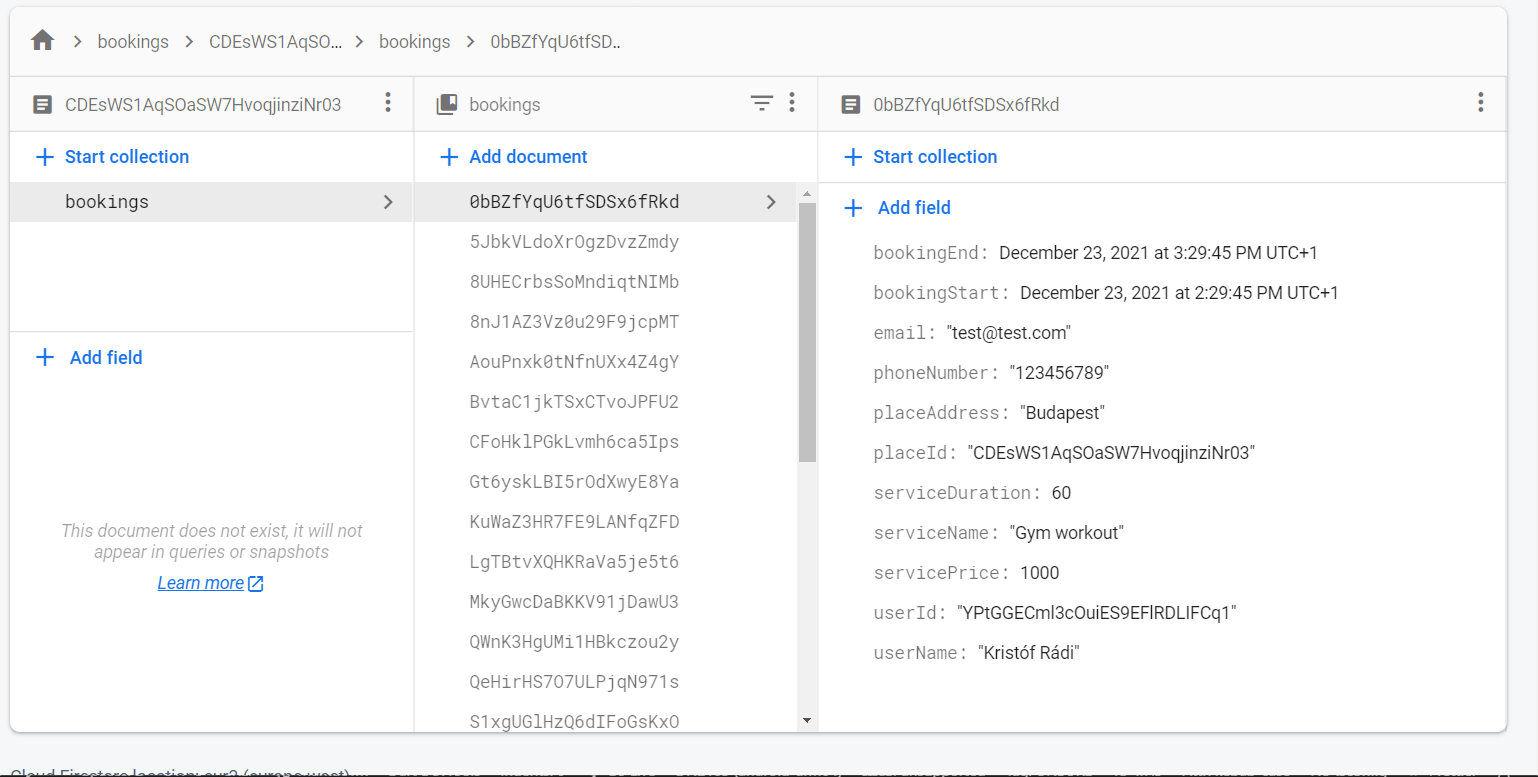
So after the Firebase init, we can access the Firestore collection.
  CollectionReference bookings = FirebaseFirestore.instance.collection('bookings');

  ///This is how can you get the reference to your data from the collection, and serialize the data with the help of the Firestore [withConverter]. This function would be in your repository.
  CollectionReference<SportBooking> getBookingStream({required String placeId}) {
    return bookings.doc(placeId).collection('bookings').withConverter<SportBooking>(
          fromFirestore: (snapshots, _) => SportBooking.fromJson(snapshots.data()!),
          toFirestore: (snapshots, _) => snapshots.toJson(),
        );
  }

  ///How you actually get the stream of data from Firestore with the help of the previous function
  ///note that this query filters are for my data structure, you need to adjust it to your solution.
  Stream<dynamic>? getBookingStreamFirebase(
    {required DateTime end, required DateTime start}) {
       return ApiRepository.
                        .getBookingStream(placeId: 'YOUR_DOC_ID')
                        .where('bookingStart', isGreaterThanOrEqualTo: start)
                        .where('bookingStart', isLessThanOrEqualTo: end)
                        .snapshots(),
  }

  ///After you fetched the data from firestore, we only need to have a list of datetimes from the bookings:
  List<DateTimeRange> convertStreamResultFirebase(
    {required dynamic streamResult}) {
    ///here you can parse the streamresult and convert to [List<DateTimeRange>]
    ///Note that this is dynamic, so you need to know what properties are available on your result, in our case the [SportBooking] has bookingStart and bookingEnd property
      List<DateTimeRange> converted = []
      for (var i = 0; i < streamResult.size; i++) {
        final item = streamResult.docs[i].data();
        converted.add(DateTimeRange(start: (item.bookingStart!), end: (item.bookingEnd!)));
      }
  return converted;
}

  ///This is how you upload data to Firestore
  Future<dynamic> uploadBookingFirebase(
    {required BookingService newBooking}) async {
    await bookings
        .doc('your id, or autogenerate')
        .collection('bookings')
        .add(newBooking.toJson())
        .then((value) => print("Booking Added"))
        .catchError((error) => print("Failed to add booking: $error"));
    }
  }


/**AFTER YOU HAVE EVERY HELPER FUNCTION YOU CAN PASS THESE TO YOUR BOOKINGCALENDAR */
BookingCalendar(
    bookingService: mockBookingService,
    convertStreamResultToDateTimeRanges: convertStreamResultFirebase,
    getBookingStream: getBookingStreamFirebase,
    uploadBooking: uploadBookingFirebase,
    uploadingWidget: const CircularProgressIndicator(),
    //... other customisation properties
),
Feel free to add issues, open PR-s and leave comments on the github repository.


依賴清單 7 項
{"sdk":"flutter"}^3.0.9^0.19.0^6.0.5{"sdk":"flutter"}^4.0.0^2.1.7先依使用情境篩選,再比較專案活躍情況,最後到原始儲存庫確認使用要求。
“A repository is the most basic element of GitHub.”
GitHub Docs — About repositories ↗