
 v9.4.0
mongol
用於顯示和編輯垂直蒙古文字的 Flutter 小工具套件。
61喜歡 1020近 30 天下載145Pub 分數
AndroidiOSWebmacOSWindowsLinux
適用於Flutter應用的蒙古文垂直書寫元件

{"sdk":"flutter"}^1.2.1{"sdk":"flutter"}^2.0.1anyanyanyanyanyany以下為英文專案原文快照,最新內容請造訪 GitHub。
This library is a collection of Flutter widgets for displaying traditional Mongolian vertical text.
The primary widgets include:
MongolText: vertical version of TextMongolTextField: vertical version of TextFieldMongolListTile: vertical version of ListTile, for use in horizontal list views and menusMongolPopupMenuButton: vertical version of PopupMenuButton, for displaying menusMongolAlertDialog: vertical version of AlertDialogMongolText is a vertical text version of Flutter's Text widget. Left-to-right line wrapping is supported.
MongolText('ᠨᠢᠭᠡ ᠬᠣᠶᠠᠷ ᠭᠤᠷᠪᠠ ᠳᠦᠷᠪᠡ ᠲᠠᠪᠤ ᠵᠢᠷᠭᠤᠭᠠ ᠳᠣᠯᠣᠭᠠ ᠨᠠᠢᠮᠠ ᠶᠢᠰᠦ ᠠᠷᠪᠠ'),
The library supports mobile, web, and desktop.
https://raw.githubusercontent.com/suragch/mongol/HEAD/example/supplemental/mongol_text.gif
The library rotates emoji and CJK (Chinese, Japanese, and Korean) characters for proper orientation.
https://raw.githubusercontent.com/suragch/mongol/HEAD/example/supplemental/emoji_cjk.png
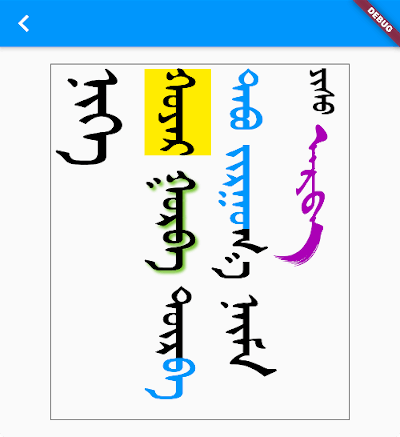
You add styling using TextSpan and/or TextStyle, just as you would for a Text widget.
MongolText.rich(
  textSpan,
  textScaleFactor: 2.5,
),
where textSpan is defined like so:
const textSpan = TextSpan(
style: TextStyle(fontSize: 30, color: Colors.black),
children: [
TextSpan(text: 'ᠨᠢᠭᠡ\n', style: TextStyle(fontSize: 40)),
TextSpan(text: 'ᠬᠣᠶᠠᠷ', style: TextStyle(backgroundColor: Colors.yellow)),
TextSpan(
text: ' ᠭᠤᠷᠪᠠ ',
style: TextStyle(shadows: [
Shadow(
blurRadius: 3.0,
color: Colors.lightGreen,
offset: Offset(3.0, -3.0),
),
]),
),
TextSpan(text: 'ᠳᠦᠷ'),
TextSpan(text: 'ᠪᠡ ᠲᠠᠪᠤ ᠵᠢᠷᠭᠤ', style: TextStyle(color: Colors.blue)),
TextSpan(text: 'ᠭᠠ ᠨᠠᠢᠮᠠ '),
TextSpan(text: 'ᠶᠢᠰᠦ ', style: TextStyle(fontSize: 20)),
TextSpan(
text: 'ᠠᠷᠪᠠ',
style:
TextStyle(fontFamily: 'MenksoftAmuguleng', color: Colors.purple)),
],
);
https://raw.githubusercontent.com/suragch/mongol/HEAD/example/supplemental/mongol_rich_text.png
This all assumes you've added one or more Mongolian fonts to your app assets.
The library does not include a Mongolian font. This allows the library to be smaller and also gives developers the freedom to choose any Mongolian font they like.
Since it's likely that some of your users' devices won't have a Mongolian font installed, you should include at least one Mongolian font with your project. Here is what you need to do:
You can find a font from the following sources:
You can get directions to do that here and here.
Basically you just need to create an assets/fonts folder for it and then declare the font in pubspec.yaml like this:
flutter:
  fonts:
    - family: MenksoftQagan
      fonts:
        - asset: assets/fonts/MQG8F02.ttf
You can call the family name whatever you want, but this string is what you will use in the next step.
In your main.dart file, set the fontFamily for the app theme.
MaterialApp(
  theme: ThemeData(fontFamily: 'MenksoftQagan'),
  // ...
);
Now you won't have to manually set the font for every Mongolian text widget. If you want to use a different font for some widgets, though, you can still set the fontFamily as you normally would inside TextStyle.
You may also consider using mongol_code with a Menksoft font if your users have devices that don't support OpenType Unicode font rendering. mongol_code converts Unicode to Menksoft code, which a Menksoft font can display without any special rendering requirements.
You can use MongolTextField to receive and edit text from the system keyboard. This widget includes most of the functionality of the standard Flutter TextField widget.
https://raw.githubusercontent.com/suragch/mongol/HEAD/example/supplemental/mongol_text_field.gif
Here is it on iOS and Android interacting with a system keyboard:
https://raw.githubusercontent.com/suragch/mongol/HEAD/example/supplemental/mongol_text_field_large.gif
If you want to use an outlined text field with a label, use MongolOutlineInputBorder:
https://raw.githubusercontent.com/suragch/mongol/HEAD/example/supplemental/mongol_outline_input_border.png
Note: There is currently a bug in the
MongolTextFieldformaxLines: null. PRs are welcome!
MongolTextField(
  decoration: InputDecoration(
    border: MongolOutlineInputBorder(),
    labelText: 'ᠨᠢᠭᠡ ᠬᠤᠶᠠᠷ ᠭᠤᠷᠪᠠ',
  ),
),
In order to correctly handle right/left and up/down keys on the web and desktop (or for physical keyboards connected to a mobile app), you need to return the MongolTextEditingShortcuts widget from the builder method of your MaterialApp (or CupertinoApp or WidgetsApp) at the top of your widget tree:
MaterialApp(
  builder: (context, child) => MongolTextEditingShortcuts(child: child),
  // ...
)
You can display horizontally scrolling lists with the standard ListView widget. All you need to do is set the scroll direction to horizontal.
ListView(
  scrollDirection: Axis.horizontal,
  children: [
    MongolText('ᠨᠢᠭᠡ'),
    MongolText('ᠬᠣᠶᠠᠷ'),
    MongolText('ᠭᠤᠷᠪᠠ'),
  ],
),
For something a little fancier, you can also use the MongolListTile widget just like you would use ListTile. Here is an example from the example project:
Card(
child: MongolListTile(
leading: FlutterLogo(size: 56.0),
title: MongolText('ᠨᠢᠭᠡ ᠬᠣᠶᠠᠷ ᠭᠤᠷᠪᠠ'),
subtitle: MongolText('ᠳᠦᠷᠪᠡ ᠲᠠᠪᠤ ᠵᠢᠷᠭᠤᠭᠠ ᠳᠣᠯᠣᠭᠠ ᠨᠠᠢᠮᠠ'),
trailing: Icon(Icons.more_vert),
),
),
https://raw.githubusercontent.com/suragch/mongol/HEAD/example/supplemental/mongol_list_tile.gif
As visible in the image above, in addition to MongolListTile, there is also:
MongolCheckboxListTileMongolRadioListTileMongolSwitchListTileTo add a popup menu with horizontal items, you can use MongolPopupMenuButton. It is customizable in all the ways that the standard PopupMenuButton is.
Scaffold(
  appBar: AppBar(
    title: const Text('MongolPopupMenuButton'),
    actions: [
      MongolPopupMenuButton(
        itemBuilder: (context) => const [
          MongolPopupMenuItem(child: MongolText('ᠨᠢᠭᠡ'), value: 1),
          MongolPopupMenuItem(child: MongolText('ᠬᠣᠶᠠᠷ'), value: 2),
          MongolPopupMenuItem(child: MongolText('ᠭᠤᠷᠪᠠ'), value: 3),
        ],
        tooltip: 'vertical tooltip text',
        onSelected: (value) => print(value),
      ),
    ],
  ),
  body: Container(),
);
https://raw.githubusercontent.com/suragch/mongol/HEAD/example/supplemental/mongol_popup_menu_button.gif
There are Mongol equivalents to all of the Flutter buttons:
MongolTextButtonMongolOutlinedButtonMongolElevatedButtonMongolFilledButtonMongolFilledButton.tonalMongolTextButton.iconMongolOutlinedButton.iconMongolElevatedButton.iconMongolFilledButton.iconMongolFilledButton.tonalIconMongolIconButtonMongolIconButton.filledMongolIconButton.filledTonalMongolIconButton.outlinedhttps://raw.githubusercontent.com/suragch/mongol/HEAD/example/supplemental/buttons.png
The reason for the Mongol icon button is to provide a vertical tooltip that will appear for a longpress on mobile and for a mouse hover on desktop and web.
This alert dialog works mostly the same as the Flutter AlertDialog.
https://raw.githubusercontent.com/suragch/mongol/HEAD/example/supplemental/mongol_alert_dialog.png
WidgetSpan.MongolTextAlign.bottom don't count final space in line heightMongolSelectableText widget