搜尋套件、儲存庫與 APP 分類

mongol 封面
套件詳情v11.2.0

mongol

用於顯示和編輯垂直蒙古文字的 Flutter 小工具套件。

AndroidiOSWebmacOSWindowsLinux
近 30 天下載
2450
喜歡數
61
Pub 分數
155

安裝套件

flutter pub add mongol

套件介紹

根據套件公開資料產生的選型評估,僅供參考。

mongol 套件是一個 Flutter 小工具程式庫,專為呈現與編輯垂直蒙古文而設計。它支援傳統蒙古文字中獨特的水平至垂直書寫系統,能夠準確顯示並互動處理由上而下的文字流動。非常適合針對蒙古語使用者或需要文化特定字型之應用程式,可無縫整合至各主要平台的 Flutter 項目中。此套件處理針對蒙古文字規範量身打造的版面配置、對齊與輸入邏輯。

適用情境

  • 顯示傳統蒙古文
  • 編輯垂直蒙古文
  • 支援蒙古語的多語言應用程式
  • 文化或教育應用
  • 蒙古文數位出版

主要特色

  • 蒙古文的垂直文字渲染
  • 互動式文字編輯
  • 跨平台相容性
  • 對蒙古文 Unicode 字元的支援
  • 可自訂的文字版面

適合對象

  • 面向蒙古語受眾的開發者
  • 需要傳統蒙古文排版的應用程式
  • 教育或語言軟體
  • 涉及東亞或中亞文字的項目

使用建議

  • 需要了解蒙古文字結構
  • 限於特定語言使用場景
  • 可能需要額外的本地化努力
  • 不適合標準橫向文字版面

原始 README

以下為關聯原始碼儲存庫的 README 原文快照,最新內容請造訪原始碼儲存庫。

mongol

This library is a collection of Flutter widgets for displaying traditional Mongolian vertical text.

The primary widgets include:

  • MongolText: vertical version of Text
  • MongolTextField: vertical version of TextField
  • MongolListTile: vertical version of ListTile, for use in horizontal list views and menus
  • MongolPopupMenuButton: vertical version of PopupMenuButton, for displaying menus
  • MongolAlertDialog: vertical version of AlertDialog

Displaying vertical text

MongolText is a vertical text version of Flutter's Text widget. Left-to-right line wrapping is supported.

MongolText('ᠨᠢᠭᠡ ᠬᠣᠶᠠᠷ ᠭᠤᠷᠪᠠ ᠳᠦᠷᠪᠡ ᠲᠠᠪᠤ ᠵᠢᠷᠭᠤᠭ᠎ᠠ ᠳᠣᠯᠣᠭ᠎ᠠ ᠨᠠᠢᠮᠠ ᠶᠢᠰᠦ ᠠᠷᠪᠠ'),

The library supports mobile, web, and desktop.

Emoji and CJK characters

The library rotates emoji and CJK (Chinese, Japanese, and Korean) characters for proper orientation.

Text styling

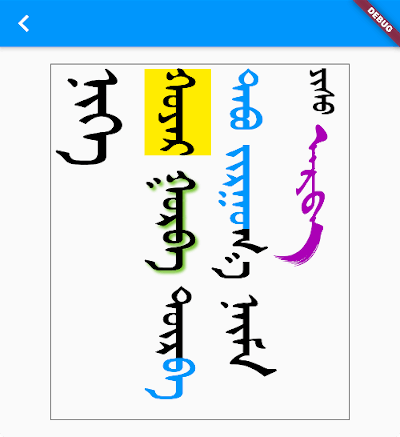
You add styling using TextSpan and/or TextStyle, just as you would for a Text widget.

MongolText.rich(
  textSpan,
  textScaleFactor: 2.5,
),

where textSpan is defined like so:

const textSpan = TextSpan(
  style: TextStyle(fontSize: 30, color: Colors.black),
  children: [
    TextSpan(text: 'ᠨᠢᠭᠡ\n', style: TextStyle(fontSize: 40)),
    TextSpan(text: 'ᠬᠣᠶᠠᠷ', style: TextStyle(backgroundColor: Colors.yellow)),
    TextSpan(
      text: ' ᠭᠤᠷᠪᠠ ',
      style: TextStyle(shadows: [
        Shadow(
          blurRadius: 3.0,
          color: Colors.lightGreen,
          offset: Offset(3.0, -3.0),
        ),
      ]),
    ),
    TextSpan(text: 'ᠳᠦᠷ'),
    TextSpan(text: 'ᠪᠡ ᠲᠠᠪᠤ ᠵᠢᠷᠭᠤ', style: TextStyle(color: Colors.blue)),
    TextSpan(text: 'ᠭ᠎ᠠ ᠨᠠᠢᠮᠠ '),
    TextSpan(text: 'ᠶᠢᠰᠦ ', style: TextStyle(fontSize: 20)),
    TextSpan(
        text: 'ᠠᠷᠪᠠ',
        style:
            TextStyle(fontFamily: 'MenksoftAmuguleng', color: Colors.purple)),
  ],
);

This all assumes you've added one or more Mongolian fonts to your app assets.

Adding a Mongolian font

The library does not include a Mongolian font. This allows the library to be smaller and also gives developers the freedom to choose any Mongolian font they like.

Since it's likely that some of your users' devices won't have a Mongolian font installed, you should include at least one Mongolian font with your project. Here is what you need to do:

1. Get a font

You can find a font from the following sources:

2. Add the font to your project

You can get directions to do that here and here.

Basically you just need to create an assets/fonts folder for it and then declare the font in pubspec.yaml like this:

flutter:
  fonts:
    - family: MenksoftQagan
      fonts:
        - asset: assets/fonts/MQG8F02.ttf

You can call the family name whatever you want, but this string is what you will use in the next step.

3. Set the default Mongolian font for your app

In your main.dart file, set the fontFamily for the app theme.

MaterialApp(
  theme: ThemeData(fontFamily: 'MenksoftQagan'),
  // ...
);

Now you won't have to manually set the font for every Mongolian text widget. If you want to use a different font for some widgets, though, you can still set the fontFamily as you normally would inside TextStyle.

You may also consider using mongol_code with a Menksoft font if your users have devices that don't support OpenType Unicode font rendering. mongol_code converts Unicode to Menksoft code, which a Menksoft font can display without any special rendering requirements.

Editing vertical text

You can use MongolTextField to receive and edit text from the system keyboard. This widget includes most of the functionality of the standard Flutter TextField widget.

Here is it on iOS and Android interacting with a system keyboard:

If you want to use an outlined text field with a label, use MongolOutlineInputBorder:

Note: There is currently a bug in the MongolTextField for maxLines: null. PRs are welcome!

MongolTextField(
  decoration: InputDecoration(
    border: MongolOutlineInputBorder(),
    labelText: 'ᠨᠢᠭᠡ ᠬᠤᠶᠠᠷ ᠭᠤᠷᠪᠠ',
  ),
),

In order to correctly handle right/left and up/down keys on the web and desktop (or for physical keyboards connected to a mobile app), you need to return the MongolTextEditingShortcuts widget from the builder method of your MaterialApp (or CupertinoApp or WidgetsApp) at the top of your widget tree:

MaterialApp(
  builder: (context, child) => MongolTextEditingShortcuts(child: child),
  // ...
)

Horizontal lists

You can display horizontally scrolling lists with the standard ListView widget. All you need to do is set the scroll direction to horizontal.

ListView(
  scrollDirection: Axis.horizontal,
  children: [
    MongolText('ᠨᠢᠭᠡ'),
    MongolText('ᠬᠣᠶᠠᠷ'),
    MongolText('ᠭᠤᠷᠪᠠ'),
  ],
),

For something a little fancier, you can also use the MongolListTile widget just like you would use ListTile. Here is an example from the example project:

Card(
  child: MongolListTile(
    leading: FlutterLogo(size: 56.0),
    title: MongolText('ᠨᠢᠭᠡ ᠬᠣᠶᠠᠷ ᠭᠤᠷᠪᠠ'),
    subtitle: MongolText('ᠳᠦᠷᠪᠡ ᠲᠠᠪᠤ ᠵᠢᠷᠭᠤᠭ᠎ᠠ ᠳᠣᠯᠣᠭ᠎ᠠ ᠨᠠᠢᠮᠠ'),
    trailing: Icon(Icons.more_vert),
  ),
),

As visible in the image above, in addition to MongolListTile, there is also:

  • MongolCheckboxListTile
  • MongolRadioListTile
  • MongolSwitchListTile

Menus

To add a popup menu with horizontal items, you can use MongolPopupMenuButton. It is customizable in all the ways that the standard PopupMenuButton is.

Scaffold(
  appBar: AppBar(
    title: const Text('MongolPopupMenuButton'),
    actions: [
      MongolPopupMenuButton(
        itemBuilder: (context) => const [
          MongolPopupMenuItem(child: MongolText('ᠨᠢᠭᠡ'), value: 1),
          MongolPopupMenuItem(child: MongolText('ᠬᠣᠶᠠᠷ'), value: 2),
          MongolPopupMenuItem(child: MongolText('ᠭᠤᠷᠪᠠ'), value: 3),
        ],
        tooltip: 'vertical tooltip text',
        onSelected: (value) => print(value),
      ),
    ],
  ),
  body: Container(),
);

Buttons

There are Mongol equivalents to all of the Flutter buttons:

  • MongolTextButton
  • MongolOutlinedButton
  • MongolElevatedButton
  • MongolFilledButton
  • MongolFilledButton.tonal
  • MongolTextButton.icon
  • MongolOutlinedButton.icon
  • MongolElevatedButton.icon
  • MongolFilledButton.icon
  • MongolFilledButton.tonalIcon
  • MongolIconButton
  • MongolIconButton.filled
  • MongolIconButton.filledTonal
  • MongolIconButton.outlined

The reason for the Mongol icon button is to provide a vertical tooltip that will appear for a longpress on mobile and for a mouse hover on desktop and web.

Other widgets

MongolAlertDialog

This alert dialog works mostly the same as the Flutter AlertDialog.

TODO
  • Improve keyboard (this may be better as a separate package)
  • Various other text based widgets
  • Support WidgetSpan.
  • Add more tests
  • For MongolTextAlign.bottom don't count final space in line height
  • Add MongolSelectableText widget

所屬分類

依賴

依賴清單 3 項

原始碼儲存庫

使用此套件的專案