
v1.0.2
parallax_cards
一個用於滾動視差效果和自訂卡片疊加的 Flutter 套件
94喜歡 92近 30 天下載160Pub 分數
AndroidiOSmacOSWindowsLinux
一個用於滾動視差效果和自訂卡片疊加的 Flutter 套件
以下為英文專案原文快照,最新內容請造訪 GitHub。
A Flutter package for scrolling parallax effect and custom card overlays
Add this to your package's pubspec.yaml file:
dependencies:
  parallax_cards: ^1.0.1
Install it from the command line:
$ flutter pub get
Now in your project you can use:
import 'package:parallax_cards/parallax_cards.dart';
ParallaxCards is a Stateless Widget which you can include in your widget tree.
You can use it either vertically or horizontally by overriding the scrollDirection property:
ParallaxCards(
  scrollDirection: Axis.horizontal,
  imagesList: imagesList,
  width: 250,
  height: 350,
  onTap: (index) {
    log('$index pressed');
  },
),
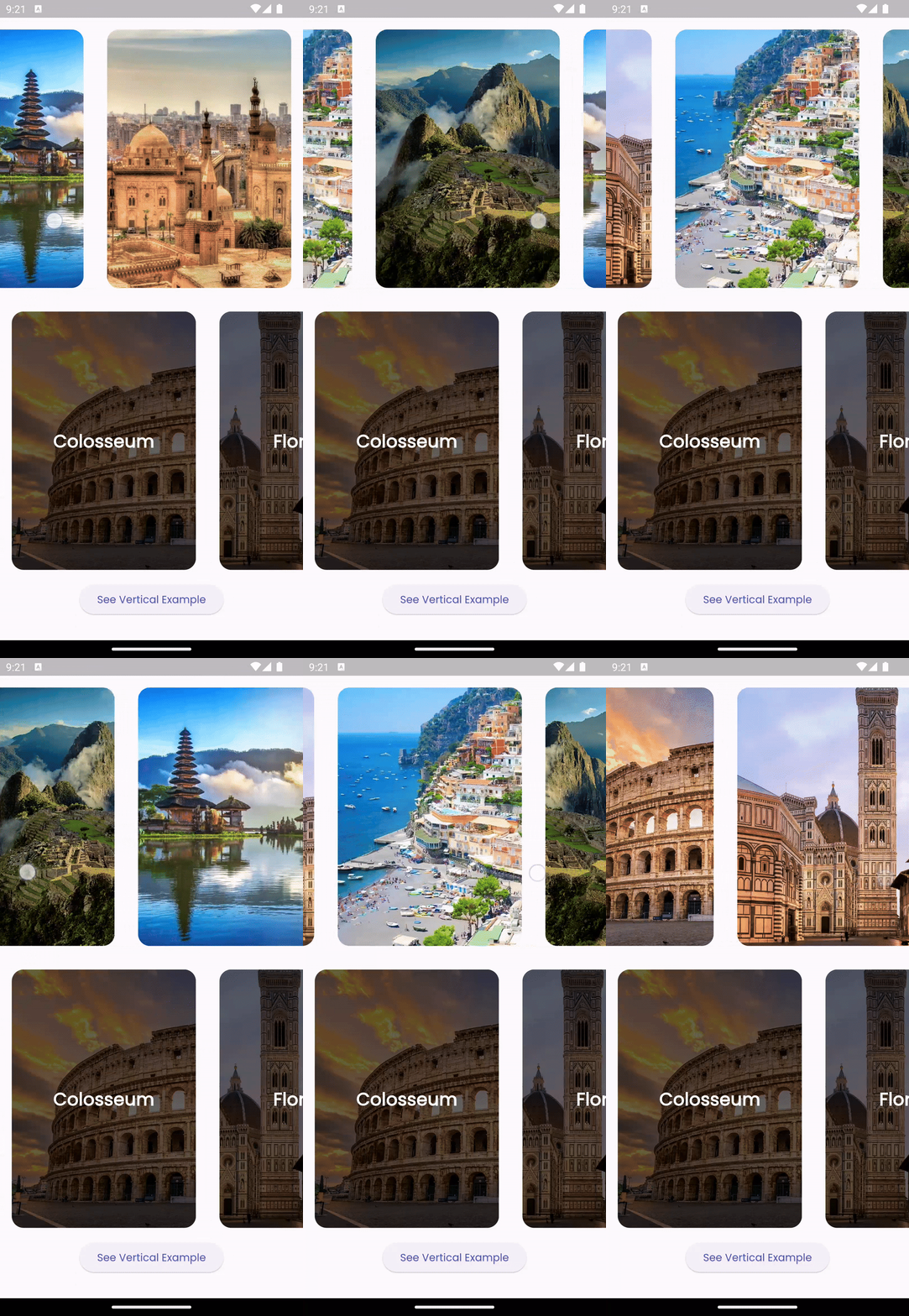
You can customize the card overlays according to your preferences by overriding the overlays property.
However, ensure that the lengths of imageList and overlays are equal.
ParallaxCards(
                imagesList: imagesList,
                width: double.infinity,
                height: 200,
                onTap: (index) {
                  ScaffoldMessenger.of(context).showSnackBar(SnackBar(
                    content: Text("$index tapped"),
                    duration: const Duration(milliseconds: 500),
                  ));
                },
                overlays: [
                  for (var title in titlesList)
                    Stack(
                      children: [
                        Positioned.fill(
                          child: DecoratedBox(
                            decoration: BoxDecoration(
                              gradient: LinearGradient(
                                colors: [
                                  Colors.transparent,
                                  Colors.black.withOpacity(0.8)
                                ],
                                stops: const [0.5, 0.9],
                                begin: Alignment.topCenter,
                                end: Alignment.bottomCenter,
                              ),
                            ),
                          ),
                        ),
                        Positioned(
                          left: 16,
                          bottom: 12,
                          child: Text(
                            title,
                            style: const TextStyle(
                                fontSize: 22,
                                color: Colors.white,
                                fontWeight: FontWeight.bold),
                          ),
                        ),
                      ],
                    )
                ],
              ),
Feel free to open an issue if you encounter any bugs or challenges. Pull requests are welcome!

依賴清單 3 項
{"sdk":"flutter"}{"sdk":"flutter"}^3.0.0先依使用情境篩選,再比較專案活躍情況,最後到原始儲存庫確認使用要求。
“A repository is the most basic element of GitHub.”
GitHub Docs — About repositories ↗