

 v0.0.8
json_editor
一個 Flutter 上的 JSON 編輯器。
22喜歡 2050近 30 天下載110Pub 分數
AndroidiOSmacOSWindowsLinux
一個基於 Flutter 的 JSON 編輯器

以下為英文專案原文快照,最新內容請造訪 GitHub。

JsonElement ;dependencies:
json_editor: ^0.0.8


import 'package:json_editor/json_editor.dart';

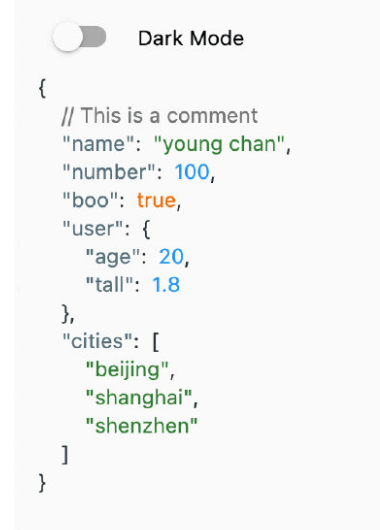
JsonEditor.string(
    jsonString: '''
        {
            // This is a comment
            "name": "young chan",
            "number": 100,
            "boo": true,
            "user": {"age": 20, "tall": 1.8},
            "cities": ["beijing", "shanghai", "shenzhen"]
         }
    ''',
    onValueChanged: (value) {
        print(value);
    },
)
import 'package:json_editor/json_editor.dart';

JsonEditor.object(
    object: const {
        "name": "young",
        "number": 100,
        "boo": true,
        "user": {"age": 20, "tall": 1.8},
        "cities": ["beijing", "shanghai", "shenzhen"]
    },
    onValueChanged: (value) {
        print(value);
    },
)
JsonElement is a data model witch contains key, value and comment.
import 'package:json_editor/json_editor.dart';

JsonEditor.element(
    element: JsonElement(),
    onValueChanged: (value) {
        print(value);
    },
)
If you want to custom the json theme. You can use JsonEditorTheme widget.
JsonEditorTheme(
    themeData: JsonEditorThemeData.defaultTheme(),
    child: JsonEditor.object(
        object: const {
            "name": "young",
            "number": 100,
            "boo": true,
            "user": {"age": 20, "tall": 1.8},
            "cities": ["beijing", "shanghai", "shenzhen"]
        },
        onValueChanged: (value) {
            print(value);
        },
    )
)
See LICENSE
依賴清單 4 項
{"sdk":"flutter"}^1.1.0{"sdk":"flutter"}^1.0.0先依使用情境篩選,再比較專案活躍情況,最後到原始儲存庫確認使用要求。
“A repository is the most basic element of GitHub.”
GitHub Docs — About repositories ↗