
p2pbookshare
Intuitive Flutter app facilitating easy book borrowing and lending among college students.

- Stars
- 3
- Forks
- 2
- Last push (UTC)
- Apr 13, 2025
- Project status
- Active
Original README
English project snapshot. Visit GitHub for the latest content.

P2P BoookShare
A user-friendly Flutter app for college students to share and borrow books on campus.


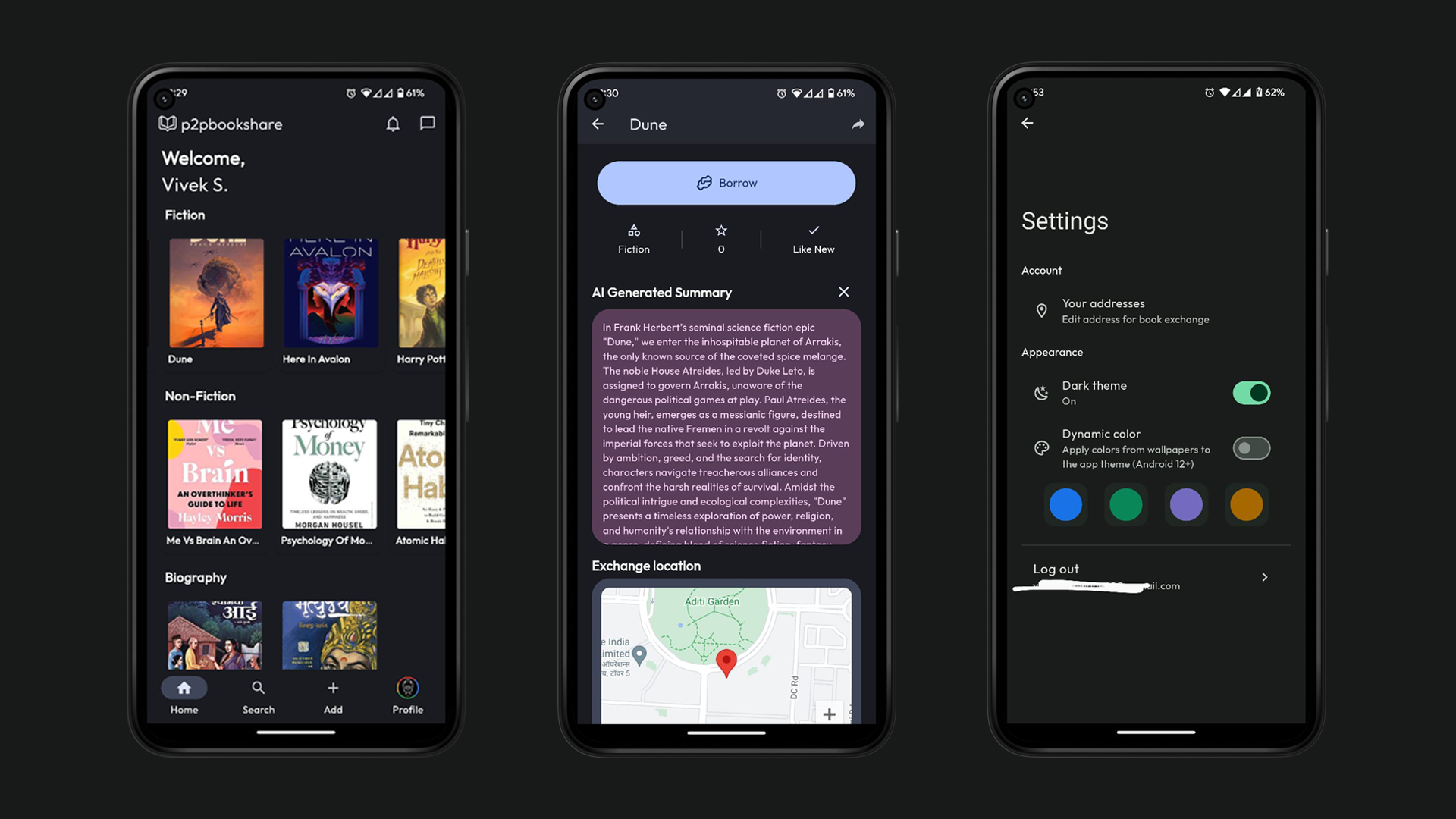
Features
- 🤖 AI-Generated Summaries: Get concise and insightful book summaries powered by Gemini.
- 🎨 Material & Dynamic Theming: Enjoy a visually appealing interface with adaptive color schemes, including light and dark modes.
- 💬 Chat Integration: Seamlessly communicate with other users for smooth book exchanges.
- 🗺️ Google Maps Integration: Easily select and share locations for meetups and book exchanges.
- 🔍 Advanced Search: Quickly find your favorite books and authors using the powerful search bar.
- 📲 Push Notifications: Stay informed with real-time notifications for chat messages.
🔨 Steps to build
-
Clone the project:
- Use
git clone https://github.com/viveeeeeek/p2pbookshare.gitto download the project from the GitHub repository.
- Use
-
Install Dependencies:
- Navigate to the project directory and run
flutter pub getto install the required dependencies.
- Navigate to the project directory and run
-
Set Up Environment Variables (.env File):
GOOGLE_MAPS_API_KEY=YOUR_GOOGLE_MAPS_API_KEY GEMINI_PRO_API_KEY=YOUR_GEMINI_PRO_API_KEY FIREBASAE_PROJECT_ID=YOUR_FIREBASE_PROJECT_ID- Google Maps API Key: Create a project in the Google Cloud Console and enable the Google Maps Platform APIs and obtain the API key.
- Gemini Pro API Key: Obtain currently Gemini Pro API key, which is free of cost as of now here.
- Firebase Project Information: Create a Firebase project in the Firebase Console and note down the Project ID and API Key for Cloud Messaging.
-
Configure Firebase for both iOS and Android platforms:
- Ensure the
build.gradlefile is properly set up and includes all necessary Firebase dependencies. Add thegoogle-services.jsonfile for Android and theGoogleService-Info.plistfile for iOS to your project. Additionally, create and include thefirebase_options.dartfile in the lib/ directory to manage Firebase configuration options.
- Ensure the
-
Configure both debug and release builds in the app/
build.gradlefile. Create and properly set up thekey.propertiesfile to securely manage your signing keys and other sensitive information.keyAlias=key-alias keyPassword=key-password storeFile=/path/to/kestore storePassword=key-store-password -
Create a service account within the Google Cloud Console and obtain the
service_account.jsonfile, which is used for sending push notifications on Android. Place this file in the assets/fcm/ folder of your project.- Create a Service Account in Google Cloud Console
- Navigate to the Google Cloud Console.
- Go to the "IAM & Admin" section and select "Service Accounts".
- Click "Create Service Account".
- Provide a name and description for the service account.
- Grant the service account the "Firebase Admin SDK Administrator Service Agent" role.
- After creating the service account, go to the "Keys" section of your new service account.
- Click "Add Key" and select "Create New Key".
- Choose "JSON" format and click "Create".
- Download the
service_account.jsonfile. - Place the downloaded
service_account.jsonfile in theassets/fcm/folder of your Flutter project.
Contribution
All contributions are very welcome!
- Bug reports and feature requests can be submitted here.
- If you are a developer and wish to contribute to the app, please fork the project and submit a pull request .
License
Copyright (c) 2024, VivekS.
All rights reserved.

This source code is licensed under the GPLv3-style license found in the
LICENSE file in the root directory of this source tree.

VivekS. ↗
Categories
Dependencies used
Dependency list 39 items
- app_settings
^6.1.1 - cached_network_image
^3.3.1 - cloud_firestore
^5.6.6 - connectivity_plus
^6.0.1 - cupertino_icons
^1.0.2 - dynamic_color
^1.6.8 - firebase_auth
^5.5.2 - firebase_core
^3.13.0 - firebase_messaging
^15.2.5 - firebase_storage
^12.4.5 - flutter
{"sdk":"flutter"} - flutter_dotenv
^5.2.1 - flutter_image_compress
^2.1.0 - flutter_local_notifications
^19.0.0 - flutter_native_splash
^2.4.0 - flutter_secure_storage
^9.0.0 - flutter_svg
^2.0.7 - geocoding
^3.0.0 - geolocator
^13.0.4 - go_router
^14.8.1 - google_fonts
^6.1.0 - google_maps_flutter
^2.12.1 - google_sign_in
^6.1.5 - googleapis_auth
^2.0.0 - image_picker
^1.0.4 - intl
^0.20.2 - material_design_icons_flutter
^7.0.7296 - path_provider
^2.1.1 - provider
^6.0.5 - rive
^0.13.1 - rxdart
^0.28.0 - shared_preferences
^2.2.2 - shimmer
^3.0.0 - tuple
^2.0.2 - flutter_lintsDevelopment
^5.0.0 - flutter_testDevelopment
{"sdk":"flutter"} - import_sorterDevelopment
^4.6.0 - loggerDevelopment
^2.2.0 - pixel_perfectDevelopment
^1.1.3
How do I choose a repository?
Start with your use case, compare repository activity, and check the original project before adopting it.
- Search by repository name, owner or description, then narrow the results by topic.
- Compare stars, forks and recent pushes. Stars show community interest, not a guarantee of quality.
- Read the README, license and issues on GitHub before using a project.
Sources and maintenance
“A repository is the most basic element of GitHub.”
GitHub Docs — About repositories ↗
- viveeeeeek/p2pbookshare · GitHub ↗
- GitHub Docs — Saving repositories with stars ↗
- Directory maintained by Ducafecat ↗