Search packages, repositories and app categories

animate_icons cover
Package detailsv2.0.0

animate_icons

This is a plugin with the help of which you can animate between any two icons like we do in AnimatedIcon widget given to us by default.

AndroidiOSWebmacOSWindowsLinux
30-day downloads
2.7K
Likes
210
Pub points
140

Install package

flutter pub add animate_icons

Package Overview

Package selection guidance compiled from public package information, community data, and project usage.

animate_icons is a Flutter package that enables smooth animations between any two icons, similar to the built-in AnimatedIcon widget. It provides a flexible way to transition between custom icon pairs with fluid motion, enhancing user interface interactivity. The package supports all major platforms including Android, iOS, Web, macOS, Windows, and Linux, making it ideal for cross-platform applications. With minimal setup, developers can easily integrate animated icon transitions into their apps.

Use cases

  • Animated icon transitions in buttons
  • Interactive UI elements
  • Loading indicators with icon changes
  • Custom toggle animations
  • Enhancing app feedback
  • Onboarding screens

Key features

  • Smooth animation between any two icons
  • Cross-platform support
  • Simple API integration
  • Customizable animation duration
  • Supports Material and Cupertino icons
  • Extensible for custom icon sets

Suitable for

  • UI/UX designers seeking dynamic interactions
  • Developers building interactive forms
  • Apps requiring visual feedback
  • Cross-platform mobile and web apps
  • Prototyping animated interfaces

Considerations

  • Requires basic knowledge of Flutter animations
  • May impact performance if overused
  • Limited to icon-to-icon transitions
  • Not suitable for complex animations
  • Best used sparingly for optimal UX

Original README

Original README snapshot from the linked source repository. Visit the repository for the latest content.

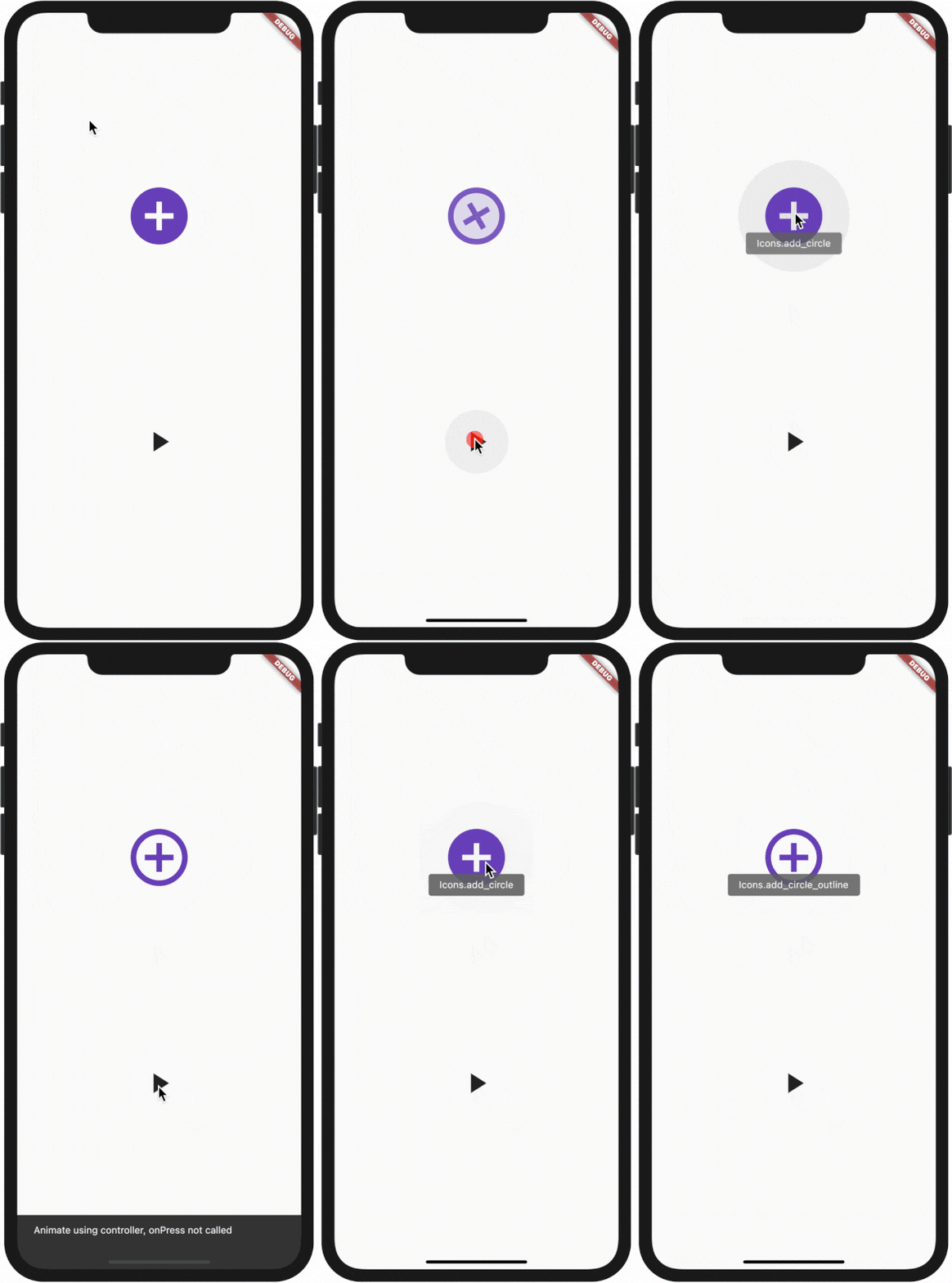
Animate Any two icons with this plugin

Demo:
How to use:

All plugin in your pubspec.yaml

animate_icons:

Make the import:

import 'package:animate_icons/animate_icons.dart';

Use the following widget:

AnimateIcons(
    startIcon: Icons.add_circle,
    endIcon: Icons.add_circle_outline,
    size: 100.0,
    controller: controller,
    // add this tooltip for the start icon
    startTooltip: 'Icons.add_circle',
    // add this tooltip for the end icon
    endTooltip: 'Icons.add_circle_outline',
    size: 60.0,
    onStartIconPress: () {
        print("Clicked on Add Icon");
        return true;
    },
    onEndIconPress: () {
        print("Clicked on Close Icon");
        return true;
    },
    duration: Duration(milliseconds: 500),
    startIconColor: Colors.deepPurple,
    endIconColor: Colors.deepOrange,
    clockwise: false,
),

Use AnimateIconController

Define AnimateIconController to animate b/w start and end icons without onIco press, check which icon is there on top - start or end.

Define AnimateIconController

AnimateIconController controller;

Initialize controller

controller = AnimateIconController();

Pass controller to widget
AnimateIcons(
    startIcon: Icons.add,
    endIcon: Icons.close,
    controller: controller, 
    size: 60.0,
    onStartIconPress: () {
        print("Clicked on Add Icon");
        return true;
    },
    onEndIconPress: () {
        print("Clicked on Close Icon");
        return true;
    },
    duration: Duration(milliseconds: 500),
    startIconColor: Colors.deepPurple,
    endIconColor: Colors.deepOrange,
    clockwise: false,
),
Use controller functions
if (controller.isStart()) {
    controller.animateToEnd();
} else if (controller.isEnd()) {
    controller.animateToStart();
}

Categories

Source repository

Projects using this package