Search packages, repositories and app categories

animated_fab_button_menu cover
Package detailsv0.0.2

animated_fab_button_menu

Flutter package to implement an animated FAB with a scrollable Menu.

AndroidiOSWebmacOSWindowsLinux
30-day downloads
61
Likes
27
Pub points
150

Install package

flutter pub add animated_fab_button_menu

Package Overview

Package selection guidance compiled from public package information, community data, and project usage.

A Flutter package that enables the creation of an animated Floating Action Button (FAB) with a scrollable menu. It enhances user interaction by smoothly expanding the FAB into a customizable menu, ideal for apps needing intuitive access to multiple actions. The menu supports scrolling, making it suitable for lists of options that exceed screen space. Designed for modern UIs, it integrates seamlessly across platforms with consistent behavior.

Use cases

  • Enhancing mobile app navigation
  • Creating interactive action hubs
  • Improving accessibility to multiple functions
  • Designing responsive interfaces
  • Adding dynamic transitions to FABs

Key features

  • Smooth animated expansion
  • Scrollable menu support
  • Cross-platform compatibility
  • Customizable menu items
  • Responsive design integration

Suitable for

  • Mobile app developers
  • UI/UX designers
  • Interactive prototype builders
  • Flutter beginners
  • Apps with complex action workflows

Considerations

  • May require additional styling for customization
  • Performance impact with large menus
  • Limited to FAB-based interactions
  • Not suitable for non-scrollable action sets
  • Depends on platform-specific gesture handling

Original README

Original README snapshot from the linked source repository. Visit the repository for the latest content.

Animated FAB Menu

Animated FAB Menu package lets you add an animated floating action button to your Flutter app that open a list of menu items.

Features

The FabMenu widget is built to be placed in the Scaffold.floatingActionButton argument, replacing the FloatingActionButton widget. Its position is set by the fabAlignment property so you don't need to set it with the Scaffold.floatingActionButtonLocation argument. By default the position is set to bottomCenter, but you can change it by the fabAlignment property to place the button anywhere in the screen. By using the fabIcon and fabBackgroundColorproperties, you can change the icon and the color of the button to whatever you like.

  • Menu

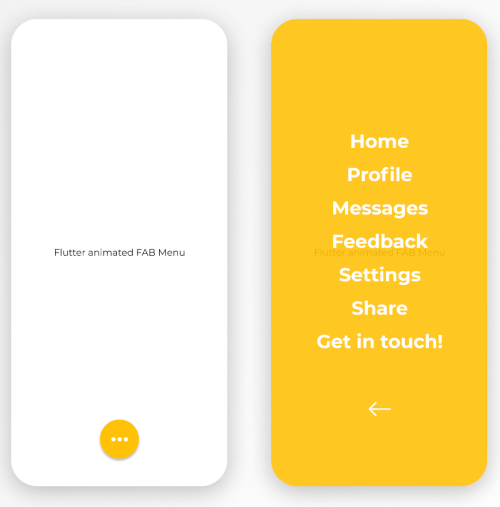
By pressing the floating action button, a page containing a menu list will be opening with some cool animation. This menu contains items that you can specify by the children list property. Every child inside the list takes a title for the item name, style for the text widget of the name, onTap function to provide the logic of the on tap action on each child. On top of that, you have an overlayColor property to change the color of the background opened page, overlayOpacity to change the opacity of the background color and closeMenuButton to choose your own back button widget.

The package will handle the animation by itself.

animated_fab_menu


Getting started

  1. Add the latest version of package to your pubspec.yaml (and run dart pub get):
dependencies:
  animated_fab_button_menu: ^0.0.2
  1. Import the package and use it in your Flutter App.
import 'package:animated_fab_button_menu/animated_fab_button_menu.dart';

Usage

There are a number of properties that you can modify:

  • fabIcon
  • fabBackgroundColor
  • fabAlignment
  • overlayColor (Color of the background menu)
  • overlayOpacity (Opacity of the background menu color)
  • elevation
  • closeMenuButton (Button that close the menu item)
  • children (Items of the menu)
  • title (Name of the child menu)
  • style (Text style for the child menu)
  • onTap (onTap function for the child menu)

Example Usage ( complete with all params ):

class MyHomePage extends StatefulWidget {
  const MyHomePage({Key? key}) : super(key: key);

  @override
  _MyHomePageState createState() => _MyHomePageState();
}

class _MyHomePageState extends State<MyHomePage> {
  @override
  Widget build(BuildContext context) {
    return Scaffold(
      floatingActionButton: FabMenu(
          fabBackgroundColor: Colors.amber,
          elevation: 2.0,
          fabAlignment: Alignment.bottomCenter,
          fabIcon: const Icon(Icons.more_horiz),
          closeMenuButton: const Icon(
            Icons.arrow_back,
            color: Colors.white,
          ),
          overlayOpacity: 0.5,
          overlayColor: Colors.amber,
          children: [
            MenuItem(
              title: 'Home',
              onTap: () {},
              style: const TextStyle(
                  color: Colors.white,
                  fontSize: 24,
                  fontWeight: FontWeight.bold),
            ),
            MenuItem(
              title: 'Profile',
              onTap: () {},
              style: const TextStyle(
                  color: Colors.white,
                  fontSize: 24,
                  fontWeight: FontWeight.bold),
            ),
            MenuItem(
              title: 'Messages',
              onTap: () {},
              style: const TextStyle(
                  color: Colors.white,
                  fontSize: 24,
                  fontWeight: FontWeight.bold),
            ),
            MenuItem(
              title: 'Feedback',
              onTap: () {},
              style: const TextStyle(
                  color: Colors.white,
                  fontSize: 24,
                  fontWeight: FontWeight.bold),
            ),
            MenuItem(
              title: 'Settings',
              onTap: () {},
              style: const TextStyle(
                  color: Colors.white,
                  fontSize: 24,
                  fontWeight: FontWeight.bold),
            ),
            MenuItem(
              title: 'Share',
              onTap: () {},
              style: const TextStyle(
                  color: Colors.white,
                  fontSize: 24,
                  fontWeight: FontWeight.bold),
            ),
            MenuItem(
              title: 'Get in touch!',
              onTap: () {},
              style: const TextStyle(
                  color: Colors.white,
                  fontSize: 24,
                  fontWeight: FontWeight.bold),
            ),
          ]),
      body: const Center(
        child: Text('Flutter animated FAB Menu'),
      ),
    );
  }
}
Here's what it looks like:

https://user-images.githubusercontent.com/68671238/134640734-751456fa-686b-4e77-bc8d-04ba3a324baf.mp4


Next Goals

We are working on some improvements including:

  • [x] Change color and opacity for menu background. Change color and opacity by specifying overlayColor and overlayOpacity properties.
  • [ ] Make the distance between menu items customizable.
  • [ ] Change opening animation with more smooth and user friendly one.

Issues & Feedback

Please file an issue! to send feedback or report a bug. Thank you!

Categories

Source repository

Projects using this package

No data available yet.