Search packages, repositories and app categories

awesome_snackbar_content cover
Package detailsv0.1.8

awesome_snackbar_content

Uplift your snackbar experience with various alert messages i.e. success, failure, help or warning with unique UI design.

AndroidiOSWebmacOSWindowsLinux
30-day downloads
14.5K
Likes
1.1K
Pub points
160

Install package

flutter pub add awesome_snackbar_content

Package Overview

Package selection guidance compiled from public package information, community data, and project usage.

A Flutter package that enhances snackbars with visually appealing, themed alert messages for success, failure, warning, and help states. It offers a modern, customizable UI to improve user feedback across platforms. The package supports multiple platforms including Android, iOS, Web, macOS, Windows, and Linux, making it ideal for consistent cross-platform experiences. With simple integration via pub add, developers can quickly implement engaging notifications that stand out from default snackbar designs.

Use cases

  • Displaying success messages after form submission
  • Showing error alerts during API failures
  • Providing helpful tips or guidance
  • Notifying users of system status changes
  • Enhancing UX with attractive feedback
  • Creating consistent notification styles

Key features

  • Themed alert types: success, failure, warning, help
  • Customizable colors and icons
  • Responsive and platform-adaptive design
  • Easy integration with Flutter's Scaffold
  • Support for multiple platforms
  • Built-in animations and transitions

Suitable for

  • Mobile and web app developers
  • UX-focused projects
  • Apps needing clear user feedback
  • Developers wanting polished notifications
  • Teams prioritizing visual consistency
  • Projects with cross-platform requirements

Considerations

  • Requires Flutter 2.5 or higher
  • Limited to basic snackbar functionality
  • May need additional styling for complex layouts
  • Best suited for simple, immediate feedback
  • Not intended for persistent notifications
  • Depends on external dependencies for full customization

Original README

Original README snapshot from the linked source repository. Visit the repository for the latest content.

A package that lets you uplift your SnackBar or MaterialBanner experience in the app.

🛠 Attributes

  • title: Top label that will be shown in the body
  • message: Body message reflecting some error message, success message etc.
  • color: Color of SnackBar body
  • contentType: ContentType class reflecting failure, success, help or warning.
  • inMaterialBanner: Simply configure the working according to showMaterialBanner

Overall Look'n Feel

https://user-images.githubusercontent.com/43790152/200166529-51927c9d-66a6-4f76-b8f7-990680db2eba.mov

📱 Usage

To use the package:

  • add the dependency to your pubspec.yaml file
dependencies:
  flutter:
      sdk: flutter

  awesome_snackbar_content: <latest-package>

Then import it in your flutter project:

import 'package:awesome_snackbar_content/awesome_snackbar_content.dart';

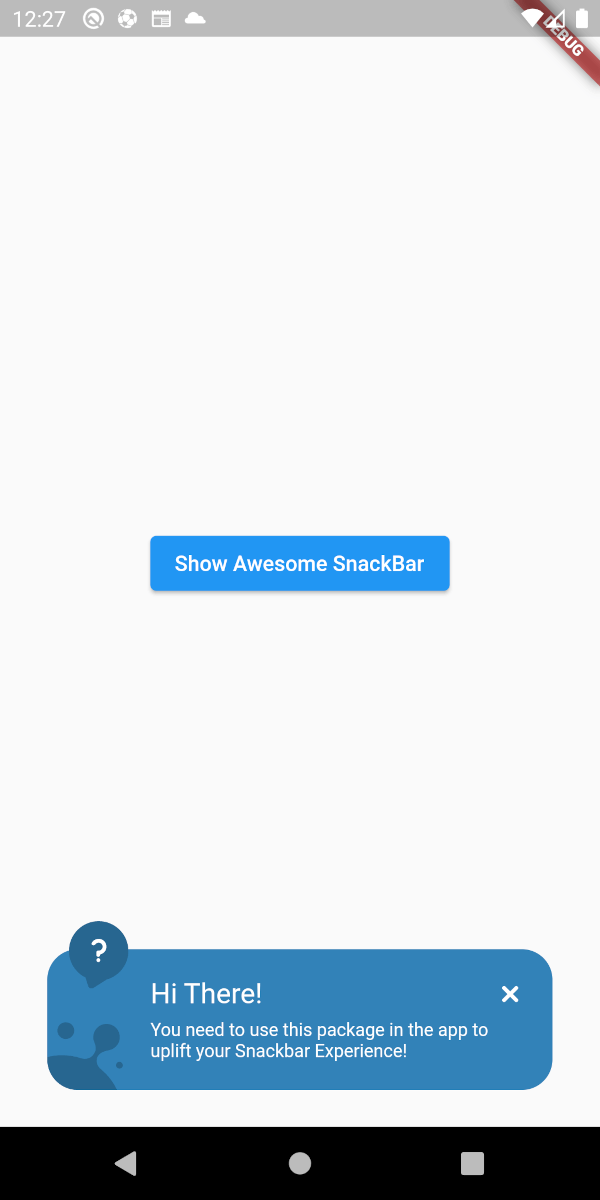
👀 SnackBar Looks

Below are the looks of various types in package used as Snackbar

🔴 Failure
✅ Success
❔ Help
⚠ Warning

👀 Material Banner Looks

Below are the looks of various types in package used as Snackbar

🔴 Failure
✅ Success
❔ Help
⚠ Warning
💻 Example

Below is a basic example usage of the awesome_snackbar_content

import 'package:flutter/material.dart';
import 'package:awesome_snackbar_content/awesome_snackbar_content.dart';

class AweseomSnackBarExample extends StatelessWidget {
  const AweseomSnackBarExample({Key? key}) : super(key: key);

  @override
  Widget build(BuildContext context) {
    return Scaffold(
      body: Center(
        child: Column(
          mainAxisSize: MainAxisSize.min,
          children: [
            ElevatedButton(
              child: const Text('Show Awesome SnackBar'),
              onPressed: () {
                final snackBar = SnackBar(
                  /// need to set following properties for best effect of awesome_snackbar_content
                  elevation: 0,
                  behavior: SnackBarBehavior.floating,
                  backgroundColor: Colors.transparent,
                  content: AwesomeSnackbarContent(
                    title: 'On Snap!',
                    message:
                        'This is an example error message that will be shown in the body of snackbar!',

                    /// change contentType to ContentType.success, ContentType.warning or ContentType.help for variants
                    contentType: ContentType.failure,
                  ),
                );

                ScaffoldMessenger.of(context)
                  ..hideCurrentSnackBar()
                  ..showSnackBar(snackBar);
              },
            ),
            const SizedBox(height: 10),
            ElevatedButton(
              child: const Text('Show Awesome Material Banner'),
              onPressed: () {
                final materialBanner = MaterialBanner(
                  /// need to set following properties for best effect of awesome_snackbar_content
                  elevation: 0,
                  backgroundColor: Colors.transparent,
                  forceActionsBelow: true,
                  content: AwesomeSnackbarContent(
                    title: 'Oh Hey!!',
                    message:
                        'This is an example error message that will be shown in the body of materialBanner!',

                    /// change contentType to ContentType.success, ContentType.warning or ContentType.help for variants
                    contentType: ContentType.success,
                    // to configure for material banner
                    inMaterialBanner: true,
                  ),
                  actions: const [SizedBox.shrink()],
                );

                ScaffoldMessenger.of(context)
                  ..hideCurrentMaterialBanner()
                  ..showMaterialBanner(materialBanner);
              },
            ),
          ],
        ),
      ),
    );
  }
}

🧑 Credits

This packages has been created in reference to Abu Anwar (GDE Flutter) YouTube video. So, make sure to check his work!

Categories

Dependencies

Dependency list 1 items

Source repository

Projects using this package