Search packages, repositories and app categories

bottom_drawer cover
Package detailsv0.0.5

bottom_drawer

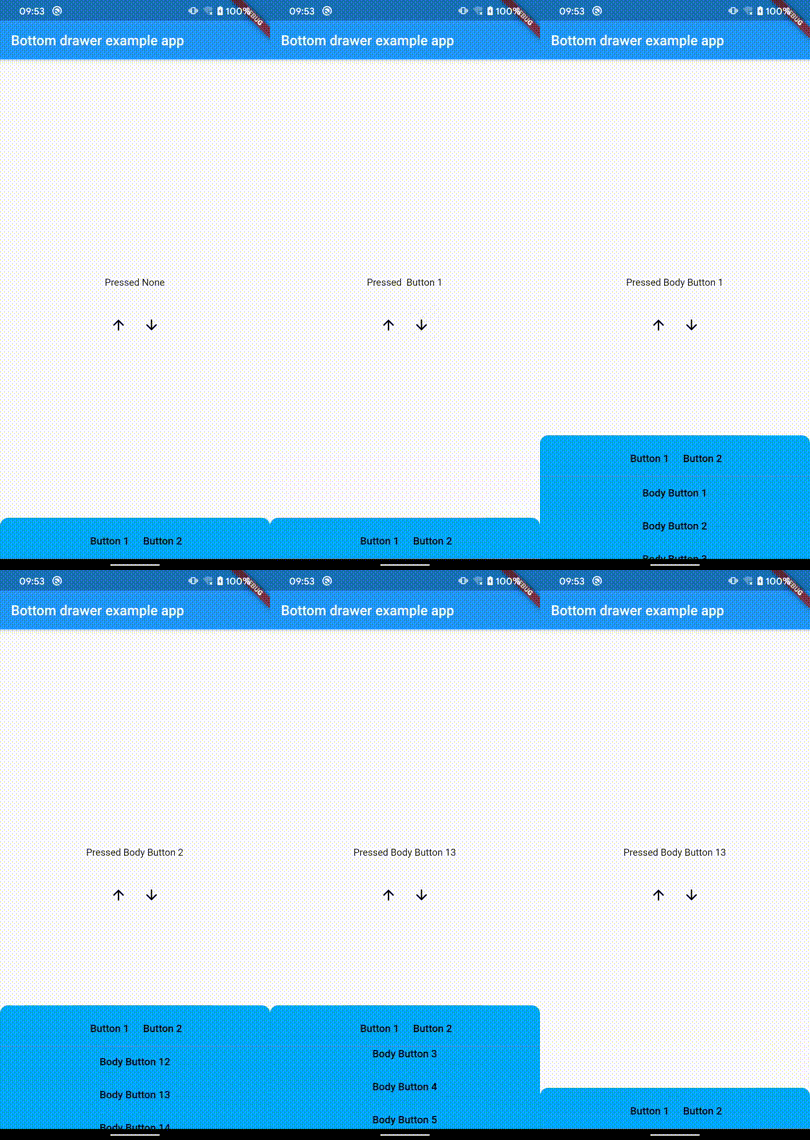
A bottom drawer widget, support customize drawer header and body, support list body, support drag to open and close.

AndroidiOSWebmacOSWindowsLinux
30-day downloads
663
Likes
36
Pub points
150

Install package

flutter pub add bottom_drawer

Package Overview

Package selection guidance compiled from public package information, community data, and project usage.

A customizable bottom drawer widget for Flutter that supports draggable opening and closing, with optional header and body customization. It can display static content or a list-based body, making it ideal for modals, filters, or supplementary information panels. The drawer adapts to various platforms including mobile, web, and desktop, ensuring consistent UX across devices. Designed for simplicity and flexibility, it integrates smoothly into existing Flutter apps.

Use cases

  • Modal overlays
  • Filter panels
  • Supplementary content displays
  • Interactive bottom sheets
  • Form inputs
  • Navigation drawers

Key features

  • Drag-to-open/close gesture
  • Customizable header and body
  • List body support
  • Cross-platform compatibility
  • Easy integration with existing widgets
  • Configurable animation and behavior

Suitable for

  • Developers building interactive UIs
  • Apps needing collapsible panels
  • Projects requiring platform-agnostic bottom sheets
  • Designers wanting flexible drawer layouts
  • Teams prioritizing smooth user interactions

Considerations

  • May require additional styling for complex headers
  • Performance impact with large lists
  • Limited built-in animations beyond basic slide
  • Not suitable for full-screen modals
  • Requires careful handling of touch events on nested scrollables

Original README

Original README snapshot from the linked source repository. Visit the repository for the latest content.

Bottom Drawer for Flutter Pub version

Bottom Drawer.

DEMO

1. Add dependency
dependencies:
  bottom_drawer: ^0.0.5
2. Import bottom drawer
import 'package:bottom_drawer/bottom_drawer.dart';
3. Use bottom drawer

Create a bottom drawer controller.

/// create a bottom drawer controller to control the drawer.
BottomDrawerController controller = BottomDrawerController();

Build a bottom drawer widget.

/// return a bottom drawer widget.
Widget buildBottomDrawer(BuildContext context) {
  return BottomDrawer(
    /// your customized drawer header.
    header: Container(),
    /// your customized drawer body.
    body: Container(),
    /// your customized drawer header height.
    headerHeight: 60.0,
    /// your customized drawer body height.
    drawerHeight: 180.0,
    /// drawer background color.
    color: Colors.lightBlue,
    /// drawer controller.
    controller: controller,
  );
}

Control the bottom drawer.

/// open the bottom drawer.
controller.open();

/// close the bottom drawer.
controller.close();

For more information, see the example.

Categories

Source repository

Projects using this package

No data available yet.