Search packages, repositories and app categories

christian_picker_image cover
Package detailsv2.0.0

christian_picker_image

Flutter plugin for selecting images from the Android and iOS image library, and taking new pictures with the camera.

AndroidiOS
30-day downloads
131
Likes
44
Pub points
140

Install package

flutter pub add christian_picker_image

Package Overview

Package selection guidance compiled from public package information, community data, and project usage.

Christian Picker Image is a Flutter plugin enabling users to select images from the device's gallery or capture new photos using the camera on both Android and iOS. It provides a seamless, cross-platform solution for image input within Flutter applications. The plugin integrates native image picker functionality with a simple API, making it easy to implement in apps requiring photo uploads or media collection. It supports both single and multiple image selection, with options to customize the picker interface. Designed for developers seeking reliable image handling without complex setup, it streamlines media integration across platforms.

Use cases

  • Image upload forms
  • User profile picture selection
  • Photo documentation in apps
  • Social media content sharing
  • Document scanning workflows

Key features

  • Cross-platform support (Android & iOS)
  • Camera and gallery integration
  • Multiple image selection
  • Simple API for quick implementation
  • Customizable picker UI

Suitable for

  • Mobile app developers
  • Apps needing user photo uploads
  • Forms requiring media input
  • Content creation tools
  • User authentication flows

Considerations

  • Requires platform-specific permissions
  • May need additional configuration for iOS
  • Limited to image-only selection
  • No built-in image editing
  • Depends on native image picker behavior

Original README

Original README snapshot from the linked source repository. Visit the repository for the latest content.

christian_picker_image

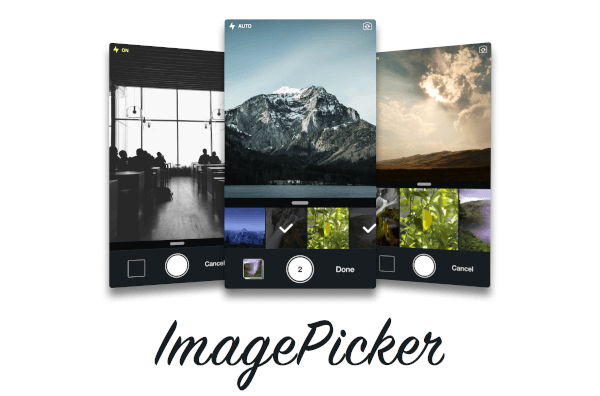
Flutter plugin that allows you to upload multi image picker on iOS & Android.

Getting Started

ChristianImagePicker is an all-in-one camera solution for your iOS app. It lets your users select images from the library and take pictures at the same time. As a developer you get notified of all the user interactions and get the beautiful UI for free, out of the box, it's just that simple.

ImagePicker has been optimized to give a great user experience, it passes around referenced images instead of the image itself which makes it less memory consuming. This is what makes it smooth as butter.

Demo

iOS

Add the following keys to your Info.plist file, located in <project root>/ios/Runner/Info.plist:

  • NSPhotoLibraryUsageDescription - describe why your app needs permission for the photo library. This is called Privacy - Photo Library Usage Description in the visual editor.
  • NSCameraUsageDescription - describe why your app needs access to the camera. This is called Privacy - Camera Usage Description in the visual editor. visual editor.
Example
import 'package:christian_picker_image/christian_picker_image.dart';

class MyHomePage extends StatefulWidget {
  @override
  _MyHomePageState createState() => _MyHomePageState();
}

class _MyHomePageState extends State<MyHomePage> {
  
  void takeImage(BuildContext context) async {
    List<File> images  = await ChristianPickerImage.pickImages(maxImages: 5);
    print(images);
    Navigator.of(context).pop();
  }

  Future _pickImage(BuildContext context) async {

    showDialog<Null>(
      context: context,
      barrierDismissible: false,
      builder: (BuildContext context) {
        takeImage(context);
        return Center();
    });

  }

  @override
  Widget build(BuildContext context) {
    return MaterialApp(
      home: Scaffold(
        appBar: AppBar(
          title: const Text('Plugin example app'),
        ),
        body: Text("Christian Picker Image Demo"),
        floatingActionButton: Column(
          mainAxisAlignment: MainAxisAlignment.end,
          children: <Widget>[
            Padding(
              padding: const EdgeInsets.only(top: 16.0),
              child: FloatingActionButton(
                onPressed: () {
                  _pickImage(context);
                },
                tooltip: 'Take a Photo',
                child: const Icon(Icons.photo_library),
              ),
            ),
          ],
        )
      ),
    );
  }

}

Categories

Source repository

Projects using this package

No data available yet.