Search packages, repositories and app categories

cnic_scanner cover
Package detailsv0.0.5

cnic_scanner

A package that lets you to scan your CNIC and ID cards and all types of other cards. It support both Android and iOS and null safe.

AndroidiOS
30-day downloads
76
Likes
66
Pub points
140

Install package

flutter pub add cnic_scanner

Package Overview

Package selection guidance compiled from public package information, community data, and project usage.

The cnic_scanner package enables users to scan CNICs, ID cards, and other similar documents using QR code or barcode technology. It supports both Android and iOS platforms and is fully null-safe, ensuring robust and modern Dart integration. Designed for simplicity and reliability, it provides a seamless experience for extracting data from identification cards through camera-based scanning. Ideal for applications requiring quick document verification.

Use cases

  • ID card verification
  • CNIC scanning
  • Document digitization
  • User onboarding
  • Identity authentication

Key features

  • Cross-platform support (Android & iOS)
  • Null-safe code
  • QR/Barcode scanning
  • Simple API integration
  • Real-time scanning

Suitable for

  • Government apps
  • Banking and finance
  • E-commerce platforms
  • Mobile identity verification
  • Digital onboarding systems

Considerations

  • Requires camera permissions
  • Depends on device camera quality
  • May need additional validation layer
  • Limited to QR/Barcode encoded data
  • Privacy considerations for sensitive data

Original README

Original README snapshot from the linked source repository. Visit the repository for the latest content.

cnic_scanner

A Flutter package that let's you to scan your CNIC and ID cards and all types of other cards.

Installation

Add following dependency in pubspec.yaml file. And add this import to your file.

cnic_scanner: latest version
image_picker: latest version

import 'package:cnic_scanner/cnic_scanner.dart';

Quick Start


// create a obj of CnicModel
CnicModel _cnicModel = CnicModel();

// then call this method fron package, our package needs you to pass ImageSource as an argument
scanImage(imageSource: imageSource) from CnicScanner class

await CnicScanner().scanImage(imageSource: imageSource);                ​

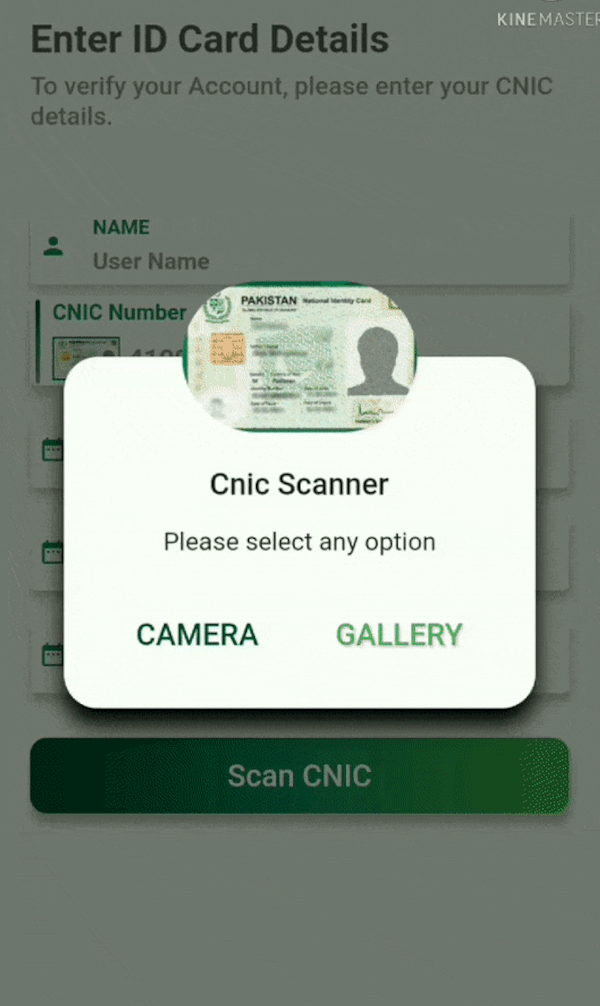
CustomDialog


// I have created a custom dialog and passing ImageSource here in ths way. You can furture check it in example

CustomDialogBox(onCameraBTNPressed: () {
                scanCnic(ImageSource.camera);
              }, onGalleryBTNPressed: () {
                scanCnic(ImageSource.gallery);
              });                ​

CnicModel


// this class will return these parameters.

class CardModel {
     String _cnicNumber = "";
     String _cnicIssueDate = "";
     String _cnicHolderName = "";
     String _cnicExpiryDate = "";
     String _cnicHolderDateOfBirth = "";
}

ScreenShots

Cnic Screen Custom Dialog Scanned Cnic Data

Demo

Scanned from Gallery Scanned from Camera

Developers

Faiza Farooqui and Kamran Khan

License

MIT

Categories

Dependencies

Dependency list 5 items

Source repository

Projects using this package

No data available yet.