Search packages, repositories and app categories

Package detailsv1.0.7

date_range_picker

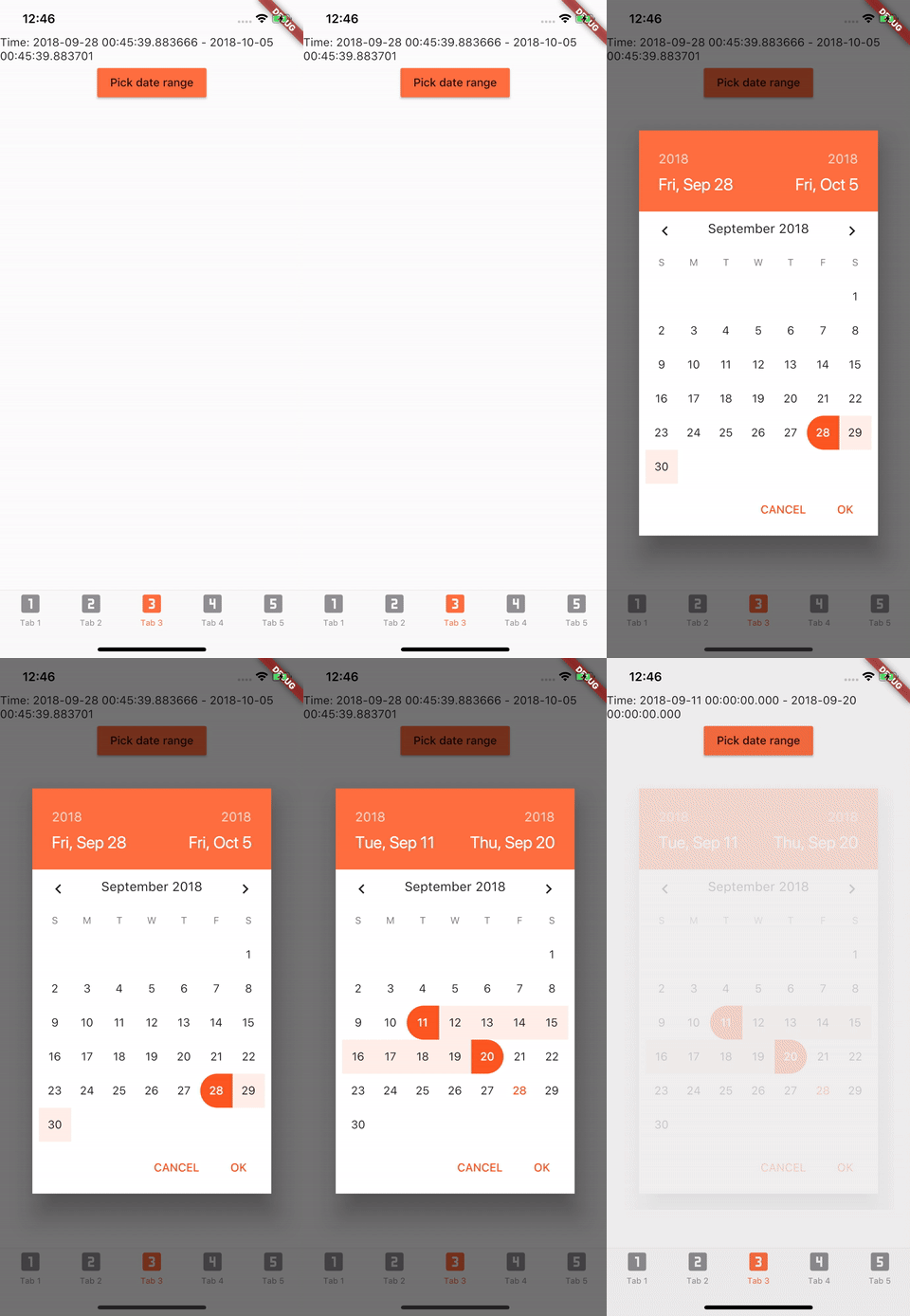
Date Range Pickers use a dialog window to select a range of date on mobile.

30-day downloads
796
Likes
119
Pub points
25

Install package

flutter pub add date_range_picker

Package Overview

Package selection guidance compiled from public package information, community data, and project usage.

The date_range_picker package provides a mobile-friendly date range picker widget that displays a dialog for selecting a start and end date. It is designed for Flutter applications targeting mobile platforms, offering an intuitive interface for users to pick a range of dates. The package integrates seamlessly with Flutter's material design principles and supports customization of the picker's appearance and behavior. It is ideal for booking systems, scheduling apps, or any application requiring date range input.

Use cases

  • Booking systems
  • Scheduling applications
  • Data filtering by date range
  • Travel planning tools
  • Event registration forms

Key features

  • Dialog-based date selection
  • Start and end date range picking
  • Mobile-optimized UI
  • Customizable appearance
  • Easy integration with Flutter

Suitable for

  • Mobile app developers
  • Date range input needs
  • Material Design apps
  • Booking and calendar features
  • User-friendly date selection

Considerations

  • Limited to mobile platforms
  • No server-side rendering support
  • Requires manual handling of date logic
  • May need additional styling for dark mode
  • Depends on external GitHub repository

Original README

Original README snapshot from the linked source repository. Visit the repository for the latest content.

Awesome Flutter pub version

[Deprecated] Date Range Picker

Currently Flutter has supported date range picker, so I think my mission is done. Thanks for using my lib. Link: https://api.flutter.dev/flutter/material/showDateRangePicker.html

Demo

Getting Started

Installation

Add to pubspec.yaml in dependencies

  date_range_picker: ^1.0.5
Usage
import 'package:date_range_picker/date_range_picker.dart' as DateRagePicker;
...
new MaterialButton(
    color: Colors.deepOrangeAccent,
    onPressed: () async {
      final List<DateTime> picked = await DateRagePicker.showDatePicker(
          context: context,
          initialFirstDate: new DateTime.now(),
          initialLastDate: (new DateTime.now()).add(new Duration(days: 7)),
          firstDate: new DateTime(2015),
          lastDate: new DateTime(DateTime.now().year + 2)
      );
      if (picked != null && picked.length == 2) {
          print(picked);
      }
    },
    child: new Text("Pick date range")
)
Theme Customization

To change the colors to your preferred ones, you can wrap it in a Theme and a builder.

Theme(
    data: Theme.of(context).copyWith(
        accentColor: Colors.green,
        primaryColor: Colors.black,
        buttonTheme: ButtonThemeData(
        highlightColor: Colors.green,
        buttonColor: Colors.green,
        colorScheme: Theme.of(context).colorScheme.copyWith(
            secondary: Colors.red,
            background: Colors.white,
            primary: Colors.green,
            primaryVariant: Colors.green,
            brightness: Brightness.dark,
            onBackground: Colors.green),
            textTheme: ButtonTextTheme.accent)),
            child: Builder(
                builder: (context) => RaisedButton(
                    color: Color.fromRGBO(212, 20, 15, 1.0),
                    shape: RoundedRectangleBorder(borderRadius: BorderRadius.circular(30.0)),
                    child: Padding(
                        padding: const EdgeInsets.only(top: 10.0, bottom: 10.0, left: 30.0, right: 30.0),
                        child: Text(
                          "Date Picker",
                          style: TextStyle(
                            color: primaryColor,
                            fontSize: 28,
                            fontWeight: FontWeight.w300,
                          ),
                        ),
                      ),
                      onPressed: () async {
                        final List<DateTime> picked = await DateRangePicker.showDatePicker(
                            context: context,
                            initialFirstDate: new DateTime.now(),
                            initialLastDate: (new DateTime.now()).add(new Duration(days: 7)),
                            firstDate: new DateTime(2015),
                            lastDate: new DateTime(DateTime.now().year + 2));
                        if (picked != null && picked.length == 2) {
                          print(picked);
                        }
                      },
                    ),
                ),
            )

Categories

Source repository

Projects using this package