Search packages, repositories and app categories

easy_mask cover
Package detailsv2.0.1

easy_mask

Easy and Powerful Mask for TextField, TextFormField and Strings. Has multi mask support, reverse mask for currency and placeholder. It controls user's cursor.

AndroidiOSWebmacOSWindowsLinux
30-day downloads
27.7K
Likes
159
Pub points
150

Install package

flutter pub add easy_mask

Package Overview

Package selection guidance compiled from public package information, community data, and project usage.

Easy Mask is a Flutter package that simplifies input formatting for text fields and strings with powerful masking capabilities. It supports multiple masks, reverse masking for currency formatting, and customizable placeholders. The package intelligently manages the cursor position during user input, ensuring a smooth typing experience. Ideal for forms requiring structured input like phone numbers, dates, or financial values, it enhances usability by automatically applying format as users type.

Use cases

  • Form inputs with structured data
  • Currency and number formatting
  • Date and phone number masks
  • Real-time input validation
  • Dynamic mask switching
  • Placeholder management

Key features

  • Multi-mask support
  • Reverse mask for currency
  • Automatic cursor control
  • Customizable placeholders
  • Real-time formatting
  • Cross-platform compatibility

Suitable for

  • Developers building form-heavy apps
  • Apps needing formatted input fields
  • Financial or data-entry applications
  • Projects requiring consistent input patterns
  • Teams prioritizing UX in text input

Considerations

  • May require careful handling of complex mask logic
  • Limited documentation beyond basic examples
  • Potential performance impact with many active masks
  • Not ideal for non-text input scenarios
  • Requires testing across all target platforms

Original README

Original README snapshot from the linked source repository. Visit the repository for the latest content.

Easy Mask

Easy way to apply a mask to Flutter's TextFields and on Strings

To use it, you only need to pass EasyMask on TextField's parameter inputFormatters.

The Easy Mask cares about user's cursor position, to make fluid it's usability.

Supports Multi Mask based on masks length.

Supports Placeholders.

Sample

Usage

Simplest Sample

Import package:easy_mask/text_input_mask.dart

Then instantiate TextInputMask passing at least a String mask parameter.

import package:easy_mask/text_input_mask.dart
...
  TextField(
    inputFormatters: [ TextInputMask(mask: '99? (99) 999 99-99') ],
  ),
  TextField(
    inputFormatters: [ TextInputMask(mask: '999.999.999-99', reverse:true ) ],
  )
...

Formatting a String

import package:easy_mask/text_input_mask.dart
...
  String text = '432516565';
  MagicMask mask = MagicMask.buildMask('\\+99 (99) 99999-9999');
  String formattedString = mask.getMaskedString(text);
...
Multi Mask Sample

Import package:easy_mask/text_input_mask.dart

Then instantiate TextInputMask passing at least a String mask parameter.
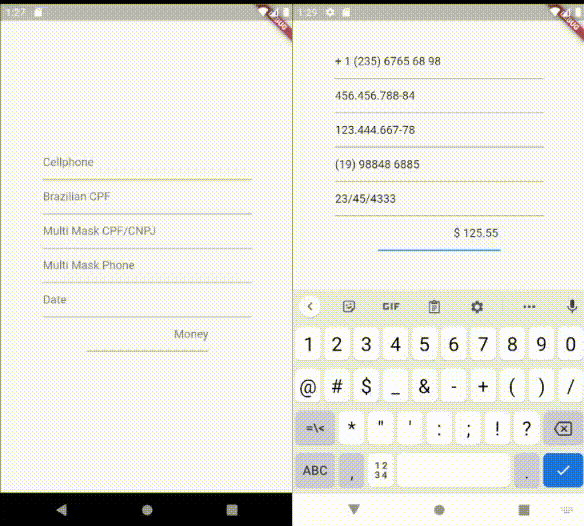
import package:easy_mask/text_input_mask.dart
...
  TextField(
    inputFormatters: [ TextInputMask(mask: ['999.999.999-99', '99.999.999/9999-99'] ],
  ),
  TextField(
    inputFormatters: [ TextInputMask(mask: ['(99) 9999 9999', '(99) 99999 9999'], reverse:true ) ],
  )
...
PlaceHolder Sample

Import package:easy_mask/text_input_mask.dart

Then instantiate TextInputMask passing at least a String mask parameter.
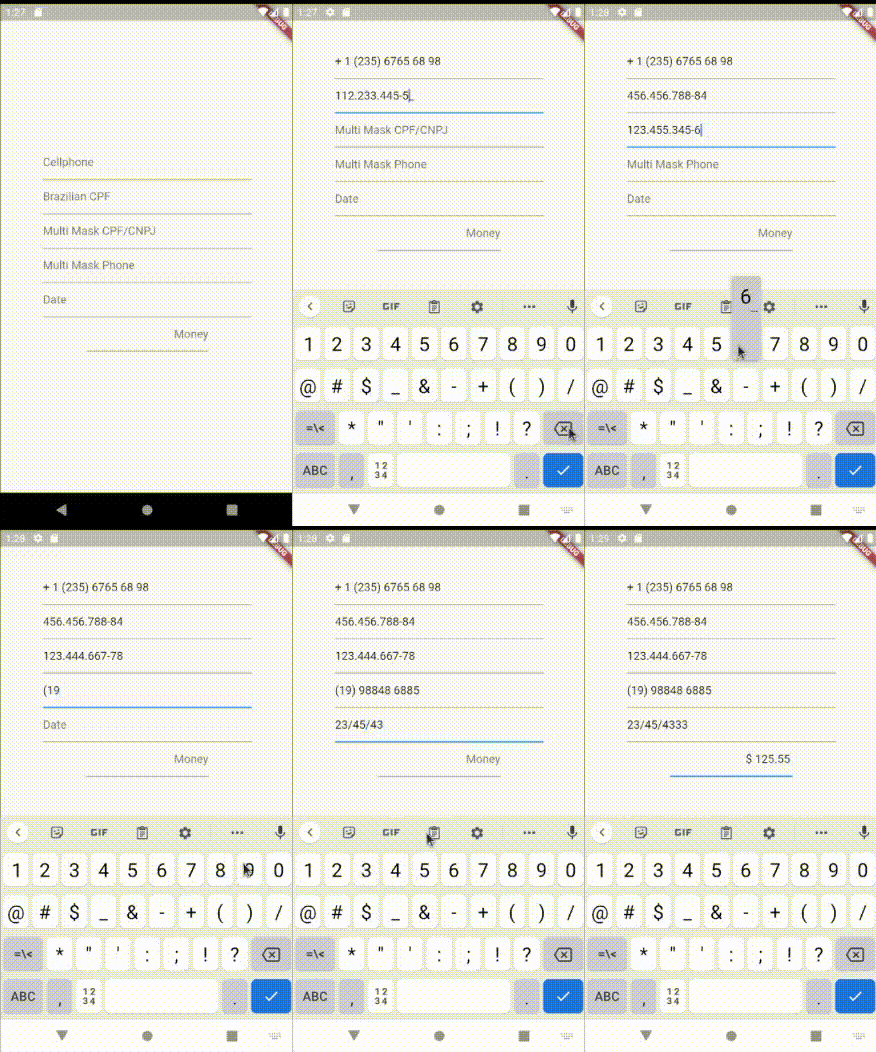
import package:easy_mask/text_input_mask.dart
...
  TextField(
    inputFormatters: [ TextInputMask(mask: '999.999.999-99', placeholder: '_', maxPlaceHolders: 11 ],
  ),
...
Pretty Currency Sample

Import package:easy_mask/text_input_mask.dart

Then instantiate TextInputMask passing at least a String mask parameter.

import package:easy_mask/text_input_mask.dart
...
  TextField(
    inputFormatters: [ TextInputMask(mask: '\$! !9+,999.99', placeholder: '0', maxPlaceHolders: 3, reverse: true],
  ),
...
Possible parameters
  • mask can be a String or an List with the wanted masks pattern.
  • reverse is a boolean that indicates if the user will type from right to left. Used normally on currency TextFields.
  • maxLength is an Integer that limits the maximum size of returned masked text.
  • placeholder is a String character to be used as placeholder on untyped characters. Must define maxPlaceHolders
  • maxPlaceHolders an integer to map how many possible places it would be placed. Typed characters consumes a position from this counter.
Mask Patterns Characters

9 - is used to allow a number from 0-9

A - is used to allow a letter from a-z or A-Z

N - is used to allow a number or letter from 0-9, a-z or A-Z

X - is used to allow any character

Those tokens 9,A,N and X can be followed by one following modifier

? - indicates that is optional

+ - indicates that must have at least 1 or more repetitions

* - indicates that can have 0 or more repetitions

\ - is used as scape

*Any character that is interpreted as letter to be placed, can be followed by modifier **

! - Used to force print it, when it has at least 1 character typed on TextField.

Any other letters will be displayed on masking.

Examples of String masks

(card number) 999 999 999 999

(us cellphone) \+1 (999) 999 99 99

(currency) $! !9+,999.99

(version) 99?9?.99?9?.99?9?

(RG brazilian document) 99.999.999-N

Categories

Source repository

Projects using this package

No data available yet.