Package selection guidance compiled from public package information, community data, and project usage.
A Flutter package that enables styling and interaction with specific parts of text using defined rules. It allows matching words, phrases, or patterns and applying custom styles or actions such as onTap events. Ideal for creating rich text displays with dynamic formatting, like highlighting keywords, embedding links, or adding animations to certain text segments. Works across all major platforms including mobile, web, and desktop.
Use cases
Highlighting keywords in text
Creating interactive text with tap actions
Embedding styled links within paragraphs
Adding animations to specific text segments
Displaying formatted content with dynamic rules
Rich text rendering in chat or article apps
Key features
Pattern-based text matching
Custom style application per match
Interactive callbacks (e.g., onTap)
Support for multiple rules simultaneously
Cross-platform compatibility
Easy integration with existing Text widgets
Suitable for
Developers building rich text interfaces
Apps requiring keyword highlighting
Chat or messaging applications
Content-rich educational or news apps
UIs with dynamic text formatting needs
Projects needing interactive text elements
Considerations
Performance may impact large text blocks
Complex regex patterns require careful testing
Limited built-in emoji support beyond basic styling
Requires understanding of text pattern matching
May need additional logic for nested or overlapping matches
Not intended for full-featured rich text editors
Original README
Original README snapshot from the linked source repository. Visit the repository for the latest content.
Flutter DecoratedText
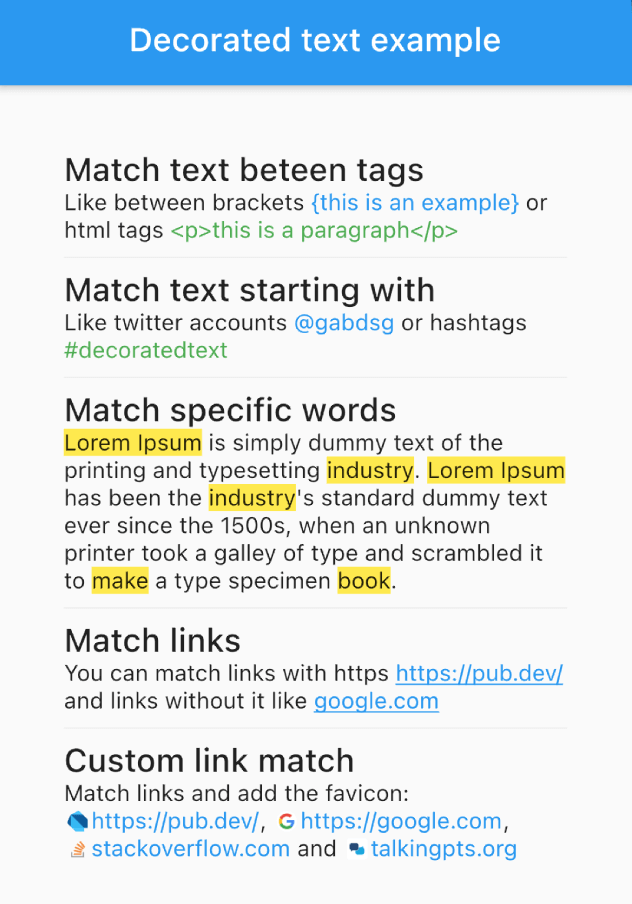
The DecoratedText widget allows you to style and interact with different parts of a text string based on predefined rules. It's versatile, easy-to-use, and can handle different scenarios such as matching specific words, phrases, or patterns, allowing you to style the matched text differently.
Features
Selectable Text: Enable the selectable property (selectable: true) to allow text selection in the DecoratedText widget.
Predefined Rules: These are used to match different elements within the text. These rules include:
Matching words.
Matching text starting with a particular prefix.
Matching text between specific tags.
Matching links (URLs).
Interactive: Each rule can include an onTap callback, which returns the matched text, allowing you to implement interactive behavior such as opening a link when a URL is tapped.
Performance Optimized: RegExp patterns are cached internally, decoration results are memoized in text controllers, and tag deduplication uses an efficient O(n log n) algorithm.
Usage Examples
Match Text Between Tags
DecoratedText(
    text: "Like between brackets {this is an example} or html tags <p>this is a paragraph</p>",
    rules: [
        DecoratorRule.between(
            start: "{",
            end: "}",
            style: TextStyle(
                color: Colors.blue,
            ),
        ),
        DecoratorRule.between(
            start: "<p>",
            end: "</p>",
            style: TextStyle(
                color: Colors.green,
            ),
        ),
    ],
);
DecoratedText(
    text: "Lorem Ipsum is simply dummy text of the printing and typesetting industry. Lorem Ipsum has been the industry's standard dummy text ever since the 1500s, when an unknown printer took a galley of type and scrambled it to make a type specimen book.",
    rules: [
        DecoratorRule.words(
            words: ["lorem ipsum", "industry", "book", "make"],
            onTap: (match) {
                print(match);
            },
            style: TextStyle(
                background: Paint()..color = Colors.yellow,
            ),
        ),
    ],
);
Match URLs
DecoratedText(
    text: "You can match links with https https://pub.dev/ and links without it like google.com",
    rules: [
        DecoratorRule.url(
            onTap: (url) {
                print(url);
            },
            style: TextStyle(
                color: Colors.blue,
                decoration: TextDecoration.underline,
            ),
        ),
    ],
);
DecoratedText(
text: "I love Flutter! 😍",
rules: [
DecoratorRule(
regExp: RegExp(r'(\p{Emoji_Presentation})', unicode: true),
style: constTextStyle(
fontSize: 30.0,
),
onTap: (emoji) {
debugPrint('You tapped on the emoji: $emoji');
},
),
],
);
Performance Tips
For best performance when using custom RegExp patterns, cache them outside the build() method:
// Cache at the class or file level — avoid creating inside build()final _myRegExp = RegExp(r'my-pattern');
@overrideWidgetbuild(BuildContext context) {
returnDecoratedText(
text: "...",
rules: [
DecoratorRule(regExp: _myRegExp, style: TextStyle(...)),
],
);
}
Built-in rules like DecoratorRule.words(), DecoratorRule.url(), etc. handle caching automatically.
Remember, with the DecoratedText widget, you can style your text based on predefined rules, add interactivity, and handle complex matching scenarios with ease. Happy coding!