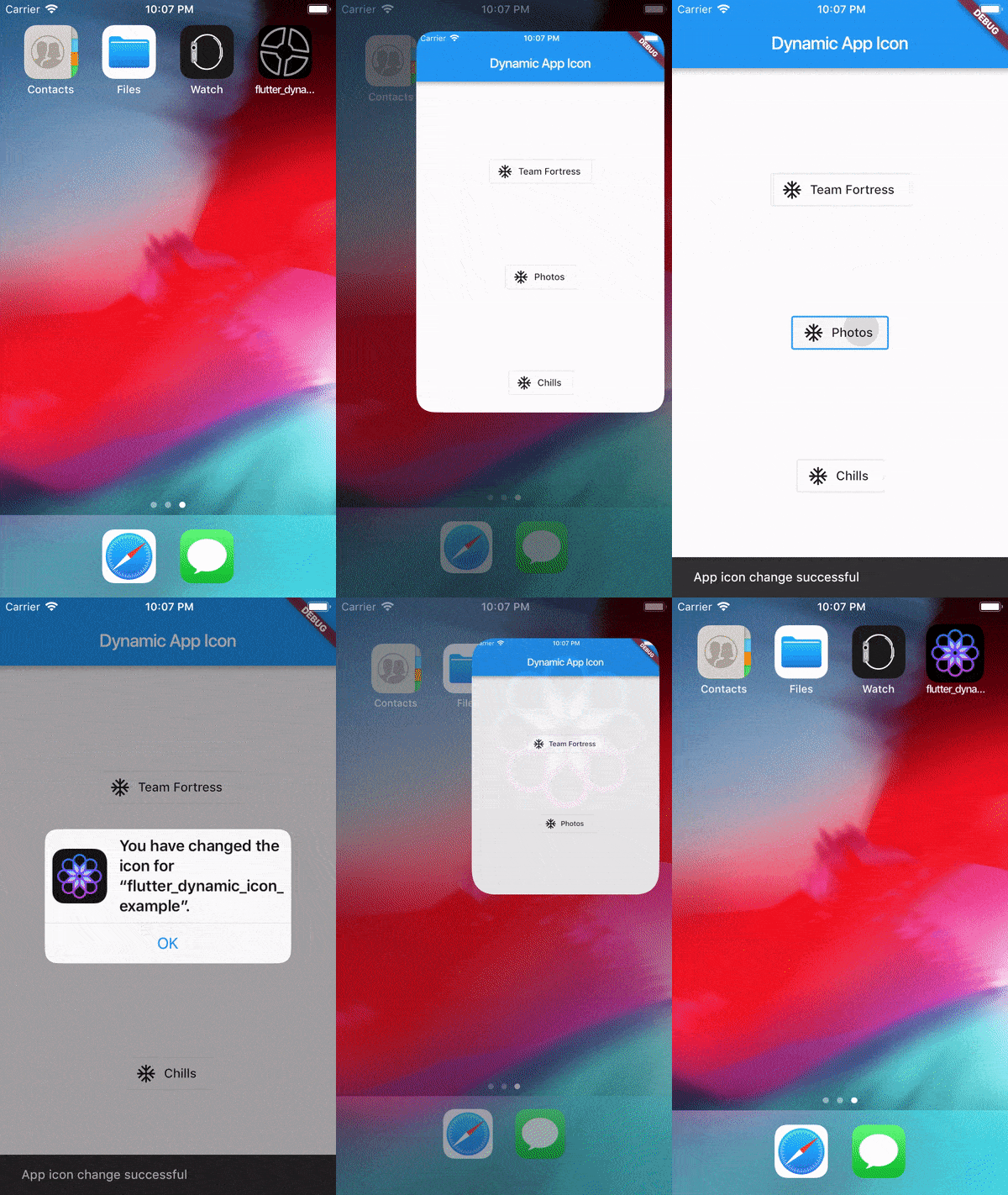
Original README snapshot from the linked source repository. Visit the repository for the latest content.
flutter_dynamic_icon
A flutter plugin for dynamically changing app icon and app icon batch number in the mobile platform. Supports only iOS (with version > 10.3).
Usage
To use this plugin, add flutter_dynamic_icon as a dependency in your pubspec.yaml file.
Getting Started
Check out the example directory for a sample app using flutter_dynamic_icon.
iOS Integration
Index
2x - 120px x 120px3x - 180px x 180px
To integrate your plugin into the iOS part of your app, follow these steps
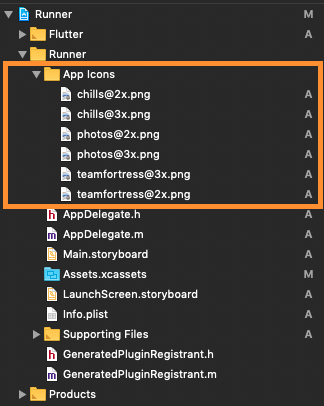
- First let us put a few images for app icons, they are
teamfortress@2x.png, teamfortress@3x.pngphotos@2x.png, photos@3x.png,chills@2x.png, chills@3x.png,
- These icons shouldn't be kept in
Assets.xcassets folder, but outside. When copying to Xcode, you can select 'create folder references' or 'create groups', if not you will get and error when uploading the build to the AppStore saying: (Thanks to @nohli for this observation)
TMS-90032: Invalid Image Path - - No image found at the path referenced under key 'CFBundleAlternateIcons':...
Here is my directory structure:
- Next, we need to setup the
Info.plist
- Add
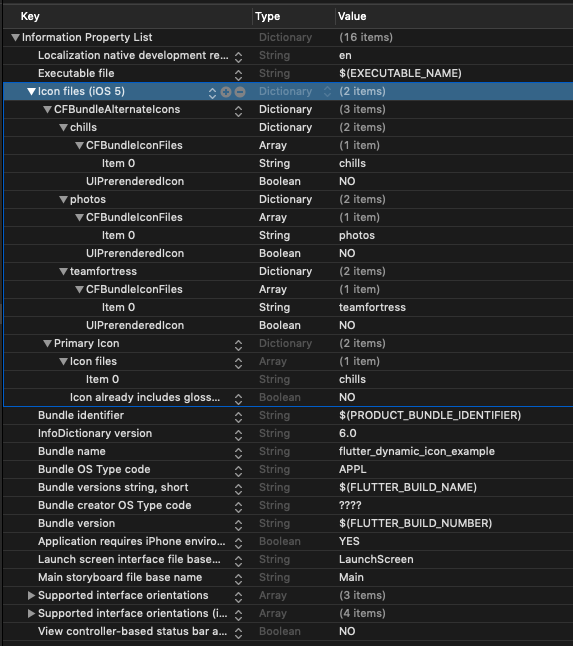
Icon files (iOS 5) to the Information Property List
- Add
CFBundleAlternateIcons as a dictionary, it is used for alternative icons
- Set 3 dictionaries under
CFBundleAlternateIcons, they are correspond to teamfortress, photos, and chills
- For each dictionary, two properties —
UIPrerenderedIcon and CFBundleIconFiles need to be configured
- If the sub-property
UINewsstandIcon is showing under Icon files (iOS 5) and you don't plan on using it (it is intended for use with Newstand features), erase it or the app will get rejected upon submission on the App Store
Note that if you need it work for iPads, You need to add these icon declarations in CFBundleIcons~ipad as well. See here for more details.
Here is my Info.plist after adding Alternate Icons
Screenshot
Raw
<?xml version="1.0" encoding="UTF-8"?>
<!DOCTYPE plist PUBLIC "-//Apple//DTD PLIST 1.0//EN" "http://www.apple.com/DTDs/PropertyList-1.0.dtd">
<plist version="1.0">
<dict>
	<key>CFBundleDevelopmentRegion</key>
	<string>en</string>
	<key>CFBundleExecutable</key>
	<string>$(EXECUTABLE_NAME)</string>
	<key>CFBundleIcons</key>
	<dict>
		<key>CFBundleAlternateIcons</key>
		<dict>
			<key>chills</key>
			<dict>
				<key>CFBundleIconFiles</key>
				<array>
					<string>chills</string>
				</array>
				<key>UIPrerenderedIcon</key>
				<false/>
			</dict>
			<key>photos</key>
			<dict>
				<key>CFBundleIconFiles</key>
				<array>
					<string>photos</string>
				</array>
				<key>UIPrerenderedIcon</key>
				<false/>
			</dict>
			<key>teamfortress</key>
			<dict>
				<key>CFBundleIconFiles</key>
				<array>
					<string>teamfortress</string>
				</array>
				<key>UIPrerenderedIcon</key>
				<false/>
			</dict>
		</dict>
		<key>CFBundlePrimaryIcon</key>
		<dict>
			<key>CFBundleIconFiles</key>
			<array>
				<string>chills</string>
			</array>
			<key>UIPrerenderedIcon</key>
			<false/>
		</dict>
	</dict>
	<key>CFBundleIdentifier</key>
	<string>$(PRODUCT_BUNDLE_IDENTIFIER)</string>
	<key>CFBundleInfoDictionaryVersion</key>
	<string>6.0</string>
	<key>CFBundleName</key>
	<string>flutter_dynamic_icon_example</string>
	<key>CFBundlePackageType</key>
	<string>APPL</string>
	<key>CFBundleShortVersionString</key>
	<string>$(FLUTTER_BUILD_NAME)</string>
	<key>CFBundleSignature</key>
	<string>????</string>
	<key>CFBundleVersion</key>
	<string>$(FLUTTER_BUILD_NUMBER)</string>
	<key>LSRequiresIPhoneOS</key>
	<true/>
	<key>UILaunchStoryboardName</key>
	<string>LaunchScreen</string>
	<key>UIMainStoryboardFile</key>
	<string>Main</string>
	<key>UISupportedInterfaceOrientations</key>
	<array>
		<string>UIInterfaceOrientationPortrait</string>
		<string>UIInterfaceOrientationLandscapeLeft</string>
		<string>UIInterfaceOrientationLandscapeRight</string>
	</array>
	<key>UISupportedInterfaceOrientations~ipad</key>
	<array>
		<string>UIInterfaceOrientationPortrait</string>
		<string>UIInterfaceOrientationPortraitUpsideDown</string>
		<string>UIInterfaceOrientationLandscapeLeft</string>
		<string>UIInterfaceOrientationLandscapeRight</string>
	</array>
	<key>UIViewControllerBasedStatusBarAppearance</key>
	<false/>
</dict>
</plist>
Now, you can call FlutterDynamicIcon.setAlternateIconName with the CFBundleAlternateIcons key as the argument to set that icon.
Dart/Flutter Integration
From your Dart code, you need to import the plugin and use it's static methods:
import 'package:flutter_dynamic_icon/flutter_dynamic_icon.dart';
try {
if (await FlutterDynamicIcon.supportsAlternateIcons) {
await FlutterDynamicIcon.setAlternateIconName("photos");
print("App icon change successful");
return;
}
} on PlatformException {} catch (e) {}
print("Failed to change app icon");
...
try {
await FlutterDynamicIcon.setApplicationIconBadgeNumber(9399);
} on PlatformException {} catch (e) {}
int batchNumber = FlutterDynamicIcon.getApplicationIconBadgeNumber();
Check out the example app for more details
Screenrecord
Showing App Icon change

Showing Batch number on app icon change in SpringBoard

Reference
This was made possible because this blog. I borrowed a lot of words from this blog.
https://medium.com/ios-os-x-development/dynamically-change-the-app-icon-7d4bece820d2