Package selection guidance compiled from public package information, community data, and project usage.
A Flutter package that enhances text input with social media-style features, including automatic detection and styling of hashtags, URLs, and mentions using regular expressions. It integrates with TextEditingController and supports tap interactions for these elements via RichText and TextSpan. Ideal for chat apps, social platforms, or any app requiring rich text editing with interactive content. Works across all major platforms: Android, iOS, Web, macOS, Windows, and Linux.
Use cases
Social media app comments
Chat applications with clickable links
User tagging in messages
Rich text input with dynamic styling
Content creation tools with metadata highlighting
Key features
Hashtag detection and styling
URL and mention auto-linking
Tapable text spans
RichText integration
Regex-based parsing
Cross-platform compatibility
Suitable for
Developers building social apps
Teams needing rich text input
Apps with user-generated content
Interactive messaging interfaces
Customizable text editors
Considerations
Requires careful regex tuning for edge cases
May need performance optimization for long texts
Limited to basic formatting without advanced styling
No built-in emoji picker
Depends on external regex logic for accuracy
Original README
Original README snapshot from the linked source repository. Visit the repository for the latest content.
flutter_social_textfield
A Flutter plugin that helps detection of common social media contents.
The current position of the cursor is used for detecting content.
Current detection types are:
HashTag (#): Texts start with #
Mention (@): Text start with @ sign
Web Links: Can detect web links
Emojis: can detect emojis [thanks @moazh]
You can see the supported detection types from DetectedType enum
enum DetectedType{
    mention, //By Default texts starting with @sign
    hashtag,  //By default, texts starting with #hashtag
    url, //By default texts starting with http://xxx.yyy or https://aaa.bbb
    plain_text //Any other type falls into this.
}
One of the main reasons that i want to create this plugin was that i needed to listen detection events from different widgets.
So flutter_social_textfield provides a stream for detections so you can subscribe and listen events when needed.
The Stream Subscriptoin returns SocialContentDetection class:
class SocialContentDetection{
    final DetectedType type; //mention, url, hashtag, plan_text
    final TextRange range; //range of detected content
    final String text; //detected content
    SocialContentDetection(this.type, this.range, this.text);

    @override
    String toString() {
        return 'SocialContentDetection{type: $type, range: $range, text: $text}';
    }
}
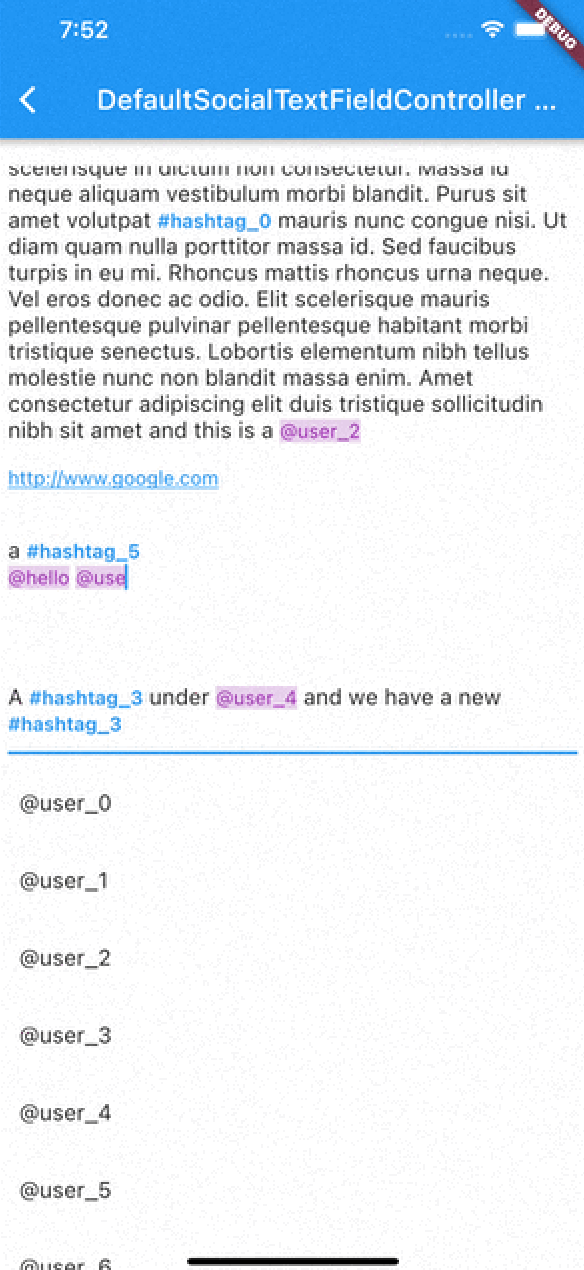
DefaultSocialTextFieldController
I've implemented an experimental widget for ease of use. DefaultSocialTextFieldController puts the main content inside a Stack and allows users to show relevant content when curser comes over a detected content
As with version 0.0.9 There are 2 different types of presentation of detection content:
Detection Presentation Mode
DetectionPresentationMode.split_screen : Shows detection view but moving from bottom to determined widget size. useful for full screen textfields like text editors
DetectionPresentationMode.above_text_field : Useful for showing detection view from above the textfield. The location of textfield is detected from the FocusNode automatically.
Please notice the 'scrollPhysics' property of the TextField;
An example usage of the DefaultSocialTextFieldController can be seen in the example project.
The main goal is to provide an easy way to implement features that have been seen in most of the social media applications.
SocialTextSpanBuilder
flutter_social_textfield uses SocialTextSpanBuilder for rendering the text inside the attached textfield.
So if you just want to show formatted text content instead of using inside an editor you can use it like this:
With version 0.0.3 you can also implement onTapDetection function for adding tap gestures to detected strings.
void initBuilder(){
    final Map<DetectedType, RegExp> _regularExpressions = {
        DetectedType.mention:atSignRegExp,
        DetectedType.hashtag:hashTagRegExp,
        DetectedType.url:urlRegex
    };

    final Map<DetectedType, TextStyle> _detectionTextStyles = {
        DetectedType.mention:TextStyle(...)
    };

    final TextStyle _defaultTextStyle = TextStyle();

    final _textSpanBuilder = SocialTextSpanBuilder(regularExpressions: _regularExpressions,defaultTextStyle:_defaultTextStyle,detectionTextStyles: _detectionTextStyles, onTapDetection: (detection){print("Tapped on detection: $detection");});
}

//And you can return RichText content bu calling build(context) method afterwards.
@override
    Widget build(BuildContext context) {
        var height = MediaQuery.of(context).size.height * 0.4;
        return Scaffold(
            appBar: AppBar(
                title: Text(widget.title),
            ),
        body: Container(
           child:RichText(
              text:_textSpanBuilder.build(context)
            )
        )// This trailing comma makes auto-formatting nicer for build methods.
    );
}
Acknowledgements
Thanks https://github.com/Bhupesh-V (@Bhupesh-V) for his contribution to url regex 👌
This widget's default regular expressions taken from this wonderful widget: