Search packages, repositories and app categories

iconsax_plus cover
Package detailsv1.0.0

iconsax_plus

Iconsax are the official icons of the Vuesax framework, these icons can be used for personal and commercial use for free

AndroidiOSWebmacOSWindowsLinux
30-day downloads
11.7K
Likes
48
Pub points
150

Install package

flutter pub add iconsax_plus

Package Overview

Package selection guidance compiled from public package information, community data, and project usage.

Iconsax Plus is a Flutter package providing the official Iconsax icons from the Vuesax framework. These scalable, high-quality icons are free for both personal and commercial use. The package supports multiple platforms including Android, iOS, Web, macOS, Windows, and Linux, making it ideal for cross-platform applications. With a clean and consistent design language, Iconsax Plus enhances UIs with intuitive, modern icons that integrate seamlessly into Flutter projects.

Use cases

  • Mobile app iconography
  • Web application UIs
  • Desktop application interfaces
  • Cross-platform app development
  • Brand-consistent icon sets

Key features

  • Free for commercial use
  • Multi-platform support
  • Scalable vector icons
  • Easy integration with Flutter
  • Regularly updated icon library

Suitable for

  • Flutter developers
  • Design system implementers
  • Cross-platform app creators
  • UI/UX designers

Considerations

  • Requires Flutter SDK setup
  • Icon set may not include every variant
  • Limited customization options
  • Depends on external repository updates

Original README

Original README snapshot from the linked source repository. Visit the repository for the latest content.


Iconsax Plus

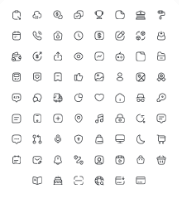
Iconsax Plus is an enhanced version of the original Iconsax package, tailored to address the issues of outdated and unresponsive maintenance. It features a refined icon library, meticulously curated and optimized for seamless integration into Flutter projects. Iconsax_plus offers a comprehensive collection of icons, categorized into three distinct styles: Bold, Linear, and Broken, each designed to cater to different visual aesthetics and UI requirements.

Screenshots Screenshots Screenshots

Installation

To use Iconsax Plus in your Flutter project, simply add it as a dependency in your pubspec.yaml file:

flutter pub add iconsax_plus

or

dependencies:
  iconsax_plus: ^1.0.0

Usage

To use Iconsax Plus icons in your Flutter application, import the package and use the appropriate style class to access the icons:

import 'package:iconsax_plus/iconsax_plus.dart';
import 'package:flutter/material.dart';

Column(
  mainAxisAlignment: MainAxisAlignment.center,
  children: [
    Icon(IconsaxPlusBold.home_1),
    Icon(IconsaxPlusLinear.home_1),
    Icon(IconsaxPlusBroken.home_1),
  ],
),

License Iconsax Plus is licensed under the MIT License. See the LICENSE file for more information.


Iconsax Plus is brought to you by Iconsax. For more information, visit vuesax.com.

Categories

Source repository

Projects using this package