Search packages, repositories and app categories

Package detailsv1.0.0

measured_size

A flutter widget that calculates the size of it's child in runtime.

AndroidiOSWebmacOSWindowsLinux
30-day downloads
1.1K
Likes
40
Pub points
140

Install package

flutter pub add measured_size

Package Overview

Package selection guidance compiled from public package information, community data, and project usage.

The measured_size package is a Flutter widget that dynamically calculates and exposes the size of its child widget at runtime. It wraps a child widget and provides its actual rendered dimensions, making it useful for layout adjustments based on real-time measurements. This is particularly helpful when building responsive or adaptive UIs where precise sizing is required. The package works across all major platforms including Android, iOS, Web, macOS, Windows, and Linux.

Use cases

  • Responsive layouts
  • Dynamic UI sizing
  • Layout debugging
  • Adaptive design
  • Runtime dimension tracking

Key features

  • Real-time size measurement
  • Cross-platform support
  • Simple API
  • Child widget wrapping
  • Size callback

Suitable for

  • Developers needing dynamic layout logic
  • UI builders requiring precise dimensions
  • Debugging layout issues
  • Custom widget creation

Considerations

  • May impact performance if overused
  • Requires careful placement in widget tree
  • Not suitable for static layouts
  • Limited to measuring direct child size
  • Potential for layout rebuilds

Original README

Original README snapshot from the linked source repository. Visit the repository for the latest content.

measured_size

A flutter widget that calculates the size of it's child in runtime.

Getting Started

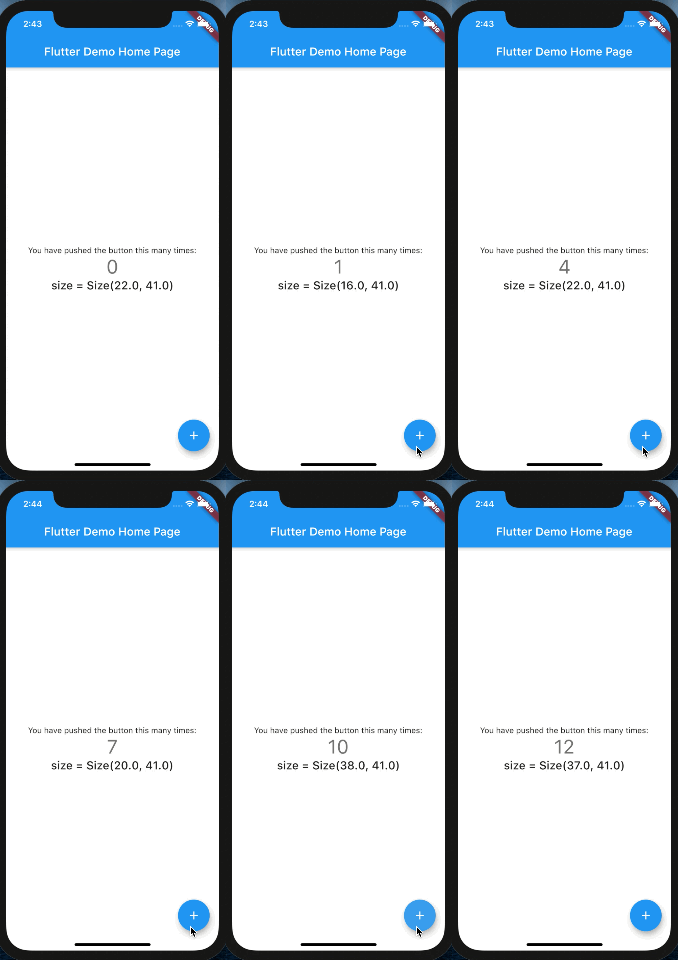
MeasuredSize Calculated the size of it's child in runtime. All you have to do is to wrap your widget with MeasuredSize and listen to size changes.

Usage

Complete example

MeasuredSize(
              onChange: (Size size) {
                setState(() {
                  print(size);
                });
              },
              child: Text(
                '$_counter',
                style: Theme.of(context).textTheme.headline4,
              ),
            );

onChange will be called when the [Size] changes.

onChange will return the value ONLY once if it didn't change, and it will NOT return a value if it's equals to Size.zero

Categories

Source repository

Projects using this package

No data available yet.