Package selection guidance compiled from public package information, community data, and project usage.
ncscolor is a Dart package that enables seamless conversion between NCS (Natural Color System) colors and common formats like RGB, HSL, and HEX. It provides accurate color transformations essential for design and development workflows requiring precise color representation. The package also includes supplementary utilities for RGB manipulation, enhancing its usability in UI/UX applications. Designed for cross-platform use, it supports Android, iOS, Web, macOS, Windows, and Linux.
Use cases
Design system implementation
Color matching in digital interfaces
Creative tool development
Accessibility-compliant color selection
UI prototyping
Key features
NCS to RGB/HSL/HEX conversion
RGB utility functions
High precision color calculations
Cross-platform compatibility
Simple API integration
Suitable for
Designers using NCS color standards
Developers building color pickers
Applications requiring accurate color translation
Frontend teams working with design systems
Creative software integrating NCS
Considerations
Requires understanding of NCS color model
Limited to color format conversion
No built-in color picker UI
Best used alongside design tools
Not optimized for real-time color editing
Original README
Original README snapshot from the linked source repository. Visit the repository for the latest content.
NCSColor 🎨
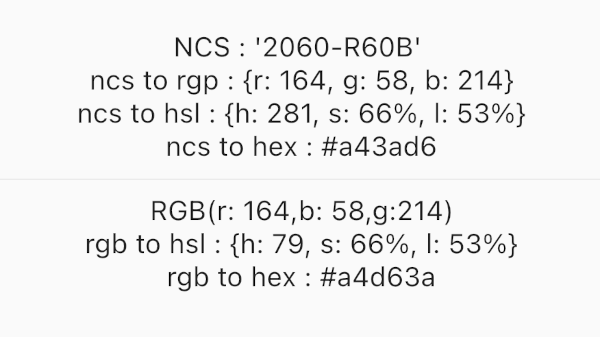
A comprehensive Dart package for converting NCS (Natural Color System) colors to RGB, HSL, and HEX formats, with additional RGB conversion utilities. Perfect for Flutter apps and Dart projects that need to work with NCS color specifications.
Experience NCSColor in action with our live Flutter web demo! Test color conversions, explore the NCS color system, and see real-time previews of your color transformations.
✨ Features
🎯 NCS to RGB conversion - Convert NCS color codes to RGB values
🌈 NCS to HSL conversion - Get HSL representation of NCS colors
🎨 NCS to HEX conversion - Generate hex color codes from NCS
🔄 RGB to HSL conversion - Convert RGB values to HSL format
🔄 RGB to HEX conversion - Convert RGB values to hex format
✅ Input validation - Proper NCS format validation with clear error messages
📱 Flutter ready - Works seamlessly with Flutter Color widgets
🚀 Modern Dart - Built with latest Dart features and null safety
🚀 Installation
Add this to your package's pubspec.yaml file:
dependencies:ncscolor:^1.0.0
Then run:
flutter pub get
📖 Usage
Import the package
import'package:ncscolor/ncscolor.dart';
NCS Color Conversions
// Create an NCS color instancefinal ncsColor = NCSColor(ncsCode: '2060-R60B');
// Convert to RGBfinal rgb = ncsColor.toRgb();
print(rgb); // {r: 164, g: 58, b: 214}// Convert to HSLfinal hsl = ncsColor.toHsl();
print(hsl); // {h: 281, s: 66%, l: 53%}// Convert to HEXfinal hex = ncsColor.toHex();
print(hex); // #a43ad6
Map<String, String> rgbToHsl({required int r, required int g, required int b})
String rgbToHex({required int r, required int g, required int b})
⚠️ Error Handling
The package provides clear error messages for invalid NCS codes:
try {
  final ncsColor = NCSColor(ncsCode: 'invalid-code');
  final rgb = ncsColor.toRgb();
} catch (e) {
  print(e); // ArgumentError: Invalid NCS color format...
}
🧪 Testing
Run the test suite:
flutter test
🤝 Contributing
Contributions are welcome! Please feel free to submit a Pull Request. For major changes, please open an issue first to discuss what you would like to change.
Fork the repository
Create your feature branch (git checkout -b feature/amazing-feature)
Commit your changes (git commit -m 'Add some amazing feature')
Push to the branch (git push origin feature/amazing-feature)