Search packages, repositories and app categories

passcode_screen cover
Package detailsv2.0.1

passcode_screen

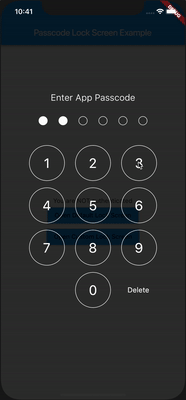
A platform agnostic Flutter package for showing passcode input screen, similar to Native iOS. Screen customizable with a colors, sizes, fonts etc.

AndroidiOSWebmacOSWindowsLinux
30-day downloads
4.6K
Likes
117
Pub points
135

Install package

flutter pub add passcode_screen

Package Overview

Package selection guidance compiled from public package information, community data, and project usage.

A platform-agnostic Flutter package that provides a customizable passcode input screen, designed to resemble native iOS passcode interfaces. It supports various customization options including colors, sizes, and fonts, making it suitable for secure PIN or OTP entry across multiple platforms. The package is lightweight and integrates seamlessly into Flutter apps, offering a consistent user experience on Android, iOS, Web, macOS, Windows, and Linux.

Use cases

  • Secure login with PIN
  • Two-factor authentication
  • OTP verification
  • Biometric fallback
  • App lock screen
  • Payment confirmation

Key features

  • Native-like iOS design
  • Fully customizable appearance
  • Cross-platform compatibility
  • Simple integration
  • Supports all major platforms
  • Configurable input behavior

Suitable for

  • Apps requiring secure PIN entry
  • Authentication flows
  • Mobile app developers
  • UX-focused applications
  • Multi-platform projects
  • Security-conscious features

Considerations

  • Requires manual handling of passcode validation
  • Limited built-in security measures
  • Custom styling may affect accessibility
  • Not optimized for complex form workflows
  • No built-in biometric integration
  • Depends on external logic for state management

Original README

Original README snapshot from the linked source repository. Visit the repository for the latest content.

Pub

Flutter - Passcode Lock Screen

A Flutter package for iOS and Android for showing passcode input screen, similar to Native iOS.

passcode-screen-demo.gif

Installation

First add passcode_screen as a dependency in your pubspec.yaml file.

Then use import

import 'package:passcode_screen/passcode_screen.dart';

What can it do for you?

passcode-screen-default.png
  1. Create a beautiful passcode lock view simply.
PasscodeScreen(
  title: title,
  passwordEnteredCallback: _onPasscodeEntered,
  cancelButton: Text('Cancel'),
  deleteButton: Text('Delete'),
  shouldTriggerVerification: _verificationNotifier.stream,  
);
  1. Passcode input completed callback.
_onPasscodeEntered(String enteredPasscode) {
  
}
  1. Notify passcode screen if passcode correct or not
final StreamController<bool> _verificationNotifier = StreamController<bool>.broadcast();

_onPasscodeEntered(String enteredPasscode) {
  bool isValid = '123456' == enteredPassword;
  _verificationNotifier.add(isValid);
}

Don't forget to close a stream

@override
void dispose() {
  _verificationNotifier.close();
  super.dispose();
}

  1. Customize UI.

Customize circles

class CircleUIConfig {
  final Color borderColor;
  final Color fillColor;
  final double borderWidth;
  final double circleSize;
  double extraSize;
}

Customize keyboard

class KeyboardUIConfig {
  final double digitSize;
  final TextStyle digitTextStyle;
  final TextStyle deleteButtonTextStyle;
  final Color primaryColor;
  final Color digitFillColor;
  final EdgeInsetsGeometry keyboardRowMargin;
  final EdgeInsetsGeometry deleteButtonMargin;
}
passcode-screen-custom.png

Landscape Support

passcode-screen-default-lanscape.png
iOS & Android

Plugin is totally platform agnostic. No configuration required - the plugin should work out of the box.

Contributions

Warmly welcome to submit a pull request!

Passcode Lock Screen

Passcode Lock Screen is owned and maintained by Redeyes Dev

Used in production

Passkeep - Passwords Keeper

Contributors

Vladimir Hudnitsky BeDaut mix1009 pixnbit ssanderson imejiasoft

Relase notes:

1.0.0+1:

Basic implementation of a widget.

  • You could show a widget, enter passcode and validate it.
1.0.1
  • Added isValidCallback to help you handle success scenario. isValidCallback will be invoked after passcode screen will pop.
1.0.2
  • Added configurable background and title color. (by @BeDaut)
  • Added cancelCallback to react when user cancelled widget (by @mix1009)
1.1.0
  • Provide widget instead of string for title
  • Fixed digits layout
  • Added flexibility to configure 'Cancel' and 'Delete' buttons as widgets
  • Added flexibility to provide digits as list of strings for better customisation
  • Removed navigation as default action when cancel pressed

1.1.1

  • Add landscape view for the passcode screen

1.2.0

  • Add dynamic size for landscape view.
  • Moved 'Cancel' button to the bottom of the screen to align with iOS Native Passcode Screen style.

1.2.1

  • Example updated to target Android 11
  • Fixed Issue#23

1.2.2

  • Fixed an issue with example build
  • Example updated to show how to implement 'Reset passcode' feature

2.0.0

  • Null safety

Categories

Source repository

Projects using this package