Search packages, repositories and app categories

payment_card cover
Package detailsv0.0.1

payment_card

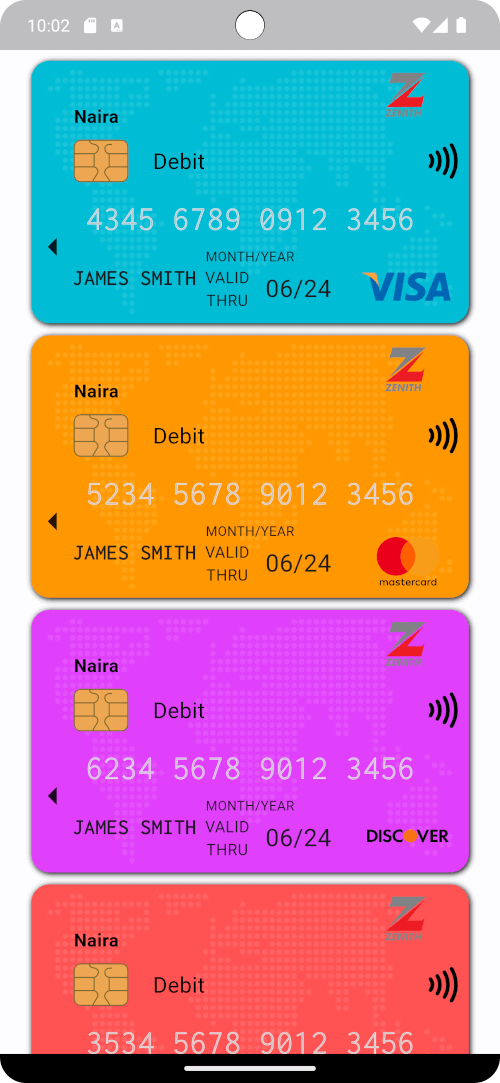
A custom widget for creating beautiful payment(eg. credit or debit) cards on flutter.

AndroidiOSWebmacOSWindowsLinux
30-day downloads
11
Likes
11
Pub points
130

Install package

flutter pub add payment_card

Package Overview

Package selection guidance compiled from public package information, community data, and project usage.

A Flutter widget designed to create visually appealing payment cards, such as credit or debit cards, with customizable styling and layout. It supports multiple platforms including Android, iOS, Web, macOS, Windows, and Linux, making it ideal for cross-platform applications requiring card UI components. The package provides a clean, reusable interface for displaying card details like number, expiry, and name, enhancing user experience in payment-related workflows.

Use cases

  • Payment form interfaces
  • Digital wallet displays
  • E-commerce checkout screens
  • Card preview components
  • User profile card management

Key features

  • Customizable card design
  • Cross-platform compatibility
  • Responsive layout support
  • Easy integration with forms
  • Supports card number formatting

Suitable for

  • Developers building e-commerce apps
  • Designers needing consistent card UI
  • Apps with payment processing features
  • Frontend-focused Flutter projects

Considerations

  • Does not handle actual payment processing
  • Requires manual input validation
  • Limited built-in security measures
  • Not intended for production payment gateways

Original README

Original README snapshot from the linked source repository. Visit the repository for the latest content.

PaymentCard

pub package pub points popularity likes Star on Github Awesome Flutter License: BSD

Overview

The PaymentCard widget is a flexible Flutter widget designed to display payment card information with customizable properties. It enables developers to showcase payment card details such as the card number, card type, cardholder name, and background image in a visually appealing manner.

Table of Contents

Installation

To use PaymentCard in your Flutter project, add the following dependency to your pubspec.yaml file:

dependencies:
  payment_card: ^0.0.1

Then, run:

flutter pub get

Usage

Import the package:

import 'package:payment_card/payment_card.dart';

Add the PaymentCard widget to your UI, providing the necessary parameters:

PaymentCard(
  cardIssuerIcon: Icons.credit_card,
  backgroundColor: Colors.blue,
  currency: 'USD',
  cardNumber: '1234567890123456',
  validity: '12/24',
  holder: 'John Doe',
  cardType: CardNetwork.visa,
  cardTypeTextStyle: TextStyle(fontSize: 16, fontWeight: FontWeight.bold),
  cardNumberStyles: CardNumberStyles.lightStyle1,
  margin: EdgeInsets.all(16),
)

Features

  • Customization: Customize various aspects of the payment card, including the card issuer icon, background color, background image, currency, card number, validity, cardholder name, card type, and more.
  • Flexible Design: The PaymentCard widget allows for flexible design configurations, enabling developers to tailor the appearance of the payment card to suit their app's visual style and branding.
  • Easy Integration: Integrating the PaymentCard widget into Flutter projects is straightforward, making it accessible to developers of all skill levels.
  • Highly Configurable: With support for customizing card number styles, card type text styles, and margins, developers can fine-tune the presentation of payment card details to meet specific requirements.

Examples

Here's a basic example demonstrating the usage of the PaymentCard widget:

import 'package:flutter/material.dart';
import 'package:payment_card/payment_card.dart';

void main() {
  runApp(const MyApp());
}

class MyApp extends StatelessWidget {
  const MyApp({super.key});

  @override
  Widget build(BuildContext context) {
    return MaterialApp(
      debugShowCheckedModeBanner: false,
      home: Scaffold(
        backgroundColor: Colors.black12,
        body: SingleChildScrollView(
          child: Padding(
            padding: const EdgeInsets.all(16.0),
            child: Column(
              crossAxisAlignment: CrossAxisAlignment.stretch,
              children: [
                buildPaymentCardExample1(),
                const SizedBox(height: 16),
                buildPaymentCardExample2(),
                const SizedBox(height: 16),
                buildPaymentCardExample3(),
                const SizedBox(height: 16),
                buildPaymentCardExample4(),
              ],
            ),
          ),
        ),
      ),
    );
  }

  Widget buildPaymentCardExample1() {
    return const PaymentCard(
      cardIssuerIcon: CardIcon(icon: Icons.credit_card),
      backgroundColor: Colors.blue,
      backgroundGradient: LinearGradient(
        colors: [Colors.purple, Colors.indigo],
        begin: Alignment.topLeft,
        end: Alignment.bottomRight,
      ),
      currency: Text('EUR'),
      cardNumber: '1234567890123456',
      validity: '10/24',
      holder: 'Jane Doe',
      isStrict: false,
      cardNetwork: CardNetwork.visa,
      cardTypeTextStyle: TextStyle(fontSize: 16, fontWeight: FontWeight.bold),
      cardNumberStyles: CardNumberStyles.darkStyle4,
      backgroundImage: null,
    );
  }

  Widget buildPaymentCardExample2() {
    return const PaymentCard(
      cardIssuerIcon: CardIcon(icon: Icons.credit_card),
      currency: Text('GBP'),
      cardNumber: '1234567890123456',
      isStrict: false,
      validity: '08/23',
      holder: 'John Smith',
      cardNetwork: CardNetwork.mastercard,
      cardTypeTextStyle: TextStyle(fontSize: 16, fontWeight: FontWeight.bold, color: Colors.white),
      cardNumberStyles: CardNumberStyles.lightStyle2,
      backgroundImage: null,
      backgroundColor: Colors.grey,
    );
  }

  Widget buildPaymentCardExample3() {
    return const PaymentCard(
      cardIssuerIcon: CardIcon(icon: Icons.credit_card),
      backgroundColor: Colors.green,
      backgroundImage: null,
      currency: Text('USD'),
      cardNumber: '1234567890123456',
      validity: '06/22',
      holder: 'Alice Johnson',
      isStrict: false,
      cardNetwork: CardNetwork.americanExpress,
      cardTypeTextStyle: TextStyle(fontSize: 16, fontWeight: FontWeight.bold),
      cardNumberStyles: CardNumberStyles.lightStyle3,
    );
  }

  Widget buildPaymentCardExample4() {
    return const PaymentCard(
      cardIssuerIcon: CardIcon(icon: Icons.credit_card),
      backgroundColor: Colors.orange,
      currency: Text('USD'),
      cardNumber: '1234567890123456',
      validity: '09/25',
      holder: 'Robert Brown',
      isStrict: false,
      cardNetwork: CardNetwork.discover,
      cardTypeTextStyle: TextStyle(fontSize: 16, fontWeight: FontWeight.bold),
      cardNumberStyles: CardNumberStyles.darkStyle5,
      backgroundImage: null,
    );
  }
}

Screenshots

Screenshot 1 Screenshot 2 Screenshot 3
Screenshot 4 Screenshot 5 Screenshot 6

Contributing

Contributions are welcome! Feel free to open issues or submit pull requests.

  • Issues: If you encounter any bugs, have feature requests, or want to suggest improvements, please open an issue on our GitHub repository. Provide as much detail as possible to help us understand the problem or idea better.

  • Pull Requests: If you'd like to contribute code changes, feel free to submit a pull request. Before doing so, make sure to fork the repository and create a new branch for your changes. Follow the existing coding style and guidelines, and write clear and concise commit messages. Your pull request will undergo review, and we'll work together to ensure the changes align with the project's goals.

  • Feature Requests: If you have ideas for new features or enhancements, please open an issue to discuss them. We value community feedback and want to ensure that new features align with the project's direction and objectives.

  • Spread the Word: Help us grow the FontResoft community by sharing the project with others. Whether through social media, blog posts, or word of mouth, spreading the word about FontResoft helps attract more users and contributors.

License

This project is licensed under the BSD 3-Clause License - see the LICENSE file for details.

Categories

Dependencies

Dependency list 1 items

Source repository

Projects using this package

No data available yet.