Search packages, repositories and app categories

quds_popup_menu cover
Package detailsv0.0.1+1

quds_popup_menu

A new way to show advanced popup menu in Flutter, the package is a part of quds_ui_kit package.

AndroidiOSWebmacOSWindowsLinux
30-day downloads
7
Likes
81
Pub points
150

Install package

flutter pub add quds_popup_menu

Package Overview

Package selection guidance compiled from public package information, community data, and project usage.

quds_popup_menu is a Flutter package that offers an advanced and customizable popup menu solution, designed as part of the quds_ui_kit suite. It enhances standard popup menus with modern styling, smooth animations, and flexible layout options. Built for cross-platform use, it supports Android, iOS, Web, macOS, Windows, and Linux, enabling consistent user experiences across devices. The package simplifies the creation of interactive, visually appealing menus with minimal code. Its integration with quds_ui_kit ensures cohesive design patterns and scalability in larger applications.

Use cases

  • Custom dropdown menus in forms
  • Contextual action panels
  • Enhanced navigation menus
  • Mobile and desktop UI enhancements
  • Cross-platform menu consistency

Key features

  • Customizable menu appearance
  • Smooth transition animations
  • Cross-platform compatibility
  • Integration with quds_ui_kit
  • Flexible item layout and spacing

Suitable for

  • Developers using quds_ui_kit
  • Apps needing modern popup designs
  • Projects requiring consistent UI across platforms
  • Design-focused Flutter applications
  • Teams prioritizing reusable components

Considerations

  • Requires quds_ui_kit for full functionality
  • Limited standalone documentation
  • Best suited for apps already using quds_ui_kit
  • May require additional styling for non-standard themes
  • Dependent on package versioning within quds_ui_kit

Original README

Original README snapshot from the linked source repository. Visit the repository for the latest content.

Quds UI Kit

This library consists of:

  • Animating widgets with simple controlling, events capturing.
  • Page Transitions
  • Toasts
  • Bottom sheets
  • Dialogs
  • Pagination
  • Simple Drawer
  • Splash Screen View
  • Another Viewers

To use this package see the following example.

Animation:

Icons:
  • QudsAnimatedIcon
    A wrap widget to control Flutter AnimatedIcon easily.
 QudsAnimatedIcon(
            iconData: AnimatedIcons.play_pause,
            showStartIcon: _isPlaying,
          )


What if desired to combine another two icons?

  • QudsAnimatedCombinedIcons
    Combines any two icons and make a transition!
 QudsAnimatedCombinedIcons(
        startIcon: Icons.accessible,
        endIcon: Icons.accessibility_new,
        showStartIcon: _onChair,
      ),


You can customize the sizes, colors, transition duration and curve, ..etc.


  • QudsAnimatedText
QudsAnimatedText(
          _isPlaying ? 'Playing' : 'Paused',
        )


  • QudsAnimatedCounter
QudsAnimatedCounter(
        counter,
        duration: Duration(milliseconds: 200),
        length: 4,
        style: TextStyle(fontSize: 30),
      )


Buttons

All animated icons in this library wrapped in buttons with capturing tap ability.

QudsAnimatedCombinedIconsButton(
            tooltip: 'Toggle',
            startIcon: Icons.arrow_forward,
            // startIconColor: Colors.white,
            onPressed: _toggle,
          ),

Other Buttons:

  • QudsAnimatedIconButton
  • QudsAnimatedCombinedIconsButton
  • QudsCheckbox
  • QudsCheckboxListTile
  • QudsCheckboxWithText


Page Transitions

Wide collection of page route tranistion are now supported in Quds UI Kit

  • Fade QudsFadePageRoute({duration, curve})
  • Rotation QudsRotatePageRoute({duration, curve, alignment})
  • Slide QudsSlidePageRoute({direction[Up Down Left Right Start End], duration, curve})
  • Zoom QudsZoomPageRoute({duration, curve, alignment})
  • Combined QudsTransitionPageRoute({withFade, withRotate, withSlide, withScale, rotateAlignment, scaleAlignment, duration, curve})
Navigator.push(
                context,
                QudsSlidePageRoute(
                  builder: (c) => _SecondScreen(),
                  slideDirection: SlideDirection.Up, //Default [SlideDirection.Start]
                ))

Toasts

Customized toasts with easy control,

showQudsToast(context,
                  content: Text('Copied!'),
                  toastTime: QudsToastTime.VeryShort,
                  leadingActions: [
                    QudsAutoAnimatedCombinedIcons(
                      startIcon: Icons.copy,
                      endIcon: Icons.paste,
                      showStartIcon: false,
                    )
                  ])

Bottom Sheets

showQudsModalBottomSheet(
              context,
              (c) => Column(
                    children: [
                      for (int i = 0; i < 5; i++) ListTile(title: Text('Hi'))
                    ],
                  ),
              titleText: 'Test Bottom Sheet')


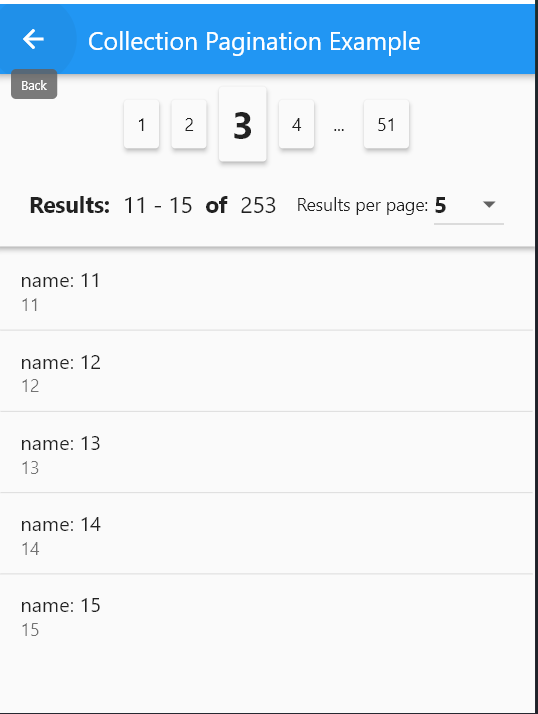
Pagination

QudsCollectionPagination<_ExampleModel>(
        resultsPerPage: itemsPerPage,
        itemsPadding: EdgeInsets.all(2),
        onResultsPerPageChanged: (p) {
          page = 1;
          itemsPerPage = p;
          _fillItems();
        },
        currentPageItems: currItems,
        onPageChanged: (p) {
          page = p;
          _fillItems();
        },
        selectedPage: page,
        total: provider.list.length,
        itemBuilder: (c, i, o) => ListTile(
          title: Text(o.name),
          subtitle: Text(o.id.toString()),
        ),
      )


Dialogs

  • General Dialogs
    In general, to show a dialog, user showQudsDialog, for example:
    showQudsDialog(context,
            title: Text('Save'),
            builder: (c) => Text(
                    'Would you like to save the document before existing?'));
  • Pre-prepared dialogs:
    This package provides some pre-customized dialogs:
 showQudsConfirmDeleteDialog(context,
              onDeletePressed: () => showQudsToast(context,
                  toastTime: QudsToastTime.VeryShort,
                  leadingActions: [
                    QudsAutoAnimatedCombinedIcons(
                        startIcon: Icons.delete, endIcon: Icons.done)
                  ],
                  content: Text('Deleted!'),
                  trailingActions: [
                    InkWell(
                        onTap: () {
                          showQudsToast(context,
                              toastTime: QudsToastTime.VeryShort,
                              content: Text('Undo pressed'));
                        },
                        child: Container(
                            padding: EdgeInsets.all(5),
                            child: QudsAutoAnimatedCombinedIcons(
                              startIcon: CupertinoIcons.delete,
                              endIcon: CupertinoIcons.arrow_turn_up_left,
                              showStartIcon: false,
                            )))
                  ]))

QudsLightDrawer


class MainDrawer extends StatelessWidget {
  @override
  Widget build(BuildContext context) {
    return QudsLightDrawer(
      bottomAboutButton: ...,
      bottomButton: ...,
      body: ...;
  }
}

QudsPopupMenu

    QudsPopupButton(
              // backgroundColor: Colors.red,
              tooltip: 'T',
              items: getMenuItems(),
              child: Icon(Icons.menu)),
      
    
List<QudsPopupMenuBase> getMenuItems() {
    return [
      QudsPopupMenuSection(
          backgroundColor: Colors.yellow.shade200,
          titleText: 'أبو أسعد الأمير',
          subTitle: Text('See your profile'),
          leading: Icon(
            Icons.redeem,
            size: 40,
          ),
          subItems: [
            QudsPopupMenuSection(
                titleText: 'Settings',
                leading: Icon(Icons.settings),
                subItems: [
                  QudsPopupMenuItem(
                      leading: Icon(Icons.logout),
                      title: Text('Logout'),
                      onPressed: () {
                        showToast('Logout Pressed!');
                      })
                ]),
          ]),
      QudsPopupMenuDivider(),
      QudsPopupMenuItem(
          leading: Icon(Icons.info_outline),
          title: Text('Give Feedback'),
          subTitle: Text('Help us improve our new app'),
          onPressed: () {
            showToast('Feedback Pressed!');
          }),
      QudsPopupMenuDivider(),
      QudsPopupMenuSection(
          leading: Icon(Icons.place),
          titleText: 'Settings & Privacy',
          subItems: [
            QudsPopupMenuItem(
                leading: Icon(Icons.settings),
                title: Text('Settings'),
                onPressed: () {
                  showToast('Settings Pressed!');
                }),
            QudsPopupMenuItem(
                leading: Icon(Icons.lock),
                title: Text('Privacy Checkup'),
                onPressed: () {
                  showToast('Privacy Checkup Pressed!');
                }),
            QudsPopupMenuItem(
                leading: Icon(Icons.lock_clock),
                title: Text('Privacy Shortcuts'),
                onPressed: () {
                  showToast('Privacy Shourtcuts Pressed!');
                }),
            QudsPopupMenuItem(
                leading: Icon(Icons.list),
                title: Text('Activity Log'),
                onPressed: () {
                  showToast('Activity Log Pressed!');
                }),
            QudsPopupMenuItem(
                leading: Icon(Icons.card_membership),
                title: Text('News Feed Preferences'),
                onPressed: () {
                  showToast('News Feed Preferences Pressed!');
                }),
            QudsPopupMenuItem(
                leading: Icon(Icons.language),
                title: Text('Language'),
                onPressed: () {
                  showToast('Language Pressed!');
                }),
          ]),
      QudsPopupMenuDivider(),
      QudsPopupMenuWidget(
          builder: (c) => Container(
              padding: EdgeInsets.all(10),
              child: IntrinsicHeight(
                child: Row(
                  mainAxisAlignment: MainAxisAlignment.center,
                  children: [
                    IconButton(
                        onPressed: () {
                          showToast('Favourite Pressed!');
                        },
                        icon: Icon(
                          Icons.favorite,
                          color: Colors.red,
                        )),
                    VerticalDivider(),
                    IconButton(
                        onPressed: () {},
                        icon: Icon(
                          Icons.music_note,
                          color: Colors.blue,
                        )),
                    VerticalDivider(),
                    IconButton(
                        onPressed: () {},
                        icon: Icon(
                          Icons.umbrella,
                          color: Colors.green,
                        ))
                  ],
                ),
              )))
    ];
  }
        

QudsSplashView

class SplashScreen extends StatelessWidget {
  @override
  Widget build(BuildContext context) {
    return Scaffold(
      body: QudsSplashView( 
      progressIndicator: ...,
      futures: [...],
      onCompleted: ...,
      ),
    );
  }
}


Another Viewers

  • For specific time
 QudsDigitalTimeViewer(
        hour: 10,
        minute: 59,
        second: 40,
        milliSecond: 10,
      ),
  • For live time:
QudsDigitalClockViewer(
        showSeconds: true,
        showMilliSeconds: true,
      )

Categories

Dependencies

Dependency list 1 items

Source repository

Projects using this package