Search packages, repositories and app categories

Package detailsv1.0.5

quiz_view

A new flutter package which allows you to host your own quiz, customize the user interface, theme , functionalities, question, correct answer and on click function for answers.

30-day downloads
29
Likes
24
Pub points
30

Install package

flutter pub add quiz_view

Package Overview

Package selection guidance compiled from public package information, community data, and project usage.

Quiz_View is a Flutter package that enables developers to create customizable quizzes within their applications. It offers full control over the user interface, themes, question content, correct answers, and on-click actions for responses. Designed for flexibility, it supports dynamic quiz creation and seamless integration into apps with social or interactive features. The package is ideal for educational tools, engagement apps, or gamified experiences. With its open-source nature and active GitHub repository, it encourages community contributions and customization.

Use cases

  • Interactive learning apps
  • Gamified social platforms
  • User engagement tools
  • Educational games
  • Live quiz events

Key features

  • Customizable UI and themes
  • Dynamic question and answer handling
  • On-click response functions
  • Open-source and extensible
  • Easy integration via pub
  • Supports multiple quiz types

Suitable for

  • Educational app developers
  • Social media feature creators
  • Gamification enthusiasts
  • Flutter beginners with basic UI skills
  • Apps requiring interactive content

Considerations

  • Requires manual setup of questions and logic
  • Limited built-in analytics
  • No official documentation yet
  • Platform support not specified
  • Depends on external theme and styling knowledge

Original README

Original README snapshot from the linked source repository. Visit the repository for the latest content.

quiz_view

A new Flutter package project that helps create quizes and surveys. It has a quiz_view customizable widget.

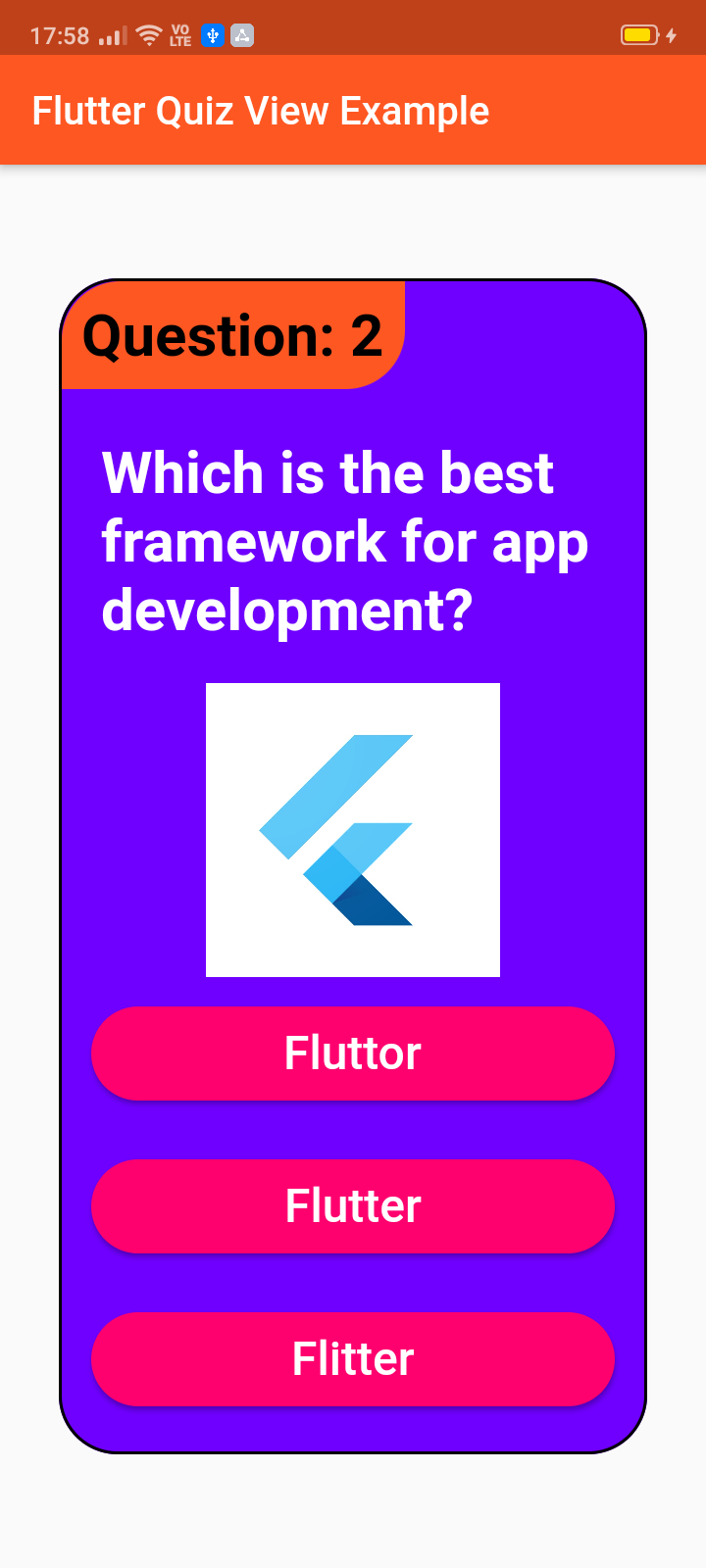
Screenshots

Usage

Example

To use this package :

  • add the dependency to your [pubspec.yaml] file.
  dependencies:
    flutter:
      sdk: flutter
    quiz_view:
How to use
QuizView(
  image: Container(
    width: 150,
    height: 150,
    child: Image.network(
        "https://yt3.ggpht.com/a/AATXAJyPMywRmD62sfK-1CXjwF0YkvrvnmaaHzs4uw=s900-c-k-c0xffffffff-no-rj-mo"),
  ),
  showCorrect: true,
  tagBackgroundColor: Colors.deepOrange,
  tagColor: Colors.black,
  questionTag: "Question: 2",
  answerColor: Colors.white,
  answerBackgroundColor: Color.fromARGB(255, 255, 0, 111),
  questionColor: Colors.white,
  backgroundColor: Color.fromARGB(255, 111, 0, 255),
  width: 300,
  height: 600,
  question: "Which is the best framework for app development?",
  rightAnswer: "Flutter",
  wrongAnswers: ["Fluttor", "Flitter"],
  onRightAnswer: () => print("Right"),
  onWrongAnswer: () => print("Wrong"),
)

License

Copyright 2020 Jay Mehta

Licensed under the Apache License, Version 2.0 (the "License");
you may not use this file except in compliance with the License.
You may obtain a copy of the License at

    http://www.apache.org/licenses/LICENSE-2.0

Unless required by applicable law or agreed to in writing, software
distributed under the License is distributed on an "AS IS" BASIS,
WITHOUT WARRANTIES OR CONDITIONS OF ANY KIND, either express or implied.
See the License for the specific language governing permissions and
limitations under the License.

Getting Started

This project is a starting point for a Dart package, a library module containing code that can be shared easily across multiple Flutter or Dart projects.

For help getting started with Flutter, view our online documentation, which offers tutorials, samples, guidance on mobile development, and a full API reference.

Example

As time based...

import 'package:flutter/material.dart';
import 'package:quiz_view/quiz_view.dart';

void main() {
  runApp(MyApp());
}

class MyApp extends StatelessWidget {
  @override
  Widget build(BuildContext context) {
    return MaterialApp(
      title: 'Flutter Quiz View Example',
      debugShowCheckedModeBanner: false,
      theme: ThemeData(
        primarySwatch: Colors.deepOrange,
        visualDensity: VisualDensity.adaptivePlatformDensity,
      ),
      home: MyHomePage(title: 'Flutter Quiz View Example'),
    );
  }
}

class MyHomePage extends StatefulWidget {
  MyHomePage({Key key, this.title}) : super(key: key);

  final String title;

  @override
  _MyHomePageState createState() => _MyHomePageState();
}

class _MyHomePageState extends State<MyHomePage> {
  @override
  Widget build(BuildContext context) {
    return Scaffold(
      appBar: AppBar(
        title: Text(widget.title),
      ),
      body: Center(
          child: QuizView(
        image: Container(
          width: 150,
          height: 150,
          child: Image.network(
              "https://yt3.ggpht.com/a/AATXAJyPMywRmD62sfK-1CXjwF0YkvrvnmaaHzs4uw=s900-c-k-c0xffffffff-no-rj-mo"),
        ),
        showCorrect: true,
        tagBackgroundColor: Colors.deepOrange,
        tagColor: Colors.black,
        questionTag: "Question: 2",
        answerColor: Colors.white,
        answerBackgroundColor: Color.fromARGB(255, 255, 0, 111),
        questionColor: Colors.white,
        backgroundColor: Color.fromARGB(255, 111, 0, 255),
        width: 300,
        height: 600,
        question: "Which is the best framework for app development?",
        rightAnswer: "Flutter",
        wrongAnswers: ["Fluttor", "Flitter"],
        onRightAnswer: () => print("Right"),
        onWrongAnswer: () => print("Wrong"),
      )),
    );
  }
}

Categories

Source repository

Projects using this package

No data available yet.