Search packages, repositories and app categories

scroll_navigation cover
Package detailsv1.3.2

scroll_navigation

It's a powerful navigation by gestures and taps. You can scroll from left to right or tap on the navigation icons.

AndroidiOSmacOSWindowsLinux
30-day downloads
199
Likes
120
Pub points
140

Install package

flutter pub add scroll_navigation

Package Overview

Package selection guidance compiled from public package information, community data, and project usage.

ScrollNavigation is a Flutter package that enables intuitive navigation through horizontal scrolling and tap gestures. Designed for tab-based interfaces, it allows users to navigate between tabs by swiping left or right or by tapping on navigation icons. The package enhances user experience with smooth transitions and responsive feedback across multiple platforms. Ideal for apps requiring fluid, gesture-driven navigation, it supports Android, iOS, macOS, Windows, and Linux. Its lightweight design integrates seamlessly into existing Flutter projects.

Use cases

  • Gesture-based tab navigation
  • Horizontal swipe navigation in dashboards
  • Mobile and desktop app navigation
  • Interactive UIs with tabbed layouts
  • Replacing traditional bottom navigation bars

Key features

  • Horizontal scroll navigation
  • Tap-to-navigate icons
  • Cross-platform support
  • Smooth animations
  • Customizable navigation indicators
  • Responsive gesture detection

Suitable for

  • Developers building gesture-rich Flutter apps
  • Designers seeking modern navigation patterns
  • Apps with multiple tab sections
  • Projects targeting both mobile and desktop
  • Teams wanting lightweight navigation solutions

Considerations

  • May require custom styling for complex designs
  • Limited to horizontal navigation only
  • Potential performance impact with many tabs
  • Not ideal for vertical navigation needs
  • Requires careful handling of touch events on small screens

Original README

Original README snapshot from the linked source repository. Visit the repository for the latest content.

scroll_navigation

My other APIs


Features

  • Fancy animations.
  • Customizable colors.
  • Works with the back button.
  • Scrolling pages by gestures.
  • Indicator that follows the scroll.
  • Easy and powerful implementation! :)
  • Page movement when tapping an icon.


Scroll Navigation Details

NavigationPosition.bottom NavigationPosition.top

Code
@override
Widget build(BuildContext context) {
  return ScrollNavigation(
    bodyStyle: NavigationBodyStyle(
      background: Colors.white,
      borderRadius: BorderRadius.vertical(bottom: Radius.circular(20)),
    ),
    barStyle: NavigationBarStyle(
      background: Colors.white,
      elevation: 0.0,
    ),
    pages: [
      Container(color: Colors.blue[100]),
      Container(color: Colors.green[100]),
      Container(color: Colors.purple[100]),
      Container(color: Colors.amber[100]),
      Container(color: Colors.deepOrange[100])
    ],
    items: const [
      ScrollNavigationItem(icon: Icon(Icons.camera)),
      ScrollNavigationItem(icon: Icon(Icons.chat)),
      ScrollNavigationItem(icon: Icon(Icons.favorite)),
      ScrollNavigationItem(icon: Icon(Icons.notifications)),
      ScrollNavigationItem(icon: Icon(Icons.home))
    ],
  );
}


NavigationPosition.left NavigationPosition.right

Code
@override
Widget build(BuildContext context) {
  return ScrollNavigation(
    bodyStyle: NavigationBodyStyle(
      background: Colors.white,
      borderRadius: BorderRadius.horizontal(left: Radius.circular(20)),
      scrollDirection: Axis.vertical,
    ),
    barStyle: NavigationBarStyle(
      position: NavigationPosition.left,
      elevation: 0.0,
      background: Colors.white,
    ),
    pages: [
      Container(color: Colors.blue[100]),
      Container(color: Colors.green[100]),
      Container(color: Colors.purple[100]),
      Container(color: Colors.amber[100]),
      Container(color: Colors.deepOrange[100])
    ],
    items: const [
      ScrollNavigationItem(icon: Icon(Icons.camera)),
      ScrollNavigationItem(icon: Icon(Icons.chat)),
      ScrollNavigationItem(icon: Icon(Icons.favorite)),
      ScrollNavigationItem(icon: Icon(Icons.notifications)),
      ScrollNavigationItem(icon: Icon(Icons.home))
    ],
  );
}


Go to a Page Code
final navigationKey = GlobalKey<ScrollNavigationState>();

@override
Widget build(BuildContext context) {
  return ScrollNavigation(
    key: navigationKey,
    pages: [...],
    items: [...],
    barStyle: NavigationBarStyle(position: NavigationPosition.top),
  );
}

void goToPage(int index) => navigationKey.currentState.goToPage(index);


Identifier Details

physics = true physics = False


position = IdentifierPosition.topAndRight showIdentifier = False

Code
return ScrollNavigation(
    pages: [...],
    items: [...],
    physics: true,
    showIdentifier: true,
    identiferStyle: NavigationIdentiferStyle(
      position: NavigationPosition.top,
    ),
);


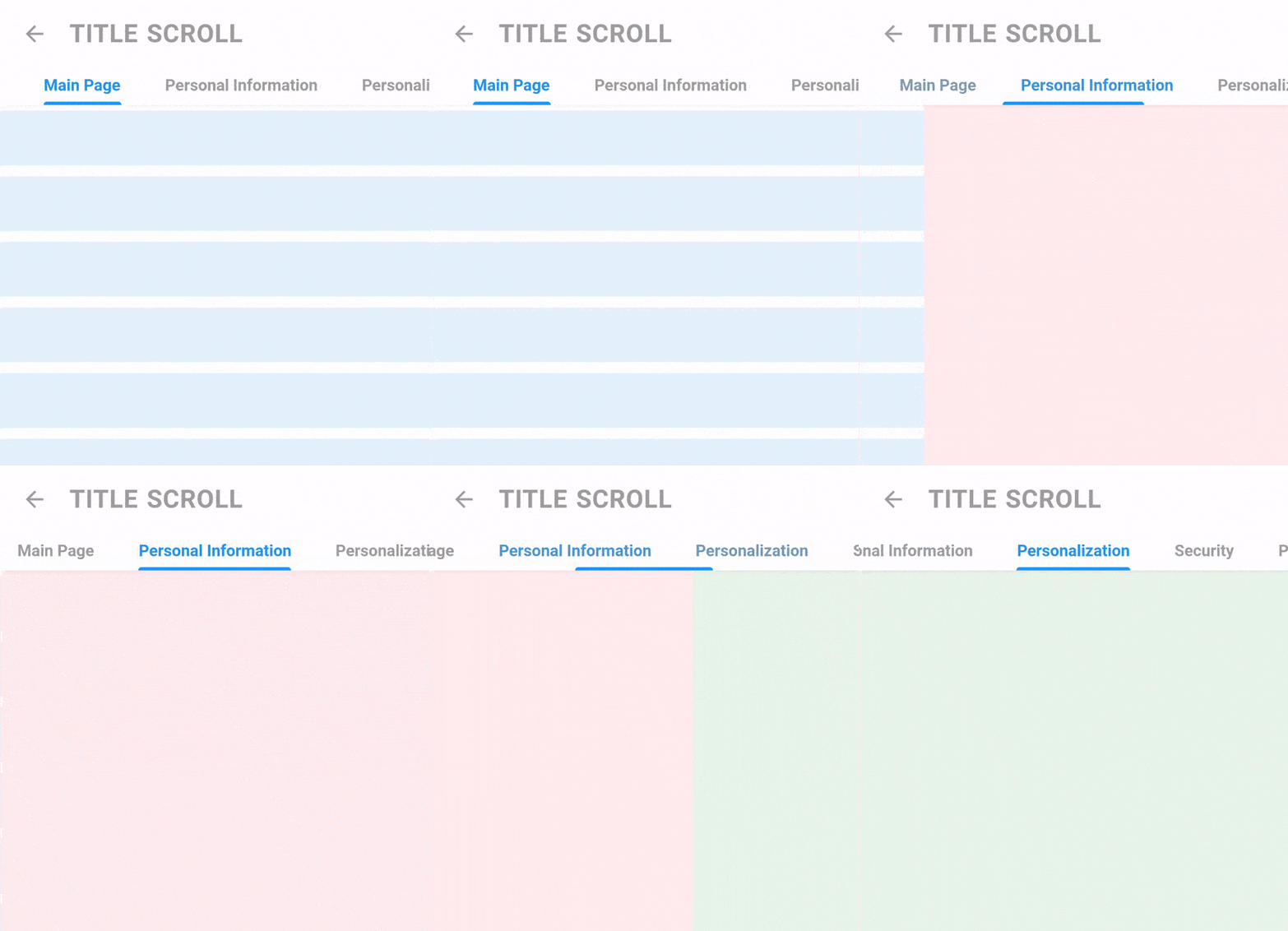
Title Scroll Navigation Details


Code
return TitleScrollNavigation(
    barStyle: TitleNavigationBarStyle(
      style: TextStyle(fontWeight: FontWeight.bold),
      padding: EdgeInsets.symmetric(horizontal: 40.0),
      spaceBetween: 40,
    ),
    titles: [
      "Main Page",
      "Personal Information",
      "Personalization",
      "Security",
      "Payment Methods",
    ],
    pages: [
      Container(color: Colors.blue[50]),
      Container(color: Colors.red[50]),
      Container(color: Colors.green[50]),
      Container(color: Colors.purple[50]),
      Container(color: Colors.yellow[50]),
    ],
);


Screen Details (Hide AppBar on scroll)


Code
ScrollController controller = ScrollController();

return Screen(
    appBar: AppBarTitle(title: "Title Scroll", showBack: true), //WIDGET IN THE EXAMPLE
    controllerToHideAppBar: controller,
    body: ListView.builder(
      itemCount: 15,
      padding: EdgeInsets.zero,
      controller: controller,
      itemBuilder: (_, __) {
        return Padding(
          padding: EdgeInsets.symmetric(vertical: 5),
          child: Container(
            height: 50,
            color: Colors.blue[50],
          ),
        );
      },
    ),
  );

Categories

Dependencies

Dependency list 1 items

Source repository

Projects using this package

No data available yet.