Search packages, repositories and app categories

Package detailsv0.0.4

secure_shared_preferences

Simple to use yet powerful package to encypt shared preferences in android and UserDefaults in iOS.

AndroidiOSmacOS
30-day downloads
403
Likes
25
Pub points
140

Install package

flutter pub add secure_shared_preferences

Package Overview

Package selection guidance compiled from public package information, community data, and project usage.

A secure and easy-to-use package that encrypts SharedPreferences on Android and UserDefaults on iOS, protecting sensitive data with strong encryption. It seamlessly integrates with Flutter apps, ensuring user data remains confidential even if the device is compromised. Designed for developers who need robust local storage without complex setup, it abstracts away encryption details while maintaining high security standards. Ideal for storing tokens, passwords, or any private information.

Use cases

  • Storing authentication tokens
  • Saving user preferences securely
  • Protecting sensitive app data
  • Securing login credentials
  • Encrypting configuration settings

Key features

  • End-to-end encryption
  • Cross-platform support (Android, iOS, macOS)
  • Simple API integration
  • Automatic key management
  • Secure by default

Suitable for

  • Apps handling sensitive user data
  • Authentication-heavy applications
  • Compliance-focused projects
  • Developers prioritizing security
  • Mobile-first applications

Considerations

  • Requires proper key handling
  • Limited to basic key-value storage
  • No built-in backup/restore
  • Performance overhead with large datasets
  • Not suitable for complex data structures

Original README

Original README snapshot from the linked source repository. Visit the repository for the latest content.

Encryption is important

pub points Pub

Features

  • Simple to use yet powerful package to encypt shared preferences in android and UserDefaults in iOS.
  • You have an option to by pass encryption just by passing a bool.
  • Supports String, int, bool, double, map and List<String>.
  • Uses advance AES-CBC-128 algorithm for encryption.
  • Encrypts both key and value.
  • Integration unit tests available here

Getting started

  1. add dependency in pubspec.yaml file secure_shared_preferences:0.0.4
  2. add import import 'package:secure_shared_preferences/secure_shared_preferences.dart';

Usage

  1. To save string data type to secure storage.
    var pref = await SecureSharedPref.getInstance();
    pref.putString("Key", "This is data I want to save to local storage", isEncrypted : true);
  1. To get string data type to secure storage.
    var pref = await SecureSharedPref.getInstance();
    pref.getString("Key", isEncrypted : true);

Additional information

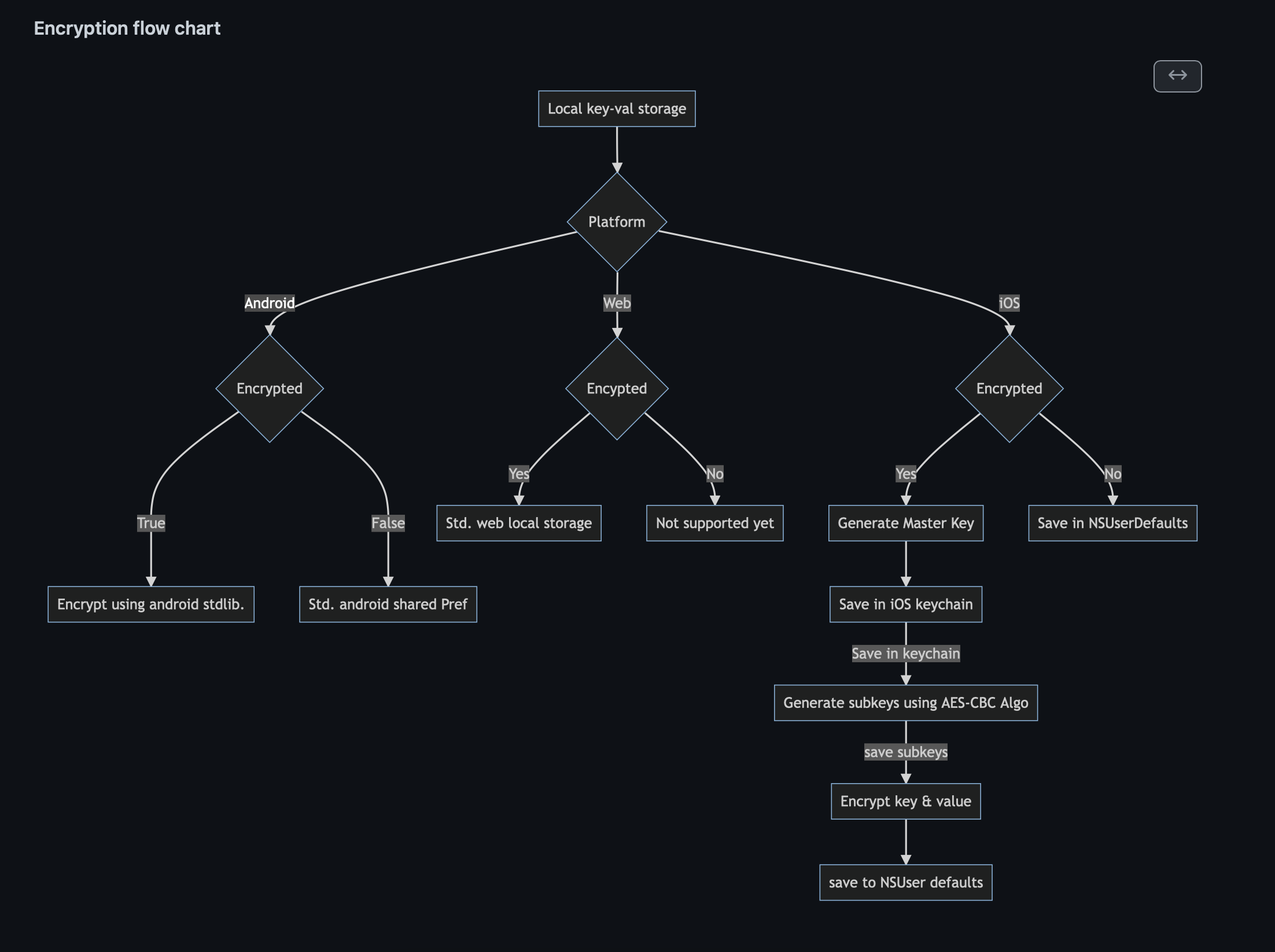
Encryption flow chart

FlowChart

Usage
  1. Save :
    var pref = await SecureSharedPref.getInstance();
    await pref.putString("StringEncrypted", "This is my first string test",isEncrypted: true);
    await pref.putInt("key", 100, isEncrypted: true);
    await pref.putMap("mapKey", {"Hello":true}, isEncrypted: true);
    await pref.putDouble("doubleKey", 20.32, isEncrypted: true);
    await pref.putBool("boolKey", true,isEncrypted:  true);
    await pref.putStringList("listKey", ["S","K"], isEncrypted: true);

First parameter is the 'key' Second parameter is the value Third parameter is whether you want to encrypt this key/value or not.

  1. Fetch :
    var pref = await SecureSharedPref.getInstance();
    await pref.getString("StringEncrypted", isEncrypted: true);
    await pref.getInt("key", isEncrypted: true);
    await pref.getMap("mapKey", isEncrypted: true);
    await pref.getDouble("doubleKey", isEncrypted: true);
    await pref.getBool("boolKey",isEncrypted: true);
    await pref.getStringList("listKey", isEncrypted: true);

First parameter is the 'key' Second parameter is whether you have encrypted this key/value or not.

Categories

Dependencies

Dependency list 5 items

Source repository

Projects using this package

No data available yet.