Package selection guidance compiled from public package information, community data, and project usage.
The zk_finger10 plugin enables integration with ZKTECO fingerprint devices on Android, offering fingerprint enrollment and verification capabilities. Designed for local biometric authentication, it allows developers to securely capture and verify fingerprints directly on supported hardware. The plugin is ideal for applications requiring physical access control, attendance systems, or secure user authentication in offline environments. It leverages native device communication through the ZKTECO SDK, ensuring compatibility with a range of ZKTECO fingerprint scanners.
Use cases
Attendance tracking systems
Secure access control
Offline biometric authentication
Employee time management
Device-specific fingerprint enrollment
Key features
Supports ZKTECO fingerprint devices
Enrollment and verification functionality
Android-only platform support
Native device communication
Offline operation capability
Suitable for
Developers building attendance apps
Systems requiring secure local biometrics
ZKTECO hardware integrations
Android-based kiosk applications
Enterprise security solutions
Considerations
Limited to Android platform
Requires compatible ZKTECO hardware
No iOS support
Dependent on device firmware
May require additional configuration for specific models
Original README
Original README snapshot from the linked source repository. Visit the repository for the latest content.
zkfinger10 - Modern Fingerprint Plugin for Flutter 🚀
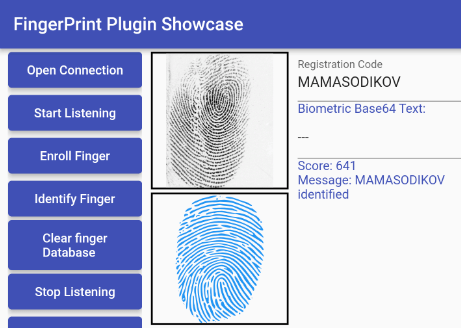
📱 Sample Screenshot
A modern, fully updated Flutter plugin for ZKTeco fingerprint scanners with Flutter v3.35.3 compatibility and Android Plugin V2 embedding. This package provides comprehensive support for ZKTeco fingerprint devices including enrollment, verification, and advanced template management.
✨ Major v1.0.0 Update - Fully Modernized!
This plugin has been completely modernized for 2024+ Flutter development:
🎯 Flutter v3.35.3 Compatible
🔧 Android Plugin V2 Embedding
📱 Android API 34+ Support
🏗️ Modern Gradle Build System
💾 Enhanced Database Management
🔒 Improved Security & Performance
📱 Supported Devices
Compatible with ZKTeco fingerprint scanners including:
SLK20R series
ZK9500 series
ZK6500 series
ZK8500R series
Other ZKTeco USB fingerprint devices
Note: This is an unofficial community-maintained package
🚀 Getting Started
Requirements
Flutter: 3.35.0 or higher
Dart SDK: 3.1.0 or higher
Android: API 21+ (Android 5.0+)
Target Android: API 34 (Android 14)
Installation
Add this to your package's pubspec.yaml file:
dependencies:zkfinger10:^1.0.0
Then run:
flutter pub get
⚙️ Android Configuration
1. Add Permissions
Add these permissions to your android/app/src/main/AndroidManifest.xml:
import'package:zkfinger10/zkfinger10.dart';
// Initialize connectionawaitZkFinger.openConnection();
// Register a fingerprintawaitZkFinger.registerFinger(userId: "user123");
// Identify a fingerprintawaitZkFinger.identify();
// Clear all fingerprintsawaitZkFinger.clearFingerDatabase();
// Close connectionawaitZkFinger.closeConnection();
🆕 New Bidirectional Data Management
// Get fingerprint feature data for a specific userString? feature = awaitZkFinger.getUserFeature(userId: "user123");
// Get all users and their fingerprint dataMap<String, String>? users = awaitZkFinger.getAllUsers();
// Get total count of usersint? count = awaitZkFinger.getUserCount();
// Update user's fingerprint feature databool? success = awaitZkFinger.updateUserFeature(
userId: "user123",
feature: "base64_encoded_fingerprint_data"
);
// Check if user existsbool? exists = awaitZkFinger.checkUserExists(userId: "user123");
Event Streams
// Listen to fingerprint status changesZkFinger.fingerStatusChangeStream.listen((status) {
print('Status: ${status['message']}');
});
// Listen to fingerprint image dataZkFinger.fingerImageStream.listen((imageBytes) {
// Process fingerprint image
});
⚠️ Build Configuration
Release Build Settings
Add these lines to your android/app/build.gradle if you have problems on release:
    buildTypes {
        release {
           ....

            //Add these lines when releasing your app
            minifyEnabled false
            shrinkResources false
            // useProguard false

        }
    }
🔧 Troubleshooting
Common Issues
Plugin not found: Ensure you've run flutter pub get and restarted your IDE
USB permission denied: Check that your device filter XML is correctly configured
Build errors: Verify your Flutter and Android versions meet the requirements
Runtime crashes: Ensure you're targeting Android API 34+ with proper permissions
Migration from v0.x.x
If upgrading from an older version:
Update Flutter: Ensure you're using Flutter 3.35.0+
Update Android: Target API 34+ in your build.gradle
Check Permissions: Verify all required permissions are added
Test Thoroughly: The plugin now uses V2 embedding which may affect lifecycle behavior