
 v2.0.5
bottom_bar
底部栏有助于创建一个经过优化的底部导航栏,并带有精美的动画效果
137喜欢 1210近 30 天下载160Pub 分数
AndroidiOSWebmacOSWindowsLinux
底部栏有助于创建一个经过优化的底部导航栏,并带有精美的动画效果

{"sdk":"flutter"}{"sdk":"flutter"}以下为英文项目原文快照,最新内容请访问 GitHub。
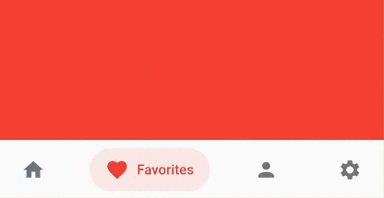
Bottom bar helps create an optimized bottom navigation bar with beautiful animations.
Bottom Bar
Add bottom_bar to pubspec.yaml
dependencies:
  bottom_bar: ^2.0.5
darkActiveColor is removed to simplify the api. Instead, use PlatformBrightness to check dark mode and adjust the color accordinglyimport 'package:bottom_bar/bottom_bar.dart';
  int _currentPage = 0;
  final _pageController = PageController();

  @override
  Widget build(BuildContext context) {
    return Scaffold(
      body: PageView(
        controller: _pageController,
        children: [
          Container(color: Colors.blue),
          Container(color: Colors.red),
          Container(color: Colors.greenAccent.shade700),
          Container(color: Colors.orange),
        ],
        onPageChanged: (index) {
          // Use a better state management solution
          // setState is used for simplicity
          setState(() => _currentPage = index);
        },
      ),
      bottomNavigationBar: BottomBar(
        selectedIndex: _currentPage,
        onTap: (int index) {
          _pageController.jumpToPage(index);
          setState(() => _currentPage = index);
        },
        items: <BottomBarItem>[
          BottomBarItem(
            icon: Icon(Icons.home),
            title: Text('Home'),
            activeColor: Colors.blue,
          ),
          BottomBarItem(
            icon: Icon(Icons.favorite),
            title: Text('Favorites'),
            activeColor: Colors.red,
          ),
          BottomBarItem(
            icon: Icon(Icons.person),
            title: Text('Account'),
            activeColor: Colors.greenAccent.shade700,
          ),
          BottomBarItem(
            icon: Icon(Icons.settings),
            title: Text('Settings'),
            activeColor: Colors.orange,
          ),
        ],
      ),
    );
  }
BottomBar that displays a list of BottomBarItemBottomBarBottomBarBottomBar containerCurve of animationDuration of animationBoxShadow of BottomBarPadding of BottomBarItem's background colorTextStyle of title widgetIcon of BottomBarItemBottomBarItem (Typically a Text widget)BottomBarItemBottomBarItemBottomBarItemBottomBarItem background color (Defaults to 15%)BottomBarItem is not activeBottomBarItem when it is NOT selected @override
Widget build(BuildContext context) {
bool isDarkMode = MediaQuery.of(context).platformBrightness == Brightness.dark;
BottomBarItem(
activeColor: isDarkMode ? Colors.orange : Colors.blue, // Is dark mode true? (Yes -> Colors.orange | No -> Colors.blue)
),
}
If you have any suggestions or issues, feel free to open an issue
If you would like to contribute, feel free to create a PR