

v11.2.0
auto_route
AutoRoute 是一种声明式路由解决方案,所有导航所需的内容都会自动为您生成。
3410喜欢 42.1万近 30 天下载160Pub 分数
AndroidiOSWebmacOSWindowsLinux
设置您的 Flutter 项目以使用模型-视图-视 ViewModel (MVVM) 架构

以下为英文项目原文快照,最新内容请访问 GitHub。
Model–View–ViewModel (MVVM) is a very established architectural pattern when it's come to software development. Here I have tried to put MVVM in simple example which will help you to implement in any project.
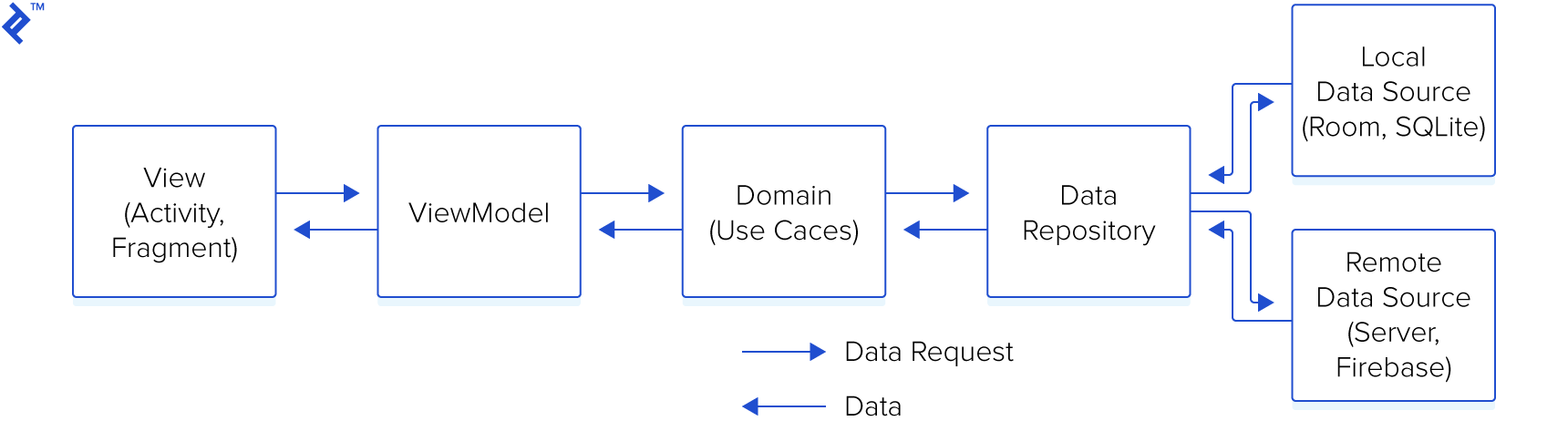
This sample demonstrates how one can
Apart from the basic architecture setup, this sample also demonstrates
There are 3 main modules to help separate the code. They are Data, Domain, and Application.
Data contains Local Storage, APIs, Data objects (Request/Response object, DB objects), and the repository implementation.
Domain contains UseCases, Domain Objects/Models, and Repository Interfaces
Application contains UI, View Objects, Widgets, etc. Can be split into separate modules itself if needed. For example, we could have a module called Device handling things like camera, location, etc.

One can download the code in zip format or take checkout from the git repository.
You need to run build_runner command for code generation everytime when you make changes in your original file.
AutoRoute 是一种声明式路由解决方案,所有导航所需的内容都会自动为您生成。
AutoRoute 是一种声明式路由解决方案,所有导航所需的内容都会自动为您生成。
retrofit.dart 是一个使用 source_gen 并受 Chopper 和 Retrofit 启发的 dio 客户端生成器。
retrofit generator 是一个使用 source_gen 生成的 dio 客户端,灵感来自 Chopper 和 Retrofit。
用于构建可测试、可扩展且可维护的 Flutter 应用程序的框架
Injectable 是一个方便的代码生成器,用于 get_it。它受到 Angular DI、Guice DI 和 inject.dart 的启发。
Injectable 是一个方便的代码生成器,用于 get_it。它受到 Angular DI、Guice DI 和 inject.dart 的启发。
Pretty Dio Logger 是一个 Dio 拦截器,以美观且易于阅读的格式记录网络调用。
依赖清单 19 项
{"sdk":"flutter"}^1.0.2^4.0.6^3.0.1+1^4.6.0^1.2.0-beta-1^7.2.0^1.5.3^2.3.15^4.2.1^1.0.2{"sdk":"flutter"}^2.0.0^4.0.3^2.2.0^6.3.1^1.5.4^4.2.1^5.3.0先按使用场景筛选,再比较项目活跃情况,最后到原始仓库核对使用要求。
“A repository is the most basic element of GitHub.”
GitHub Docs — About repositories ↗