
 v1.1.0
flutter_funding_choices
Funding Choices 的 Flutter 实现,这是 Google 提供的一项服务,允许在 AdMob 中请求用户对个性化广告的同意。
55喜欢 76近 30 天下载150Pub 分数
AndroidiOS
Funding Choices 的 Flutter 实现,这是 Google 提供的一项服务,允许在 AdMob 中请求用户对个性化广告的同意。

依赖清单 2 项
{"sdk":"flutter"}^3.0.1以下为英文项目原文快照,最新内容请访问 GitHub。
Flutter Funding Choices is an unofficial Flutter implementation of Funding Choices, a Google service that allows to request user consent for personalized ads in AdMob.
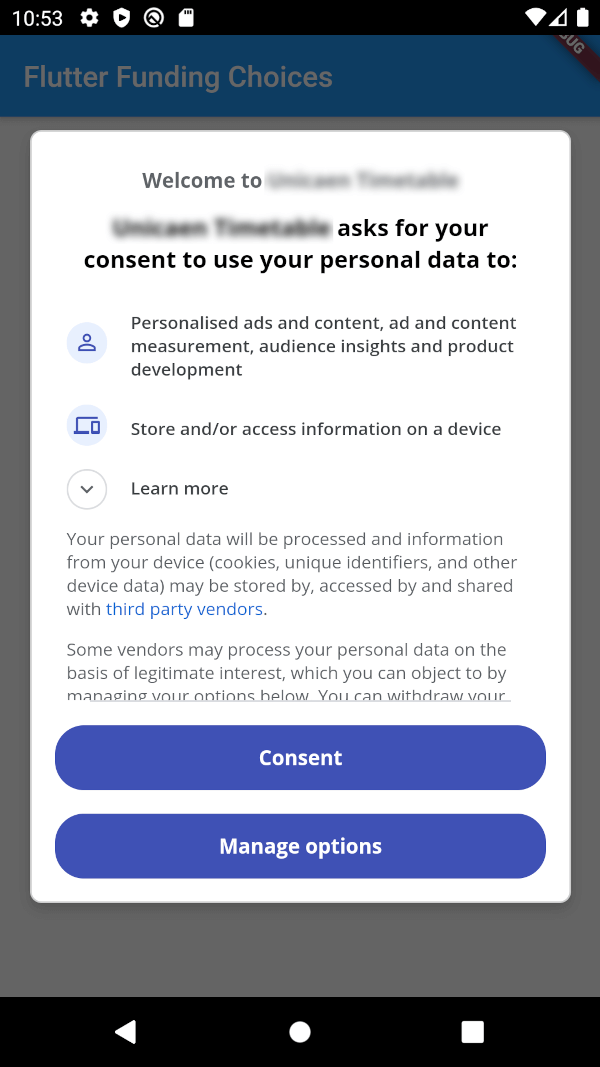
https://github.com/Skyost/FlutterFundingChoices/raw/master/screenshots/android.pngYou must have linked your FundingChoices account to your Admob account. See this documentation on Google Support.
Your app must use Android Embedding V2.
Also, you need to add an app id in your AndroidManifest.xml (in the application tag) :
<?xml version="1.0" encoding="utf-8"?>
<manifest xmlns:android="http://schemas.android.com/apk/res/android"
   package="fr.skyost.example">

   <application
       <!--
         Some attributes here...
        -->
    >
       <meta-data
           android:name="com.google.android.gms.ads.APPLICATION_ID"
           android:value="YOUR-APP-ID"/>
       <!--
         Activities, ...
        -->
   </application>

</manifest>
You can obtain your app ID by following these instructions.
You need to add an app id in your Info.plist :
<key>GADApplicationIdentifier</key>
<string>YOUR-APP-ID</string>
You can obtain your app ID by following these instructions.
You may also need to handle Apple's App Tracking Transparency message by putting this in your Info.plist :
<key>NSUserTrackingUsageDescription</key>
<string>This identifier will be used to deliver personalized ads to you.</string>
Feel free to configure the message as you want.
There are three methods :
FlutterFundingChoices.requestConsentInformation() : Allows to get current user consent information (whether you need to show the consent form, whether the user wants personalized ads, ...).FlutterFundingChoices.showConsentForm() : Loads and shows the consent form. You must check first that there is a consent form (with isConsentFormAvailable on the returned object of the previous method).FlutterFundingChoices.reset() : Resets the consent information.You typically want to use it like this on Android :
@override
void initState() {
  super.initState();
  WidgetsBinding.instance.addPostFrameCallback((_) async {
    ConsentInformation consentInfo = await FlutterFundingChoices.requestConsentInformation();
    if (consentInfo.isConsentFormAvailable && consentInfo.consentStatus == ConsentStatus.required) {
      await FlutterFundingChoices.showConsentForm();
      // You can check the result by calling `FlutterFundingChoices.requestConsentInformation()` again !
    }
  });
}
You have a lot of options to contribute to this project ! You can :