

 v3.2.0
widget_with_codeview
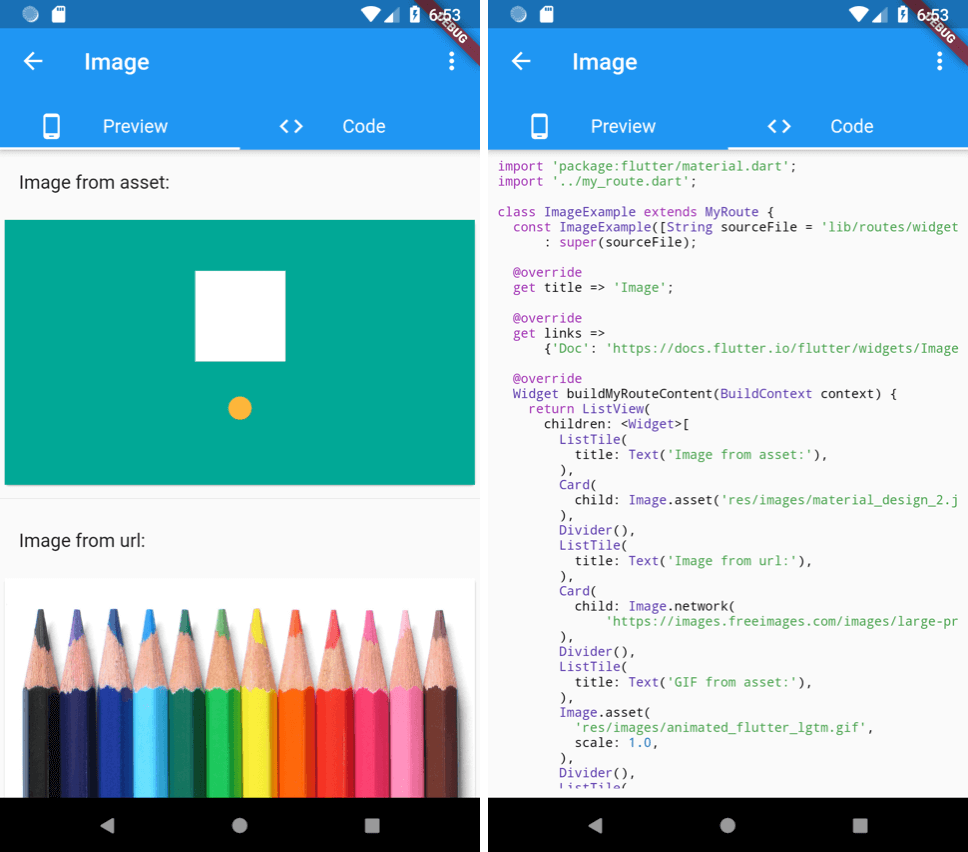
一个并排显示源代码的控件。
67喜欢 1420近 30 天下载120Pub 分数
AndroidiOSWebmacOSWindowsLinux
一个并排显示源代码的控件。

以下为英文项目原文快照,最新内容请访问 GitHub。


A widget with side-by-side source code view. Extracted from the flutter-catalog open-source app.


First make sure to add the source file to the app's assets by editing pubspec.yaml:
dependencies:
  flutter:
    sdk: flutter
  widget_with_codeview:
flutter:
  assets:
    # Include a single source code file:
    - lib/my_awesome_source_code.dart
    # Include all files under a subfoler by adding trailing "/":
    - lib/my_awesome_source_code_subdir/
    - ...
Then wrap the widget from that source file by a WidgetWithCodeView:
WidgetWithCodeView(
  child: MyAwesomeWidget(), // ⚡️ If null, will only show the source code view.
  filePath: 'lib/my_awesome_source_code.dart',
  /// [codeLinkPrefix] is optional. When it's specified, two more buttons
  /// (open-code-in-browser, copy-code-link) will be added in the code view.
  codeLinkPrefix: 'https://github.com/<my_username>/<my_project>/blob/master/',
),
You can also choose to only show the code by not setting the child argument.
See example/lib/main.dart for a concrete example.
依赖清单 8 项
{"sdk":"flutter"}^0.7.0^7.0.0^8.0.1^0.5.2^1.2.0^6.3.2{"sdk":"flutter"}先按使用场景筛选,再比较项目活跃情况,最后到原始仓库核对使用要求。
“A repository is the most basic element of GitHub.”
GitHub Docs — About repositories ↗