
 v1.2.1
decorated_icon
一个轻量级、高效的图标小部件,支持阴影效果列表。
80喜欢 3170近 30 天下载150Pub 分数
AndroidiOSWebmacOSWindowsLinux
一个为 Flutter 提供的控件,可为图标添加阴影效果

依赖清单 2 项
{"sdk":"flutter"}{"sdk":"flutter"}以下为英文项目原文快照,最新内容请访问 GitHub。
The best-performing shadowed icon widget for Flutter!
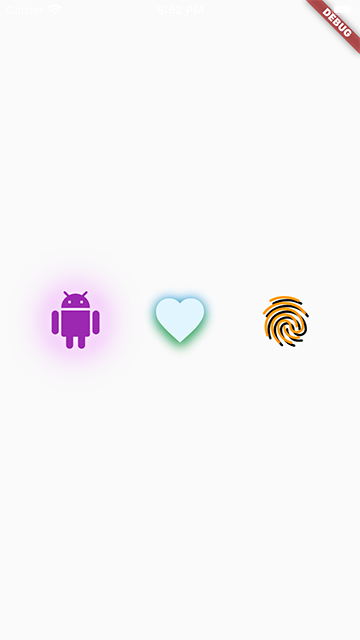
DecoratedIcon is a super lightweight Icon that supports shadow decorations.
No complicated hacks or multiple widgets, just List<Shadow> shadows like a TextStyle!
This widget is able to achieve the most efficient implementation of an icon with a shadow because it is uses a single Text widget to display the icon and apply the shadows.
It even supports debugging and Semantics.
One thing to keep in mind when using multiple shadows is the order of stacking by Flutter: the first shadow in the list will be painted at the bottom. (Similar to how the Stack widget draws its children.)
Also note that due to Flutter's current limitation, achieving an "outer glow" effect is not currently possible. You can read more here.
To use this package, add decorated_icon as a dependency in your pubspec.yaml file.
snapshot
Import the library.
import 'package:decorated_icon/decorated_icon.dart';
Then use DecoratedIcon as you would an Icon:
final decoratedIcons = Row(
  mainAxisAlignment: MainAxisAlignment.spaceEvenly,
  children: const [
    DecoratedIcon(
      Icons.android,
      color: Colors.purple,
      size: 60.0,
      shadows: [
        BoxShadow(
          blurRadius: 42.0,
          color: Colors.purpleAccent,
        ),
        BoxShadow(
          blurRadius: 12.0,
          color: Colors.white,
        ),
      ],
    ),
    DecoratedIcon(
      Icons.favorite,
      color: Colors.lightBlue.shade50,
      size: 60.0,
      shadows: [
        BoxShadow(
          blurRadius: 12.0,
          color: Colors.blue,
        ),
        BoxShadow(
          blurRadius: 12.0,
          color: Colors.green,
          offset: Offset(0, 6.0),
        ),
      ],
    ),
    DecoratedIcon(
      Icons.fingerprint,
      color: Colors.orange,
      size: 60.0,
      shadows: [
        BoxShadow(
          color: Colors.black,
          offset: Offset(3.0, 3.0),
        ),
      ],
    ),
  ],
);