搜索插件、代码仓与 APP 分类

decorated_icon 封面
插件详情v1.2.1

decorated_icon

一个轻量级、高效的图标小部件,支持阴影效果列表。

AndroidiOSWebmacOSWindowsLinux
近 30 天下载
2790
喜欢数
80
Pub 分数
150

安装插件

flutter pub add decorated_icon

插件介绍

基于插件公开信息、社区数据与项目使用情况整理的选型参考。

DecoratedIcon 是一个轻量且高效的 Flutter 小部件,旨在显示带有可自定义阴影效果的图标。它通过允许开发者应用多重阴影来扩展标准 Icon 小部件,从而增强视觉深度和设计灵活性。非常适合在不带来性能开销的情况下创建视觉吸引力强的 UI 元素,支持所有主要平台,包括 Android、iOS、Web、macOS、Windows 和 Linux。该包可通过 pub add 轻松集成,代码简洁且维护良好。适用于需要具有细微或强烈阴影效果的样式化图标的各类应用。

适合场景

  • 添加带阴影的样式图标
  • 创建视觉丰富的 UI 组件
  • 增强应用程序界面中的图标外观
  • 设计自定义按钮图标
  • 改进仪表板中的视觉层次

主要特点

  • 支持多种阴影效果
  • 轻量且高效
  • 通过 pub add 轻松集成
  • 跨平台兼容性
  • 扩展标准 Icon 小部件
  • 可自定义的阴影属性

适合对象

  • 寻求视觉魅力的UI设计师
  • 开发现代应用程序界面的开发者
  • 需要细微图标增强的项目
  • 具有高视觉设计标准的应用程序
  • 注重性能和简洁性的团队

使用建议

  • 仅限阴影效果
  • 无内置动画支持
  • 需要手动配置阴影
  • 不适用于复杂的图标变换
  • 最好与简单的图标主题配合使用

原始 README

以下为关联源码仓库的 README 原文快照,最新内容请访问源码仓库。

pub package

Decorated Icon

The best-performing shadowed icon widget for Flutter!

DecoratedIcon is a super lightweight Icon that supports shadow decorations.

No complicated hacks or multiple widgets, just List<Shadow> shadows like a TextStyle!

This widget is able to achieve the most efficient implementation of an icon with a shadow because it is uses a single Text widget to display the icon and apply the shadows.

It even supports debugging and Semantics.

One thing to keep in mind when using multiple shadows is the order of stacking by Flutter: the first shadow in the list will be painted at the bottom. (Similar to how the Stack widget draws its children.)

Also note that due to Flutter's current limitation, achieving an "outer glow" effect is not currently possible. You can read more here.

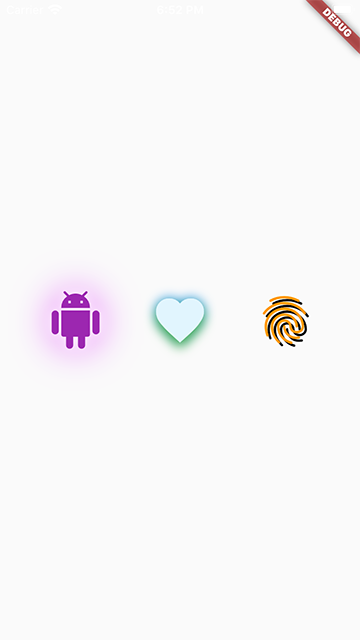
Usage

To use this package, add decorated_icon as a dependency in your pubspec.yaml file.

Example

snapshot

Import the library.

import 'package:decorated_icon/decorated_icon.dart';

Then use DecoratedIcon as you would an Icon:

final decoratedIcons = Row(
  mainAxisAlignment: MainAxisAlignment.spaceEvenly,
  children: const [
    DecoratedIcon(
      Icons.android,
      color: Colors.purple,
      size: 60.0,
      shadows: [
        BoxShadow(
          blurRadius: 42.0,
          color: Colors.purpleAccent,
        ),
        BoxShadow(
          blurRadius: 12.0,
          color: Colors.white,
        ),
      ],
    ),
    DecoratedIcon(
      Icons.favorite,
      color: Colors.lightBlue.shade50,
      size: 60.0,
      shadows: [
        BoxShadow(
          blurRadius: 12.0,
          color: Colors.blue,
        ),
        BoxShadow(
          blurRadius: 12.0,
          color: Colors.green,
          offset: Offset(0, 6.0),
        ),
      ],
    ),
    DecoratedIcon(
      Icons.fingerprint,
      color: Colors.orange,
      size: 60.0,
      shadows: [
        BoxShadow(
          color: Colors.black,
          offset: Offset(3.0, 3.0),
        ),
      ],
    ),
  ],
);

所属分类

源码仓库

使用此插件的项目