
 v4.0.2
glass_kit
一个包含用于在 Flutter 应用中实现毛玻璃效果的组件的包。
535喜欢 1.2万近 30 天下载160Pub 分数
AndroidiOSWebmacOSWindowsLinux
💎 一个包含用于在 Flutter 应用中实现玻璃拟态的组件的包

{"sdk":"flutter"}{"sdk":"flutter"}^6.0.0以下为英文项目原文快照,最新内容请访问 GitHub。
Glass Kit
A package containing widgets to implement glass morphism in flutter apps
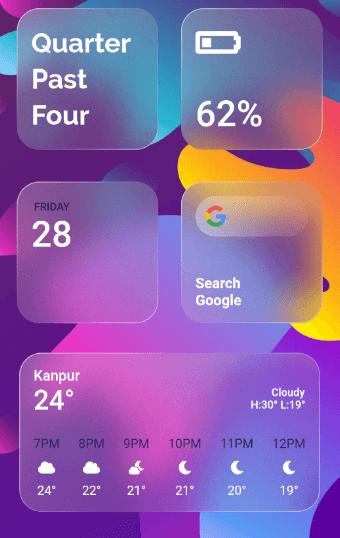
GlassMorphism, is a new UI trend with a huge popularity among designers. Glass Kit provides you with widgets and other elements to implement this style in your flutter apps easily and efficiently.
ios-themed-glassmorphism
glassmorphism-in-card
Source code for the above can be found in the example directory here
You should add the following to the pubspec.yaml file:
dependencies:
  glass_kit: ^4.0.2
You should then run flutter packages get in your terminal so as to get the package.
Now import the package in the dart file:
import 'package:glass_kit/glass_kit.dart';
To create a basic clear glass container you can use the clearGlass constructor. If needed, just provide the height and width and you are good to go. The clearGlass and frostedGlass constructors assign default values to the properties if not provided.
GlassContainer.clearGlass(child: Child());
To create a frosted glass container use the frostedGlass constructor.
GlassContainer.frostedGlass(width: 300, child: Child());
Depending on your requirements you can tweak with the properties and create awesome glass widgets. You can also use the GlassContainer constructor to create fully customizable glass widgets.
Note : GlassContainer comes with properties as in a regular Container but with some exceptions and additions. Checkout the docs for the list of properties and their default values.
Here's a fully customized GlassContainer with shape as circle:
GlassContainer(
      height: 300,
      width: 400,
      gradient: LinearGradient(
        colors: [Colors.white.withOpacity(0.40), Colors.white.withOpacity(0.10)],
        begin: Alignment.topLeft,
        end: Alignment.bottomRight,
      ),
      borderGradient: LinearGradient(
        colors: [Colors.white.withOpacity(0.60), Colors.white.withOpacity(0.10), Colors.lightBlueAccent.withOpacity(0.05), Colors.lightBlueAccent.withOpacity(0.6)],
        begin: Alignment.topLeft,
        end: Alignment.bottomRight,
        stops: [0.0, 0.39, 0.40, 1.0],
      ),
      blur: 15.0,
      borderWidth: 1.5,
      elevation: 3.0,
      isFrostedGlass: true,
      shadowColor: Colors.black.withOpacity(0.20),
      alignment: Alignment.center,
      frostedOpacity: 0.12,
      margin: EdgeInsets.all(8.0),
      padding: EdgeInsets.all(8.0),
    );
Note : You can also provide borderRadius but when the shape is BoxShape.rectangle.
If you encounter any problems feel free to open an issue. If you feel the library is missing a feature, please raise a ticket on GitHub and I'll look into it. Pull requests are also welcome.
See Contributing.md.
Thanks goes to these wonderful people (emoji key):
| Kabilan VS Kabilan VS 🐛 💻 |
Martin Klüpfel Martin Klüpfel 🚧 💻 |
Vladimir E. Koltunov Vladimir E. Koltunov 🐛 💻 |
This project follows the all-contributors specification. Contributions of any kind are welcome! See Contributing.md.
glass_kit is licensed under MIT License