搜索插件、代码仓与 APP 分类

glass_kit 封面
插件详情v4.0.2

glass_kit

一个包含用于在 Flutter 应用中实现毛玻璃效果的组件的包。

AndroidiOSWebmacOSWindowsLinux
近 30 天下载
1.3万
喜欢数
535
Pub 分数
160

安装插件

flutter pub add glass_kit

插件介绍

基于插件公开信息、社区数据与项目使用情况整理的选型参考。

Glass Kit 是一个 Flutter 包,提供可直接使用的组件,用于在应用程序中实现玻璃拟态效果。它使开发者能够创建视觉上吸引人的半透明 UI 组件,具有模糊和透明效果,这在现代设计趋势中很常见。该包支持多个平台,包括 Android、iOS、Web、macOS、Windows 和 Linux,确保在各种设备上保持一致的玻璃拟态风格。通过 pub add 简单集成,它简化了添加复杂 UI 元素的过程,无需复杂的自定义编码。

适合场景

  • 创建现代应用程序界面
  • 设计半透明叠加层
  • 构建仪表板背景
  • 实现带有模糊效果的浮动卡片
  • 通过视觉深度提升用户体验

主要特点

  • 预构建的玻璃模糊小部件
  • 支持模糊效果
  • 透明度和渐变自定义
  • 跨平台兼容性
  • 与 Flutter 的轻松集成
  • 响应式设计支持

适合对象

  • 寻求现代美学的UI设计师
  • 开发简洁移动或网页应用的开发者
  • 需要沉浸式视觉效果的项目
  • 专注于精美的用户界面
  • 面向现代设计趋势的应用

使用建议

  • 使用重度模糊效果时的性能影响
  • 可能需要在低端设备上进行优化
  • 超出基本玻璃样式之外的自定义功能有限
  • 最适合浅色主题设计
  • 不适合高对比度或深色模式为主的应用程序

原始 README

以下为关联源码仓库的 README 原文快照,最新内容请访问源码仓库。

Glass Kit

A package containing widgets to implement glass morphism in flutter apps


Platform Pub Package CI Codecov Coverage License: MIT Donate


Table of contents

About

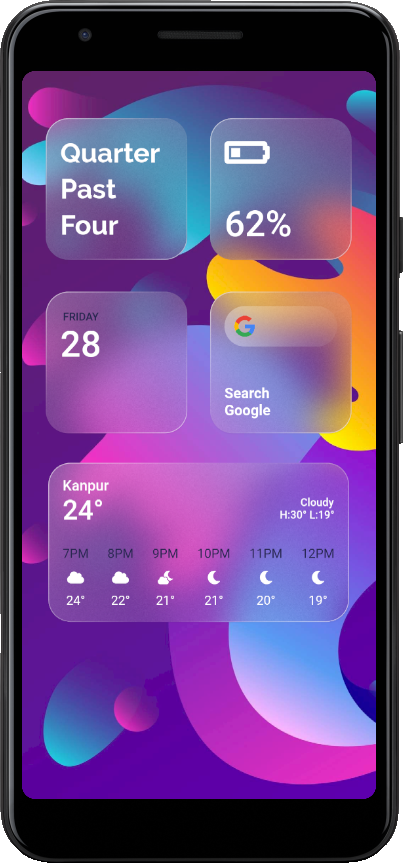
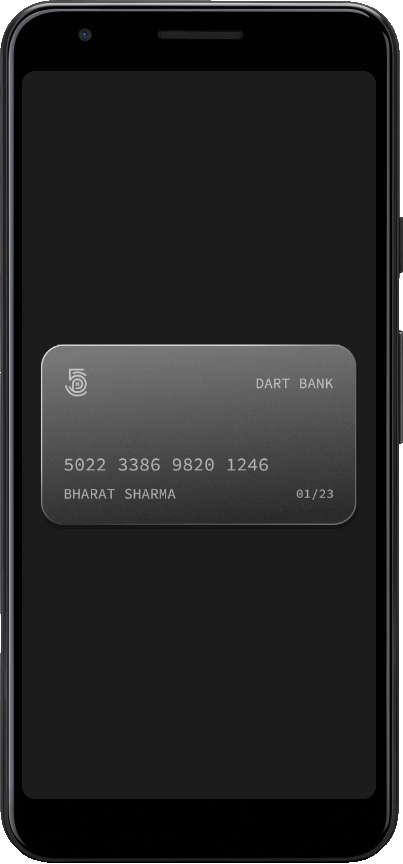
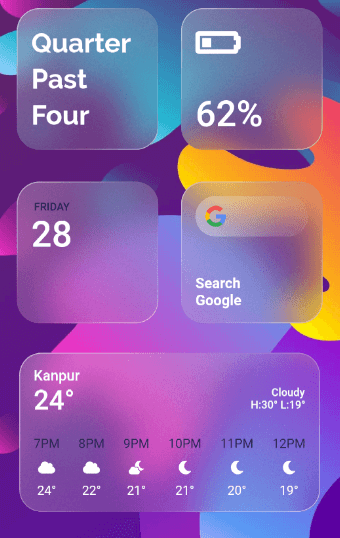
GlassMorphism, is a new UI trend with a huge popularity among designers. Glass Kit provides you with widgets and other elements to implement this style in your flutter apps easily and efficiently.

Gallery:


ios-themed-glassmorphism         glassmorphism-in-card

Source code for the above can be found in the example directory here


Getting Started

You should add the following to the pubspec.yaml file:

dependencies:
  glass_kit: ^4.0.2

You should then run flutter packages get in your terminal so as to get the package.

Now import the package in the dart file:

import 'package:glass_kit/glass_kit.dart';

Usage

To create a basic clear glass container you can use the clearGlass constructor. If needed, just provide the height and width and you are good to go. The clearGlass and frostedGlass constructors assign default values to the properties if not provided.

GlassContainer.clearGlass(child: Child());

To create a frosted glass container use the frostedGlass constructor.

GlassContainer.frostedGlass(width: 300, child: Child());

Depending on your requirements you can tweak with the properties and create awesome glass widgets. You can also use the GlassContainer constructor to create fully customizable glass widgets.

Note : GlassContainer comes with properties as in a regular Container but with some exceptions and additions. Checkout the docs for the list of properties and their default values.

Here's a fully customized GlassContainer with shape as circle:

GlassContainer(
      height: 300,
      width: 400,
      gradient: LinearGradient(
        colors: [Colors.white.withOpacity(0.40), Colors.white.withOpacity(0.10)],
        begin: Alignment.topLeft,
        end: Alignment.bottomRight,
      ),
      borderGradient: LinearGradient(
        colors: [Colors.white.withOpacity(0.60), Colors.white.withOpacity(0.10), Colors.lightBlueAccent.withOpacity(0.05), Colors.lightBlueAccent.withOpacity(0.6)],
        begin: Alignment.topLeft,
        end: Alignment.bottomRight,
        stops: [0.0, 0.39, 0.40, 1.0],
      ),
      blur: 15.0,
      borderWidth: 1.5,
      elevation: 3.0,
      isFrostedGlass: true,
      shadowColor: Colors.black.withOpacity(0.20),
      alignment: Alignment.center,
      frostedOpacity: 0.12,
      margin: EdgeInsets.all(8.0),
      padding: EdgeInsets.all(8.0),
    );

Note : You can also provide borderRadius but when the shape is BoxShape.rectangle.

Bugs or Requests

If you encounter any problems feel free to open an issue. If you feel the library is missing a feature, please raise a ticket on GitHub and I'll look into it. Pull requests are also welcome.

See Contributing.md.

Contributors

Thanks goes to these wonderful people (emoji key):

Kabilan VS
Kabilan VS

🐛 💻
Martin Klüpfel
Martin Klüpfel

🚧 💻
Vladimir E. Koltunov

🐛 💻

This project follows the all-contributors specification. Contributions of any kind are welcome! See Contributing.md.

License

glass_kit is licensed under MIT License

所属分类

源码仓库

使用此插件的项目