
 v3.1.0
google_maps_cluster_manager
基于 Geohash 的简单 Flutter 聚合库,用于 Google 地图。
311喜欢 2390近 30 天下载90Pub 分数
平台暂无数据
适用于 Google 地图的简单 Flutter 聚类库

{"sdk":"flutter"}2.11.1{"sdk":"flutter"}以下为英文项目原文快照,最新内容请访问 GitHub。
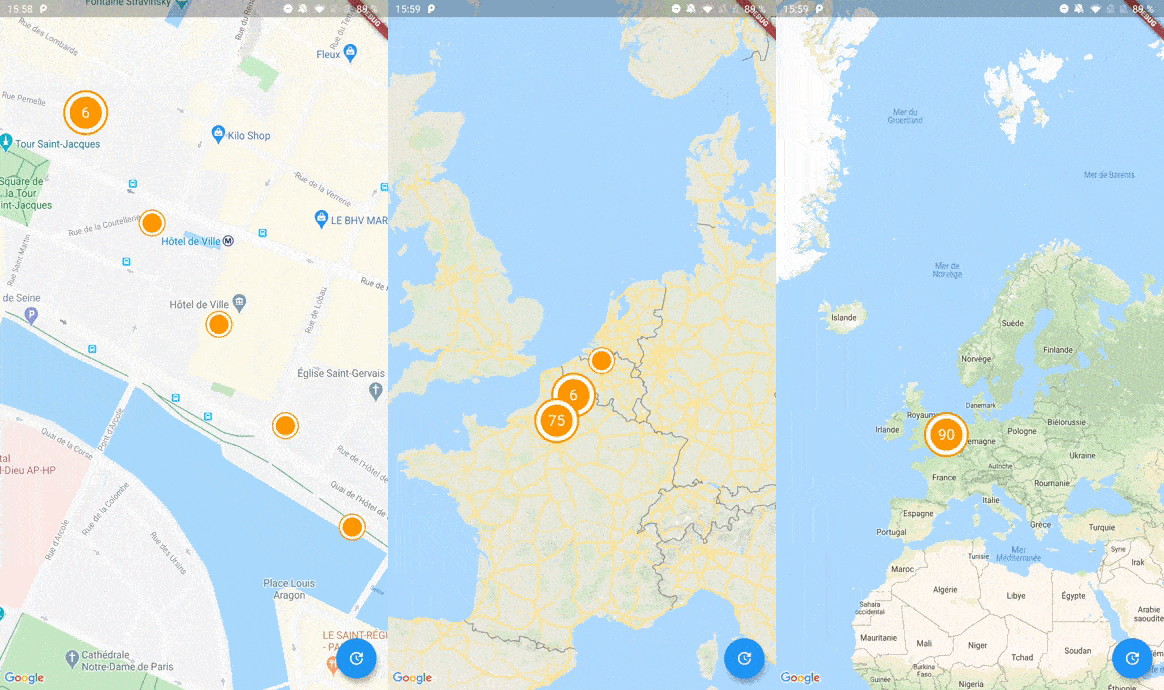
Screenshot
A Flutter package to cluster items on a Google Maps widget based on Geohash. Highly inspired by clustering_google_maps
To use this package, add google_maps_cluster_manager as a dependency in your pubspec.yaml file.
Your map items has to use ClusterItem as a mixin (or extends this class) and implements the LatLng location getter.
class Place with ClusterItem {
  final String name;
  final LatLng latLng;

  Place({required this.name, required this.latLng});

  @override
  LatLng get location => latLng;
}
To start with Cluster Manager, you have to initialize a ClusterManager instance.
ClusterManager<Place>(
    _items, // Your items to be clustered on the map (of Place type for this example)
    _updateMarkers, // Method to be called when markers are updated
    markerBuilder: _markerBuilder, // Optional : Method to implement if you want to customize markers
    levels: [1, 4.25, 6.75, 8.25, 11.5, 14.5, 16.0, 16.5, 20.0], // Optional : Configure this if you want to change zoom levels at which the clustering precision change
    extraPercent: 0.2, // Optional : This number represents the percentage (0.2 for 20%) of latitude and longitude (in each direction) to be considered on top of the visible map bounds to render clusters. This way, clusters don't "pop out" when you cross the map.
    stopClusteringZoom: 17.0 // Optional : The zoom level to stop clustering, so it's only rendering single item "clusters"
);
When your GoogleMapController is created, you have to set the mapId with the setMapId method :
_manager.setMapId(controller.mapId);
You are able to add an new item to the map by calling addItem method on your ClusterManager instance. You can also completely change the items on your maps by calling setItems method.
You can customize the icon of a cluster by using Future<Marker> Function(Cluster<T extends ClusterItem>) markerBuilder parameter.
static Future<Marker> Function(Cluster) get markerBuilder => (cluster) async {
  return Marker(
    markerId: MarkerId(cluster.getId()),
    position: cluster.location,
    onTap: () {
        print(cluster.items);
    },
    icon: await getClusterBitmap(cluster.isMultiple ? 125 : 75,
    text: cluster.isMultiple? cluster.count.toString() : null),
  );
};

static Future<BitmapDescriptor> getClusterBitmap(int size, {String text?}) async {
  final PictureRecorder pictureRecorder = PictureRecorder();
  final Canvas canvas = Canvas(pictureRecorder);
  final Paint paint1 = Paint()..color = Colors.red;

  canvas.drawCircle(Offset(size / 2, size / 2), size / 2.0, paint1);

  if (text != null) {
    TextPainter painter = TextPainter(textDirection: TextDirection.ltr);
    painter.text = TextSpan(
    text: text,
    style: TextStyle(
        fontSize: size / 3,
        color: Colors.white,
        fontWeight: FontWeight.normal),
    );
    painter.layout();
    painter.paint(
      canvas,
      Offset(size / 2 - painter.width / 2, size / 2 - painter.height / 2),
    );
  }

  final img = await pictureRecorder.endRecording().toImage(size, size);
  final data = await img.toByteData(format: ImageByteFormat.png);

  return BitmapDescriptor.fromBytes(data.buffer.asUint8List());
}
Every cluster (even one item clusters) is rendered by the library as a Cluster<T extends ClusterItem> object. You can differentiate single item clusters from multiple ones by using the isMultiple variable (or the count variable). This way, you can create different markers icon depending on the type of cluster.
You can create multiple managers for a single map, see the multiple.dart example.
See the example directory for a complete sample app.