
 v4.0.0
flutter_splash_screen
一个适用于 Flutter 的启动画面 API,可编程地隐藏和显示启动画面。适用于 Android 和 iOS。
70喜欢 207近 30 天下载140Pub 分数
AndroidiOS
Flutter 的启动画面,应用加载完成后隐藏,适用于 iOS 和 Android。

依赖清单 2 项
{"sdk":"flutter"}{"sdk":"flutter"}以下为英文项目原文快照,最新内容请访问 GitHub。
Download PRs Welcome flutter_splash_screen release License MIT RN
A splash screen API for flutter which can programatically hide and show the splash screen. Works on Android and iOS.
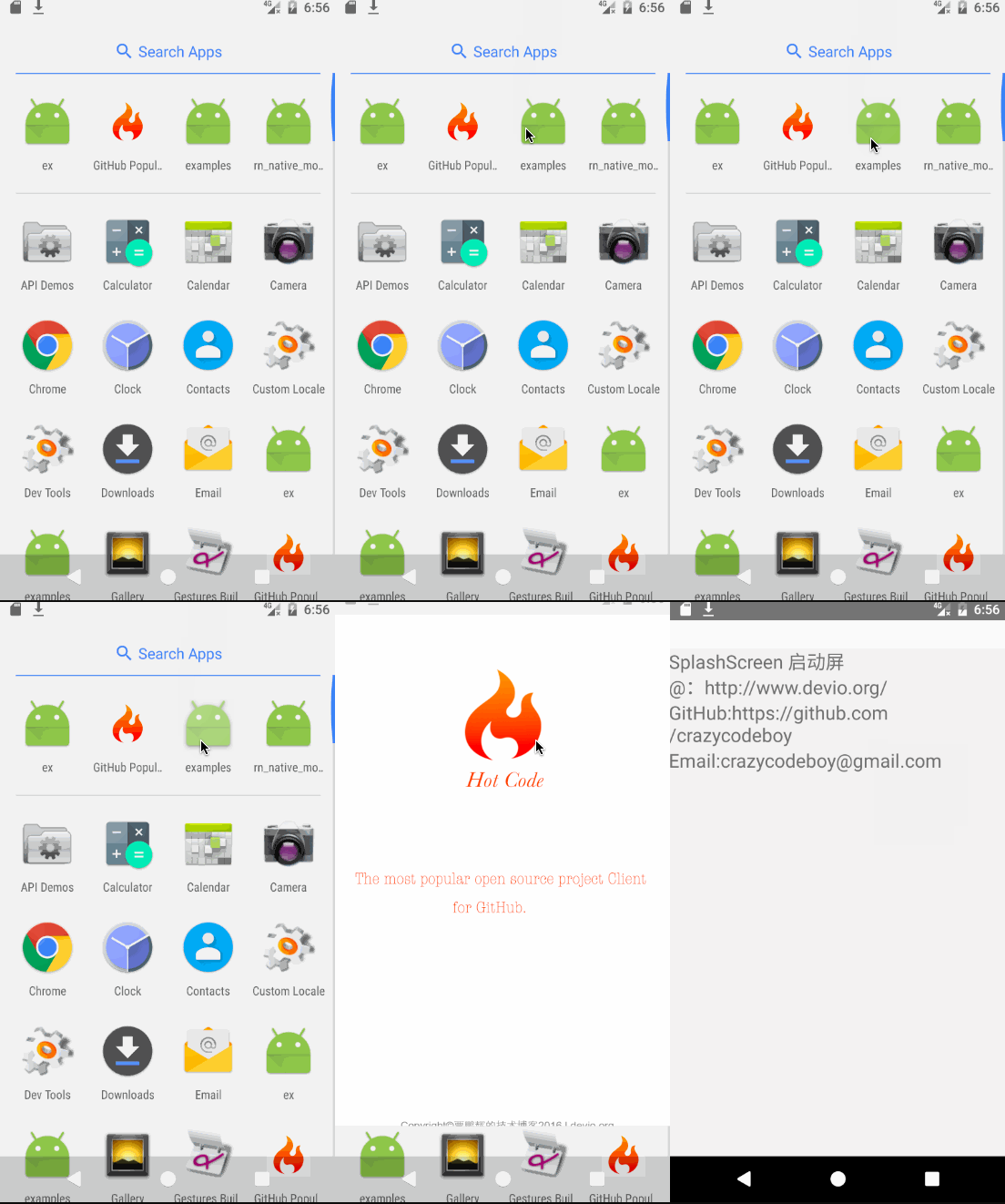
| Screenshots | Screenshots |
|---|---|
| flutter_splash_screen-Android | flutter_splash_screen-iOS |
Run this command:
flutter pub add flutter_splash_screen
MainActivity.ktUpdate the MainActivity.kt to use flutter_splash_screen via the following changes:
package org.devio.flutter.splashscreen.example

import android.os.Bundle
import io.flutter.embedding.android.FlutterActivity

import org.devio.flutter.splashscreen.SplashScreen // add

class MainActivity : FlutterActivity() {
    override fun onCreate(savedInstanceState: Bundle?) {
        // SplashScreen.show(this)
        // or enable full screen
        SplashScreen.show(this, true)
        super.onCreate(savedInstanceState)
    }
}
launch_screen.xml fileCreate a file called launch_screen.xml in app/src/main/res/layout (create the layout-folder if
it doesn't exist). The contents of the file should be the following:
<?xml version="1.0" encoding="utf-8"?>
<FrameLayout xmlns:android="http://schemas.android.com/apk/res/android"
    android:layout_width="match_parent" android:layout_height="match_parent"
    android:background="@android:color/white">

    <ImageView android:layout_width="match_parent" android:layout_height="match_parent"
        android:layout_gravity="center|top" android:scaleType="centerCrop"
        android:src="@mipmap/launch_screen" />
</FrameLayout>
Customize your launch screen by creating a launch_screen.png-file and placing it in an
appropriate mipmap-folder. Android automatically scales drawable, so you do not necessarily need
to provide images for all phone densities.
You can create splash screens in the following folders:
mipmap-ldpimipmap-mdpimipmap-hdpimipmap-xhdpimipmap-xxhdpimipmap-xxxhdpiAdd a color called primary_dark in app/src/main/res/values/colors.xml
<?xml version="1.0" encoding="utf-8"?>
<resources>
    <color name="primary_dark">#000000</color>
</resources>
Optional steps:
If you want the splash screen to be transparent, follow these steps.
Open android/app/src/main/res/values/styles.xml and
add <item name="android:windowIsTranslucent">true</item> to the file. It should look like this:
<resources>
    <!-- Base application theme. -->
    <style name="AppTheme" parent="Theme.AppCompat.Light.NoActionBar">
        <!-- Customize your theme here. -->
        <!--设置透明背景-->
        <item name="android:windowIsTranslucent">true</item>
    </style>
</resources>
To learn more see examples
If you want to customize the color of the status bar when the splash screen is displayed:
Create android/app/src/main/res/values/colors.xml and add
<?xml version="1.0" encoding="utf-8"?>
<resources>
    <color name="status_bar_color"><!-- Colour of your status bar here --></color>
</resources>
Create a style definition for this in android/app/src/main/res/values/styles.xml:
<?xml version="1.0" encoding="utf-8"?>
<resources>
    <style name="SplashScreenTheme" parent="SplashScreen_SplashTheme">
        <item name="colorPrimaryDark">@color/status_bar_color</item>
    </style>
</resources>
Change your show method to include your custom style:
SplashScreen.show(this,R.style.SplashScreenTheme);
Customize your splash screen via LaunchScreen.storyboard,
Learn more to see examples
Use like so:
import 'dart:async';

import 'package:flutter/material.dart';
import 'package:flutter_splash_screen/flutter_splash_screen.dart';

void main() => runApp(MyApp());

class MyApp extends StatefulWidget {
  @override
  _MyAppState createState() => _MyAppState();
}

class _MyAppState extends State<MyApp> {
  @override
  void initState() {
    super.initState();
    hideScreen();
  }

  ///hide your splash screen
  Future<void> hideScreen() async {
    Future.delayed(Duration(milliseconds: 1800), () {
      FlutterSplashScreen.hide();
    });
  }

  ...
| Method | Type | Optional | Description |
|---|---|---|---|
| show() | function | false | Open splash screen (Native Method ) |
| hide() | function | false | Close splash screen |
Issues are welcome. Please add a screenshot of you bug and a code snippet. Quickest way to solve issue is to reproduce it in one of the examples.
Pull requests are welcome. If you want to change the API or do something big it is best to create an issue and discuss it first.