

 v1.0.5
flutter_persistent_keyboard_height
获取键盘高度的 Flutter 包。可用于以正确高度显示贴纸/表情符号模态框。
33喜欢 52近 30 天下载150Pub 分数
AndroidiOS
获取键盘高度的 Flutter 包。可用于以正确高度显示贴纸/表情符号模态框。

以下为英文项目原文快照,最新内容请访问 GitHub。

Flutter package to get keyboard height. The height is persisted during app sessions and keyboard states (you can use the height when keyboard is closed).
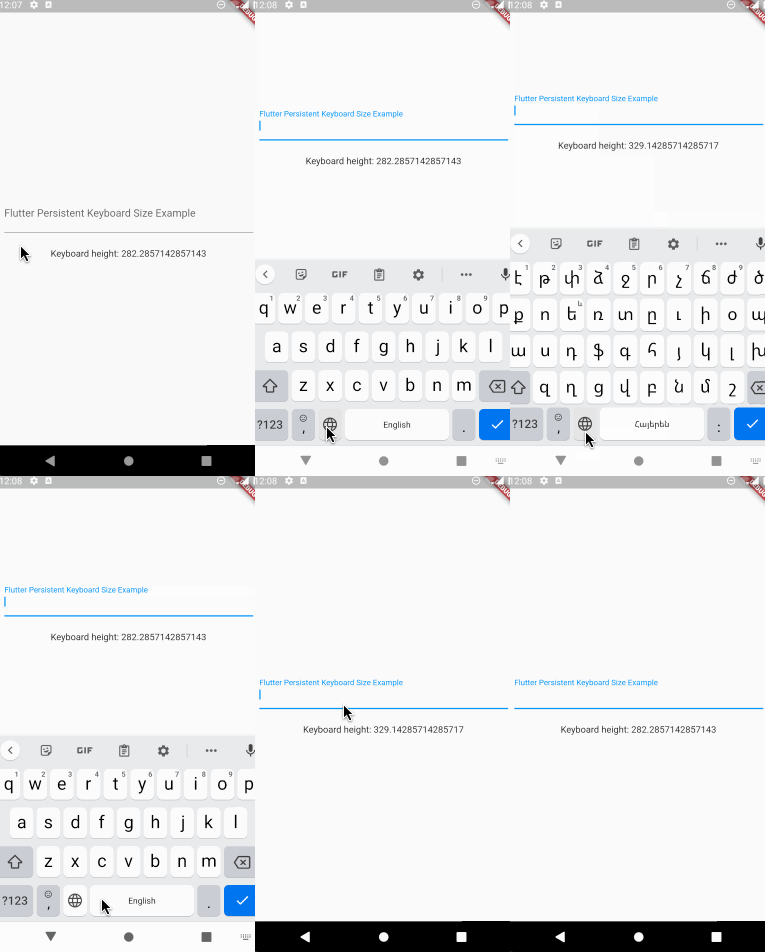
First thing you need to do is wrap a widget from children of which you want
to get the keyboard height with PersistentKeyboardHeightProvider.
Add it to the builder of your app widget (perhaps MaterialApp) if you
want to get keyboard height from all widgets.
class MyApp extends StatelessWidget {
  const MyApp({Key? key}) : super(key: key);

  @override
  Widget build(BuildContext context) {
    return MaterialApp(
      title: 'Flutter Persistent Keyboard Height Example',
      home: const FlutterPersistentKeyboardHeightExample(),
      builder: (context, child) => PersistentKeyboardHeightProvider(
        child: child!,
      ),
    );
  }
}
In order to get keyboard height use the PersistentKeyboardHeight
inherited widget:
Widget build(BuildContext context) {
  final keyboardHeight = PersistentKeyboardHeight.of(context).keyboardHeight;

  return Scaffold(
    body: Column(
      mainAxisAlignment: MainAxisAlignment.center,
      children: [
        const Padding(
          padding: EdgeInsets.all(16.0),
          child: TextField(
            decoration: InputDecoration(
              labelText: 'Flutter Persistent Keyboard Size Example',
            ),
          ),
        ),
        const SizedBox(height: 8),
        Text('Keyboard height: $keyboardHeight'),
      ],
    ),
  );
}
By default, the package uses shared_preferences to preserve the keyboard
height but if you want to use a custom solution for preserving the height
you can do that by implementing the IPersistentKeyboardHeightStorageProvider
interface and passing an instance of the class to PersistentKeyboardHeightProvider:
class CustomPersistentKeyboardHeightStorageProvider
    implements IPersistentKeyboardHeightStorageProvider {
  const CustomPersistentKeyboardHeightStorageProvider();

  @override
  Future<double> getHeight() {
    // read the height from storage
  }

  @override
  Future<void> setHeight(double height) {
    // save the height to storage
  }
}

class MyApp extends StatelessWidget {
  const MyApp({Key? key}) : super(key: key);

  @override
  Widget build(BuildContext context) {
    return MaterialApp(
      title: 'Flutter Persistent Keyboard Height Example',
      home: const FlutterPersistentKeyboardHeightExample(),
      builder: (context, child) => PersistentKeyboardHeightProvider(
        child: child!,
      ),
    );
  }
}
Check out the example directory for a complete example app.
The first version of this package was developed in two livestreams. Unfortunately, my voice disappeared at the middle of the first livestream but the second livestream is okay. In case you want to check them out, here are the links: Part 1, Part 2.
依赖清单 5 项
{"sdk":"flutter"}^1.3.4^2.0.13^1.0.4{"sdk":"flutter"}先按使用场景筛选,再比较项目活跃情况,最后到原始仓库核对使用要求。
“A repository is the most basic element of GitHub.”
GitHub Docs — About repositories ↗